

Life Dashboard Companion
Health Connect and screen time to Home Assistant, MQTT or webhooks. No account.
Depends on non-free software
- Developer
- Owen Vogelaar
- License
- MIT
- Package
com.owen282000.lifedashboard- Category
- Health Manager, Time Tracker
- Latest version
- 1.30.0 · Nov 9, 2026
- Minimum Android
- Android 8.0
Screenshots
Description
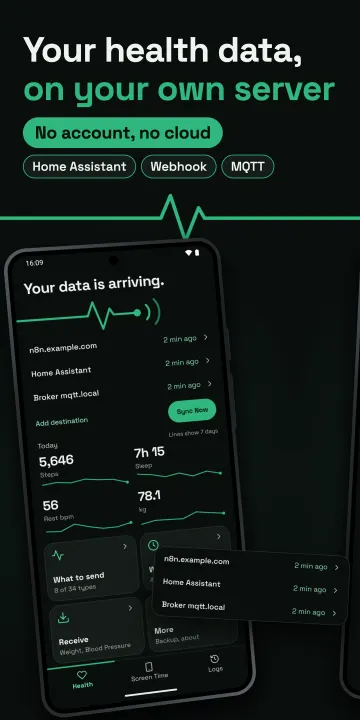
Send Health Connect and screen time from your Android phone to Home Assistant, MQTT or your own server. No account, and the developer receives none of your data. No analytics or tracking SDKs.
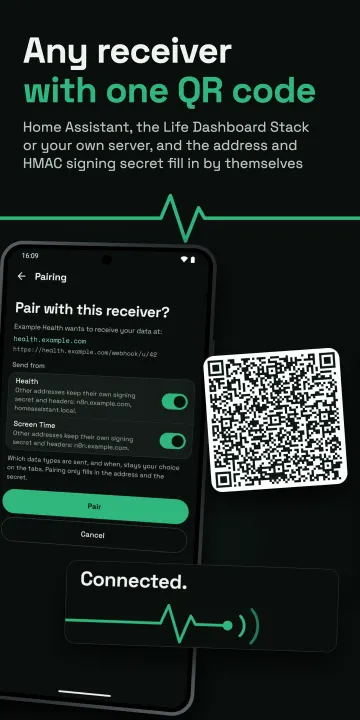
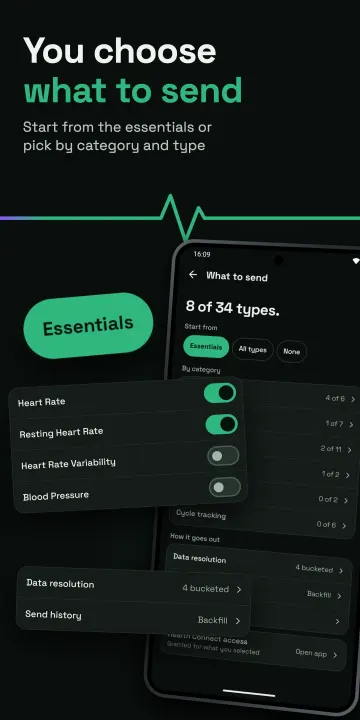
Pair by scanning one QR code, and get 34 Health Connect types and all your history.
Works with any app that writes to Health Connect, such as Samsung Health, Google Health (Fitbit and Pixel Watch), Garmin Connect, Oura, Withings and Gadgetbridge.
Your data goes only to the addresses you enter. The app contacts no other server.
Home Assistant:
• The Life Dashboard integration, installed through the Marketplace or HACS. Scan the QR code it shows and you're paired, with no broker and no YAML. Every synced day lands in Home Assistant's long-term statistics on its own date, so a backfill fills in about the last year.
• Receive, with the integration: a scale or blood pressure monitor connected to Home Assistant sends its readings to the app, which writes them into Health Connect (weight, height, body composition, blood pressure). You switch it on per type.
• MQTT Discovery, for a setup that already runs a broker: 25 of the 34 types plus screen time as sensors under one device, with optional TLS and login.
Health Connect:
• 34 types: steps, sleep with stages, heart rate, HRV, speed, blood pressure, blood glucose, VO2 max, skin temperature, cycle tracking and more.
• Every record carries its source app and a stable ID, so a duplicate is easy to drop. Daily totals come from Health Connect itself, so a walk recorded by both phone and watch counts once.
• Edits and deletions are sent too, not only new records. When a change can't be sent, the payload says so.
• Optional data resolution: send dense series such as heart rate as one summary per 1, 5, 15 or 60 minutes.
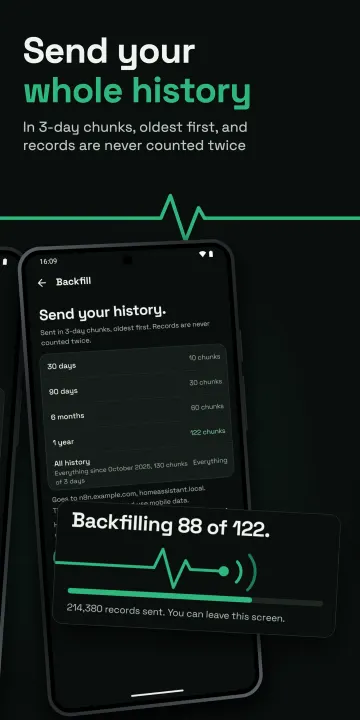
• Backfill of all your history runs in the background and picks up where it left off.
Screen time:
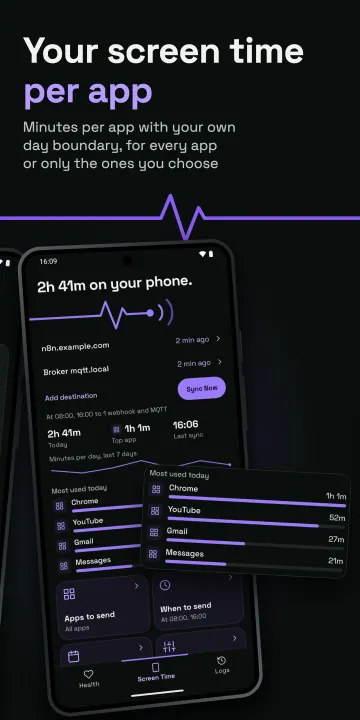
• Time per app, next to your health data, with a day boundary you choose.
• Send every app, all but some, or only the ones you pick. An app left out never leaves the phone, though the day's total still counts its time.
Webhooks:
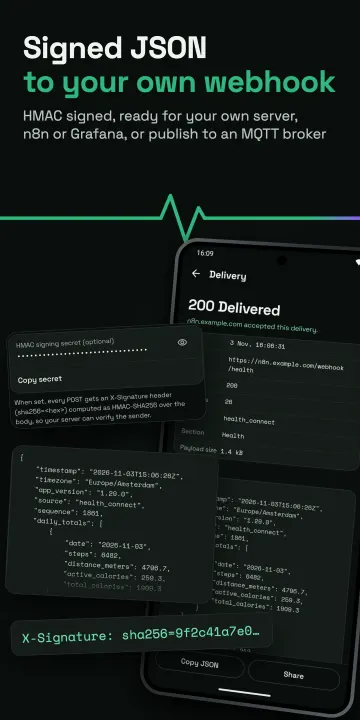
• Your own webhook gets every record in full, including single meals, cycle tracking entries and workout details, which are events rather than sensor values.
• Several URLs, each with its own headers and optional HMAC-SHA256 signing secret, and client certificates (mTLS) for a server behind a reverse proxy.
• Automatic retries, plus an outbox that keeps undelivered syncs until your server is back.
Automation:
• Syncs every 15 minutes or more, or at fixed times, on the days you pick, with quiet hours.
• Widget (Sync Status), Quick Settings tile (Sync Life Dashboard) and an intent for Tasker and MacroDroid.
• A notification when syncs fail several times in a row.
See what happened:
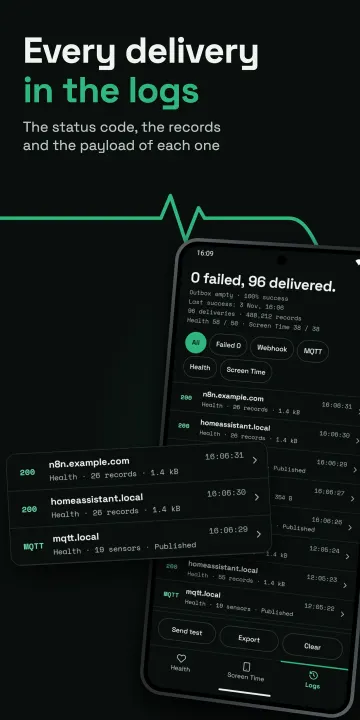
• Logs of the last 100 deliveries, with filters.
• A preview of the payload before it goes out, a test per address, and an export as CSV or JSON.
Also: settings backup and restore (encrypted when secrets are included), in eleven languages.
GitHub releases are built by public CI and carry verifiable build provenance, and the build is reproducible, so F-Droid ships the same signed APK.
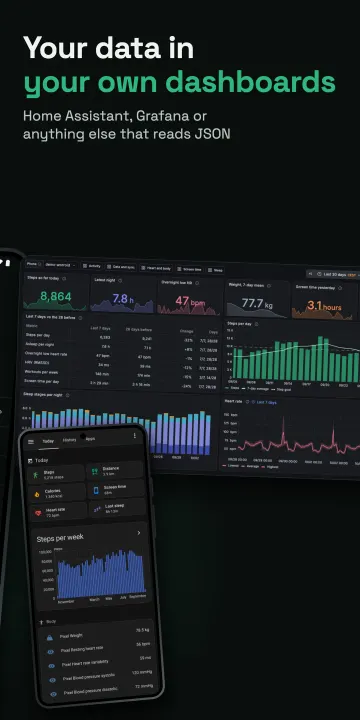
Optionally, the separate self-hosted Life Dashboard Stack stores your data in Postgres with Grafana dashboards, and its read-only MCP server lets an AI model that you run yourself read your history. The app itself contains no AI.
Health data needs Android 9 or newer with Health Connect (built into Android 14 and later, an app from Google Play on Android 9 to 13). Screen time works on Android 8.0 and newer.
Home Assistant, Grafana and other products named here are trademarks of their owners. They are not included with this app, and their owners have no connection to it.
Life Dashboard Companion is not a medical device and does not diagnose, treat, cure or prevent any medical condition. Ask a healthcare professional for medical advice, diagnosis or treatment.
Pair by scanning one QR code, and get 34 Health Connect types and all your history.
Works with any app that writes to Health Connect, such as Samsung Health, Google Health (Fitbit and Pixel Watch), Garmin Connect, Oura, Withings and Gadgetbridge.
Your data goes only to the addresses you enter. The app contacts no other server.
Home Assistant:
• The Life Dashboard integration, installed through the Marketplace or HACS. Scan the QR code it shows and you're paired, with no broker and no YAML. Every synced day lands in Home Assistant's long-term statistics on its own date, so a backfill fills in about the last year.
• Receive, with the integration: a scale or blood pressure monitor connected to Home Assistant sends its readings to the app, which writes them into Health Connect (weight, height, body composition, blood pressure). You switch it on per type.
• MQTT Discovery, for a setup that already runs a broker: 25 of the 34 types plus screen time as sensors under one device, with optional TLS and login.
Health Connect:
• 34 types: steps, sleep with stages, heart rate, HRV, speed, blood pressure, blood glucose, VO2 max, skin temperature, cycle tracking and more.
• Every record carries its source app and a stable ID, so a duplicate is easy to drop. Daily totals come from Health Connect itself, so a walk recorded by both phone and watch counts once.
• Edits and deletions are sent too, not only new records. When a change can't be sent, the payload says so.
• Optional data resolution: send dense series such as heart rate as one summary per 1, 5, 15 or 60 minutes.
• Backfill of all your history runs in the background and picks up where it left off.
Screen time:
• Time per app, next to your health data, with a day boundary you choose.
• Send every app, all but some, or only the ones you pick. An app left out never leaves the phone, though the day's total still counts its time.
Webhooks:
• Your own webhook gets every record in full, including single meals, cycle tracking entries and workout details, which are events rather than sensor values.
• Several URLs, each with its own headers and optional HMAC-SHA256 signing secret, and client certificates (mTLS) for a server behind a reverse proxy.
• Automatic retries, plus an outbox that keeps undelivered syncs until your server is back.
Automation:
• Syncs every 15 minutes or more, or at fixed times, on the days you pick, with quiet hours.
• Widget (Sync Status), Quick Settings tile (Sync Life Dashboard) and an intent for Tasker and MacroDroid.
• A notification when syncs fail several times in a row.
See what happened:
• Logs of the last 100 deliveries, with filters.
• A preview of the payload before it goes out, a test per address, and an export as CSV or JSON.
Also: settings backup and restore (encrypted when secrets are included), in eleven languages.
GitHub releases are built by public CI and carry verifiable build provenance, and the build is reproducible, so F-Droid ships the same signed APK.
Optionally, the separate self-hosted Life Dashboard Stack stores your data in Postgres with Grafana dashboards, and its read-only MCP server lets an AI model that you run yourself read your history. The app itself contains no AI.
Health data needs Android 9 or newer with Health Connect (built into Android 14 and later, an app from Google Play on Android 9 to 13). Screen time works on Android 8.0 and newer.
Home Assistant, Grafana and other products named here are trademarks of their owners. They are not included with this app, and their owners have no connection to it.
Life Dashboard Companion is not a medical device and does not diagnose, treat, cure or prevent any medical condition. Ask a healthcare professional for medical advice, diagnosis or treatment.
All versions
| Version | Released | Minimum Android | Size |
|---|---|---|---|
| 1.30.0 | Nov 9, 2026 | Android 8.0 | 6 MB |
| 1.29.0 | Oct 31, 2026 | Android 8.0 | 5.1 MB |
| 1.28.0 | Oct 25, 2026 | Android 8.0 | 5.1 MB |
| 1.26.0 | Oct 22, 2026 | Android 8.0 | 5 MB |
How to install an older version of an Android app · How to install an APK file on Android
From the developer (GitHub)
APK files published by the developer on GitHub. They are signed by the developer and may not install over the other builds on this page (different signature). Links open github.com.
Similar apps
-
 openScale
Weight and body metrics tracker, with support for Bluetooth scales
-
 Scrum Chatter
Time members while they speak at meetings
-
 Simple Time Tracker
Time tracker for work, study, and building better daily habits.
-
 Track & Graph
Dashboards for life!
- MedicLog Log basic medical information
-
 Mooneva Cycle – Period Tracker
Private period & cycle tracker. Offline, encrypted, no account, no ads.
-
 FitBook: Calorie Tracker
Track calories, macros, weight, and food — online or offline.
-
 wger Workout Manager
Fitness/workout, nutrition and weight tracker