

MapFlip - Apple to Google
Open links in navigation apps: automatic map redirect, route & directions.
- Developer
- Daniel Notthoff
- License
- MIT
- Package
de.goork.mapflip- Category
- Navigation
- Latest version
- 1.4.3 · Nov 6, 2026
- Minimum Android
- Android 8.0
Screenshots
Description
Your friends send you Apple Maps links – but you use Google Maps or other navigation apps on Android?
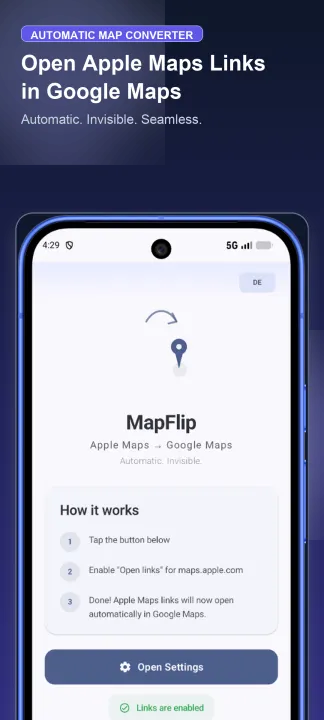
MapFlip is the ultimate Apple Maps converter, fast Apple map redirect, and automatic link converter for Android. Every Apple Map link, Apple Maps URL, or location opens instantly in your preferred navigation app. No copying, no pasting, no manual searching, and no browser detours.
Whether you need an Apple Maps for Android solution, an Apple map for Android tool, an Apple to Google converter, or an automatic Apple to Google Maps converter, MapFlip handles every Apple Map URL and link seamlessly in the background. Easily convert Apple Maps to Google Maps, convert Apple map links, redirect to Google Maps, and open Apple Maps links directly in your favorite navigation app. Plan any route, import shared places, get driving directions, navigate offline, and open destinations with ease.
⚡ 3 Easy Ways to Open Links:
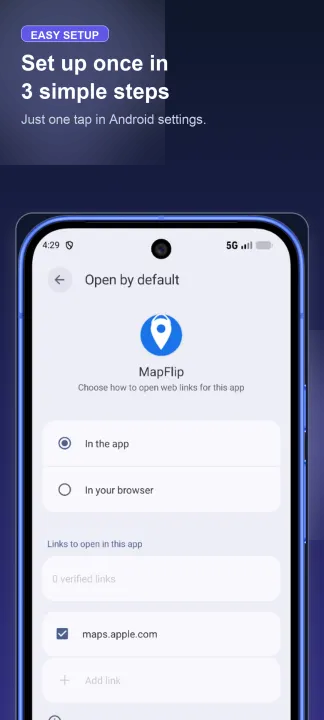
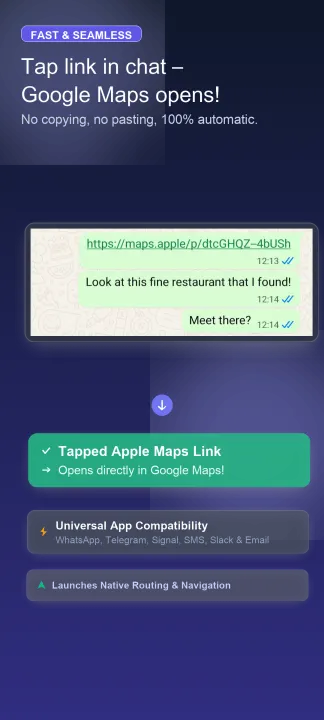
1. 🚀 Fully Automatic: Tap any Apple Maps link – MapFlip intercepts it instantly and launches your preferred navigation.
2. 📲 Via Android Share Sheet: Share any map link or chat message directly from WhatsApp, Telegram, Signal, or SMS with MapFlip.
3. 📋 Clipboard & Link Tester: Copy a link and open MapFlip for 1-tap redirection – or test and convert custom links in the built-in Link Tester.
🧭 Choose from 15 Navigation Apps:
Open destinations in your favorite app:
• Driving & Traffic: Google Maps, Waze, HERE WeGo, TomTom AmiGO, Sygic
• Privacy & Offline: Organic Maps, OsmAnd (incl. Plus), CoMaps, Vela
• Outdoor & Transit: Mapy.cz, Komoot (Hiking & Cycling), Citymapper (Public Transit), Magic Earth, Locus Map, Yandex Maps, or flexible Android system picker
🗺️ Supported Map Formats & Services (11 Sources):
• Apple Maps URLs & search queries (maps.apple.com)
• Google Maps links (maps.google.com, goo.gl) – perfect for de-Googling to private map apps
• OpenStreetMap (osm.org), Mapy.cz / Mapy.com, HERE WeGo, Waze, Bing Maps & Yandex Maps
• DuckDuckGo Maps, GPS coordinates (geo:, DMS, Decimal) & Google Plus Codes (100% offline decoding)
• Place markers, addresses, search queries & turn-by-turn navigation routes
✨ Highlights & Privacy:
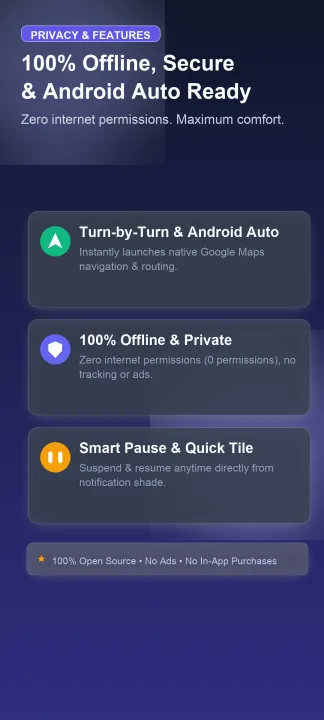
• 🚗 Turn-by-Turn Navigation & Android Auto – Apple Maps navigation and turn by turn routing in Google Maps
• 🔒 100% Offline & Private – Zero internet permissions (no android.permission.INTERNET), zero tracking, zero ads
• 🛡️ Smart Fallback – If your preferred app is uninstalled, MapFlip safely opens Google Maps or system picker
• ⏸️ Pause Mode & Quick Settings Tile – Suspend redirect anytime directly from your notification shade (1 hr, 8 hrs, until tomorrow)
• 💬 Universal App Compatibility – Works seamlessly with WhatsApp, Telegram, Signal, SMS, Slack, and email
• 👻 Invisible Background Operation – No extra screens or battery drain
MapFlip is the essential tool and route planner guide for Android users who regularly receive Apple Maps links from iPhone users and want to open them hassle-free.
MapFlip is the ultimate Apple Maps converter, fast Apple map redirect, and automatic link converter for Android. Every Apple Map link, Apple Maps URL, or location opens instantly in your preferred navigation app. No copying, no pasting, no manual searching, and no browser detours.
Whether you need an Apple Maps for Android solution, an Apple map for Android tool, an Apple to Google converter, or an automatic Apple to Google Maps converter, MapFlip handles every Apple Map URL and link seamlessly in the background. Easily convert Apple Maps to Google Maps, convert Apple map links, redirect to Google Maps, and open Apple Maps links directly in your favorite navigation app. Plan any route, import shared places, get driving directions, navigate offline, and open destinations with ease.
⚡ 3 Easy Ways to Open Links:
1. 🚀 Fully Automatic: Tap any Apple Maps link – MapFlip intercepts it instantly and launches your preferred navigation.
2. 📲 Via Android Share Sheet: Share any map link or chat message directly from WhatsApp, Telegram, Signal, or SMS with MapFlip.
3. 📋 Clipboard & Link Tester: Copy a link and open MapFlip for 1-tap redirection – or test and convert custom links in the built-in Link Tester.
🧭 Choose from 15 Navigation Apps:
Open destinations in your favorite app:
• Driving & Traffic: Google Maps, Waze, HERE WeGo, TomTom AmiGO, Sygic
• Privacy & Offline: Organic Maps, OsmAnd (incl. Plus), CoMaps, Vela
• Outdoor & Transit: Mapy.cz, Komoot (Hiking & Cycling), Citymapper (Public Transit), Magic Earth, Locus Map, Yandex Maps, or flexible Android system picker
🗺️ Supported Map Formats & Services (11 Sources):
• Apple Maps URLs & search queries (maps.apple.com)
• Google Maps links (maps.google.com, goo.gl) – perfect for de-Googling to private map apps
• OpenStreetMap (osm.org), Mapy.cz / Mapy.com, HERE WeGo, Waze, Bing Maps & Yandex Maps
• DuckDuckGo Maps, GPS coordinates (geo:, DMS, Decimal) & Google Plus Codes (100% offline decoding)
• Place markers, addresses, search queries & turn-by-turn navigation routes
✨ Highlights & Privacy:
• 🚗 Turn-by-Turn Navigation & Android Auto – Apple Maps navigation and turn by turn routing in Google Maps
• 🔒 100% Offline & Private – Zero internet permissions (no android.permission.INTERNET), zero tracking, zero ads
• 🛡️ Smart Fallback – If your preferred app is uninstalled, MapFlip safely opens Google Maps or system picker
• ⏸️ Pause Mode & Quick Settings Tile – Suspend redirect anytime directly from your notification shade (1 hr, 8 hrs, until tomorrow)
• 💬 Universal App Compatibility – Works seamlessly with WhatsApp, Telegram, Signal, SMS, Slack, and email
• 👻 Invisible Background Operation – No extra screens or battery drain
MapFlip is the essential tool and route planner guide for Android users who regularly receive Apple Maps links from iPhone users and want to open them hassle-free.
All versions
| Version | Released | Minimum Android | Size |
|---|---|---|---|
| 1.4.3 | Nov 6, 2026 | Android 8.0 | 1.2 MB |
| 1.4.2 | Oct 29, 2026 | Android 8.0 | 1.2 MB |
| 1.4.1 | Oct 27, 2026 | Android 8.0 | 1.2 MB |
| 1.3.10 | Oct 14, 2026 | Android 8.0 | 1.2 MB |
| 1.3.8 | Oct 12, 2026 | Android 8.0 | 1.2 MB |
| 1.3.3 | Oct 8, 2026 | Android 8.0 | 1.2 MB |
| 1.3.2 | Oct 3, 2026 | Android 8.0 | 1.2 MB |
| 1.3.1 | Sep 27, 2026 | Android 8.0 | 1.2 MB |
| 1.3.0 | Sep 19, 2026 | Android 8.0 | 1.2 MB |
How to install an older version of an Android app · How to install an APK file on Android
From the developer (GitHub)
APK files published by the developer on GitHub. They are signed by the developer and may not install over the other builds on this page (different signature). Links open github.com.
Similar apps
-
 RailTrip
Travel through the train stations to stamp your visa!
-
 Tower Collector
Join the community and collect cell towers locations from your area!
-
 OsmAnd~
Global Mobile Map Viewing & Navigation for Offline and Online OSM Maps
-
 Déjà Vu - A local RF based back end for the µg Pro
Mobile/cell and WLAN/Wi-Fi based network provider for UnifiedNlp and microG
-
 CoMaps - Hike, Bike, Drive Offline with Privacy
Easy map navigation - Discover more of your journey - Powered by the community
-
 Organic Maps・Offline Map & GPS
Get reliable offline maps with GPS navigation for hiking, cycling, and travel.
-
 BRouter
Get elevation-aware cycling directions
-
 Sky Map
 turns your phone into a window on the night sky.