

PDF Inspector
Inspect, select, edit and delete the elements inside any PDF
- Developer
- Shardul Vikram Singh
- License
- MIT
- Package
SVS.pdfinspector- Category
- Writing
- Latest version
- 0.3.2 · Jun 16, 2026
- Minimum Android
- Android 8.0
Screenshots
Description
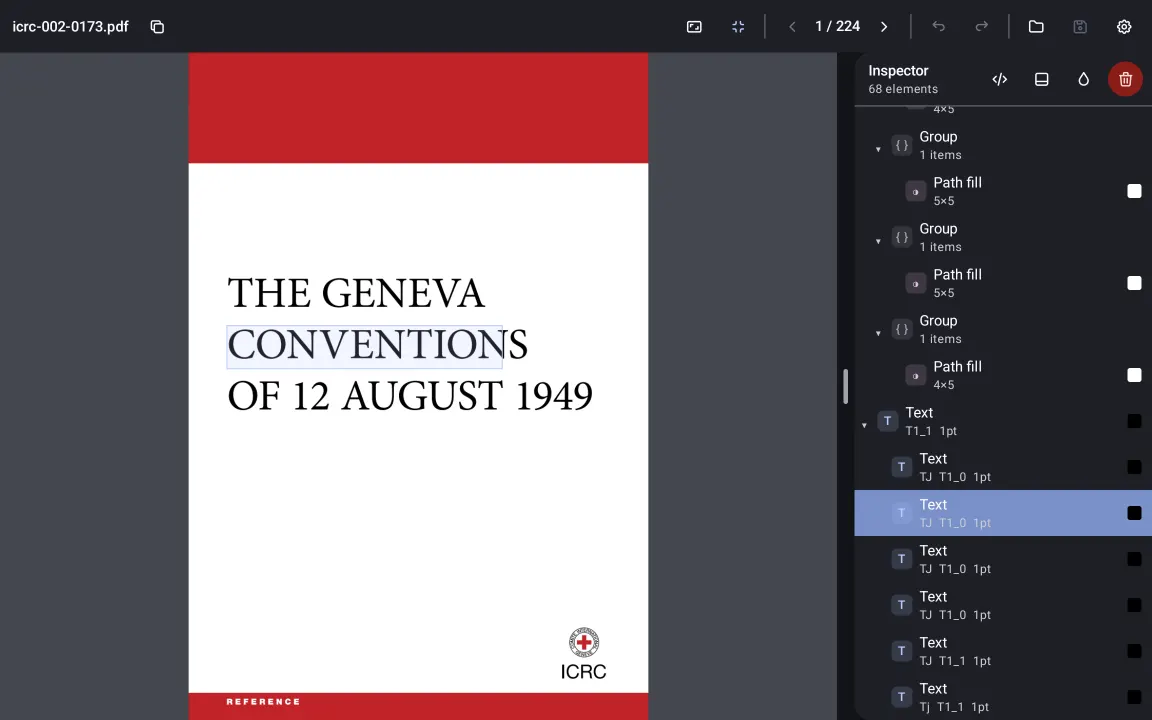
PDF Inspector opens a PDF and shows what is actually inside it. Like a browser's developer tools, it parses each page's content stream into a navigable tree of elements (text blocks, vector paths and images) so you can find any single element, select it on the page or in the tree, and edit it. Edits go to a saved copy; your original file is never touched.
Highlights:
• DevTools-style element tree: every page is parsed into a structured tree of text, path and image nodes, grouped the way the PDF draws them. Switch between friendly labels and the raw content-stream operators.
• Two-way selection: tap an element on the page or tap its row in the tree, and the other side highlights to match, with a clear bordered outline on the canvas.
• Edit in place: move and resize an element, recolor its fill or stroke (entered as hex, with the element's color space shown), and retype text. When the original font lacks a character, re-encode the line with a fallback font, bundled or taken from your device or imported. Changes are written straight back into the content stream, with full undo and redo.
• Surgical delete: remove exactly the element you picked by rewriting just its part of the content stream, leaving the rest of the page untouched.
• Save a copy: write your edited PDF to a new file through the system file picker; the source document is left unchanged.
• Smooth viewing: pan and pinch-zoom, fit to width or height, a global zoom that carries across pages, and a full-screen mode.
• Dockable inspector: the inspector panel docks to the side in landscape or the bottom in portrait, can be resized, and can be made transparent to see the page through it.
• Material You: Material 3 design with dynamic color on Android 12+, light / dark / system themes and a choice of accent colors.
Private and open:
• Open source, no accounts, no telemetry.
• No network access and no storage permission: files are opened and saved through Android's Storage Access Framework, so the app only ever touches the documents you explicitly pick.
PDF Inspector works with the drawing primitives a PDF already contains: select, move, resize, recolor, retype and delete them. It is not a word-processor-style text editor, so lines do not reflow, but when the original font is missing a character you can re-encode the text with a fallback font, bundled or taken from your device or imported.
Highlights:
• DevTools-style element tree: every page is parsed into a structured tree of text, path and image nodes, grouped the way the PDF draws them. Switch between friendly labels and the raw content-stream operators.
• Two-way selection: tap an element on the page or tap its row in the tree, and the other side highlights to match, with a clear bordered outline on the canvas.
• Edit in place: move and resize an element, recolor its fill or stroke (entered as hex, with the element's color space shown), and retype text. When the original font lacks a character, re-encode the line with a fallback font, bundled or taken from your device or imported. Changes are written straight back into the content stream, with full undo and redo.
• Surgical delete: remove exactly the element you picked by rewriting just its part of the content stream, leaving the rest of the page untouched.
• Save a copy: write your edited PDF to a new file through the system file picker; the source document is left unchanged.
• Smooth viewing: pan and pinch-zoom, fit to width or height, a global zoom that carries across pages, and a full-screen mode.
• Dockable inspector: the inspector panel docks to the side in landscape or the bottom in portrait, can be resized, and can be made transparent to see the page through it.
• Material You: Material 3 design with dynamic color on Android 12+, light / dark / system themes and a choice of accent colors.
Private and open:
• Open source, no accounts, no telemetry.
• No network access and no storage permission: files are opened and saved through Android's Storage Access Framework, so the app only ever touches the documents you explicitly pick.
PDF Inspector works with the drawing primitives a PDF already contains: select, move, resize, recolor, retype and delete them. It is not a word-processor-style text editor, so lines do not reflow, but when the original font is missing a character you can re-encode the text with a fallback font, bundled or taken from your device or imported.
All versions
| Version | Released | Minimum Android | Size |
|---|---|---|---|
| 0.3.2 | Jun 16, 2026 | Android 8.0 | 20.9 MB |
| 0.2.2 | Jun 9, 2026 | Android 8.0 | 16.7 MB |
How to install an older version of an Android app · How to install an APK file on Android
From the developer (GitHub)
APK files published by the developer on GitHub. They are signed by the developer and may not install over the other builds on this page (different signature). Links open github.com.
Similar apps
-
 NoNonsense Notes
A simple notepad and to-do app with an excellent navigation
-
 Butterfly
Take notes, draw freely, and organize ideas across an endless workspace
-
 Linwood Butterfly Nightly
Take notes, draw freely, and organize ideas across an endless workspace
-
 Thunderbird: Free Your Inbox
Thunderbird is a 100% open source, privacy focused email app.
-
 Thunderbird Beta for Testers
Thunderbird is a 100% open source, privacy focused email app.
-
 Nextcloud Notes
View and edit notes on Nextcloud
-
 Poet Assistant
Dictionary and TTS tools for editing poems
-
 BeeCount Knitting Counter
Knitting row counter