

UniPatcher
Utility to apply patches to ROMs
- Developer
- Boris Timofeev
- License
- GPL-3.0-or-later
- Package
org.emunix.unipatcher- Category
- Game Helper
- Latest version
- 0.19 · Oct 15, 2026
- Minimum Android
- Android 7.0
Screenshots
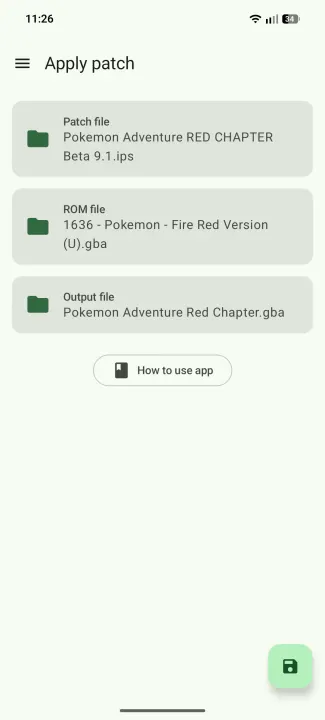
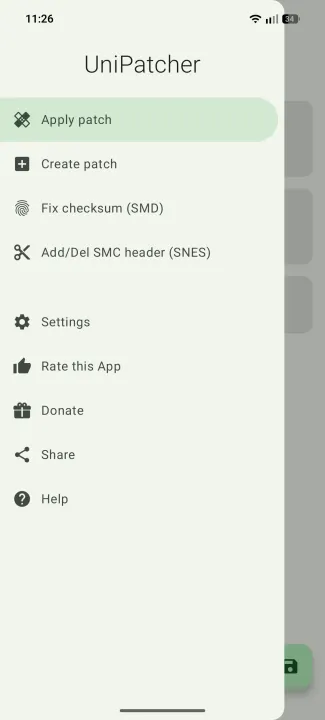
Description
UniPatcher allows you to apply patches to game ROMs.
What is a patch?
A file with the modified data of the game. For example, a game translated from Japanese to English. You download the patch containing the translation. It must be applied to the Japanese version to make an English version of it.
This program will not help you hack native Android games, it was created for the old console games (SNES, PS1, GBA, N64, SMD\Genesis etc.)
Features:
• Supported formats of patches: IPS, IPS32, UPS, BPS, APS (GBA), APS (N64), PPF, DPS, EBP, XDelta
• Create XDelta patches
• Fix the checksum in SMD\Genesis ROMs
• Remove the SMC header from SNES ROMs
How to use?
You have to select a ROM file, a patch and choose which file to save, then click on the button in the bottom. Files are selected through the standard Files application (or through one of the file managers you have installed). The application will show a message when the file is patched. Do not close the application until the file is patched.
Very important:
If the game and patch is compressed (ZIP, RAR, 7z or other), they first need to be unzipped.
What is a patch?
A file with the modified data of the game. For example, a game translated from Japanese to English. You download the patch containing the translation. It must be applied to the Japanese version to make an English version of it.
This program will not help you hack native Android games, it was created for the old console games (SNES, PS1, GBA, N64, SMD\Genesis etc.)
Features:
• Supported formats of patches: IPS, IPS32, UPS, BPS, APS (GBA), APS (N64), PPF, DPS, EBP, XDelta
• Create XDelta patches
• Fix the checksum in SMD\Genesis ROMs
• Remove the SMC header from SNES ROMs
How to use?
You have to select a ROM file, a patch and choose which file to save, then click on the button in the bottom. Files are selected through the standard Files application (or through one of the file managers you have installed). The application will show a message when the file is patched. Do not close the application until the file is patched.
Very important:
If the game and patch is compressed (ZIP, RAR, 7z or other), they first need to be unzipped.
All versions
| Version | Released | Minimum Android | Size |
|---|---|---|---|
| 0.19 | Oct 15, 2026 | Android 7.0 | 7.9 MB |
| 0.18 | Sep 17, 2026 | Android 7.0 | 3 MB |
| 0.17.3 | Nov 16, 2024 | Android 5.0 | 2.8 MB |
| 0.16.1 | Nov 6, 2018 | Android 5.0 | 2 MB |
| 0.16 | Aug 25, 2018 | Android 5.0 | 1.8 MB |
| 0.15 | Feb 20, 2018 | Android API 14 | 1.8 MB |
| 0.14.2 | Jul 19, 2017 | Android API 14 | 1.9 MB |
| 0.14.1 | May 27, 2017 | Android API 14 | 1.9 MB |
How to install an older version of an Android app · How to install an APK file on Android
From the developer (GitHub)
APK files published by the developer on GitHub. They are signed by the developer and may not install over the other builds on this page (different signature). Links open github.com.
Similar apps
-
 Tabletop Tools
Handy tool collection for tabletop games
-
 OneTwo
Provides you with dices, counter and timers
-
 MTG Familiar
 is a collection of utilities for playing "Magic: The Gathering"
-
 IITC-CE Mobile
IITC-CE map for Ingress Prime game
-
 Scid on the go
View chess games
-
 Titan Companion
Stat sheet and rules engine for all Fighting Fantasy gamebooks
-
 Dart Checker
Dart scoreboard/counter for physical dart matches
-
 Simple Chess Clock
Two touchable chess timers