

Restoid
Root-based Android app backup tool powered by restic
- Developer
- hddq
- License
- GPL-3.0-only
- Package
io.github.hddq.restoid- Category
- System
- Latest version
- 0.6.6 · Aug 5, 2026
- Minimum Android
- Android 10
Screenshots
Description
Restoid gives you complete control over your app backups through a clean, modern, and simple user interface. Powered by the open-source "restic" engine, it's built for users who demand robust, encrypted, and deduplicated backups.
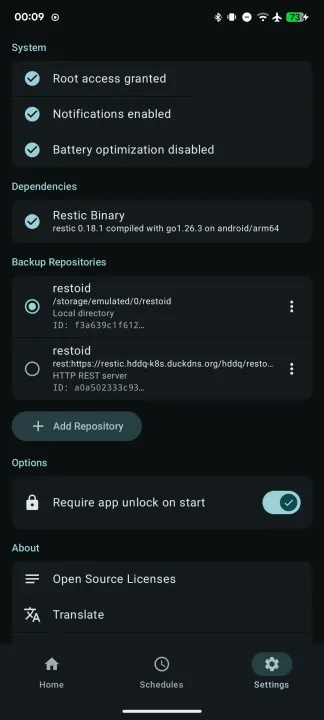
Root access is strictly required to read and write private application data directories.
Features:
• Restic-Powered: Leverages the speed, security, and efficiency of restic for local, deduplicated, and encrypted backups.
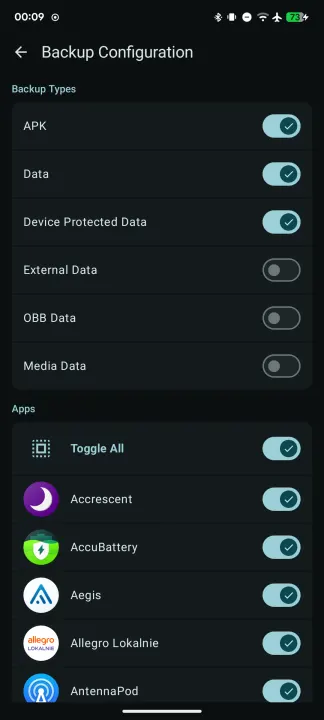
• Selective Backup: Choose exactly which user-installed applications you want to save.
• Granular Control: Granularly select what to include for each app: APK files, user data, device-protected data, external/OBB, or media files.
• Custom Directory Backup: Back up custom directories like DCIM, Documents, etc. (works without root).
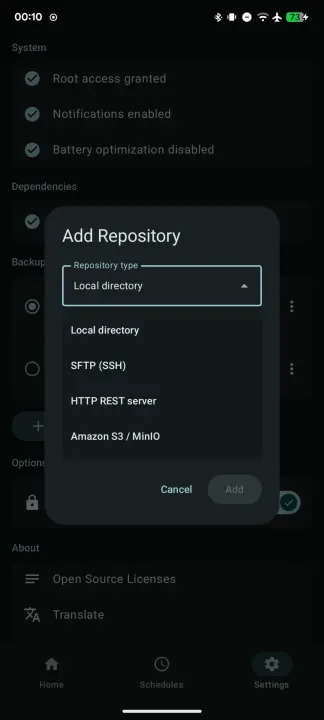
• Flexible Repository Management: Create and manage repositories across native restic backends: Local directory, SFTP, REST server, and Amazon S3/MinIO.
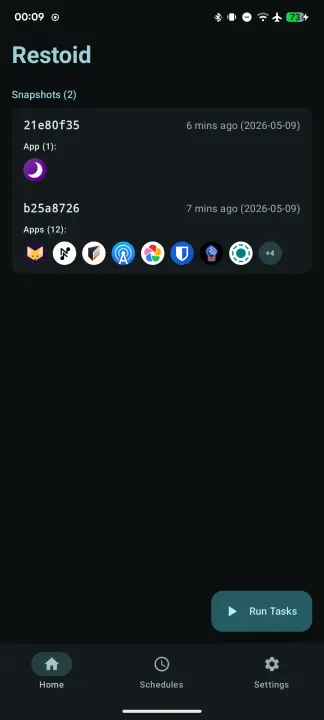
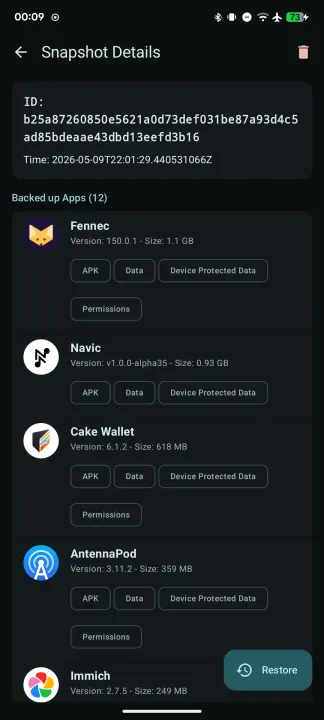
• Snapshot Management: Easily browse historical backup snapshots, view details of what was backed up, and forget old data to save space.
• Surgical Restore: Restore entire apps completely, or just specific parts (like restoring only app data without overwriting the APK).
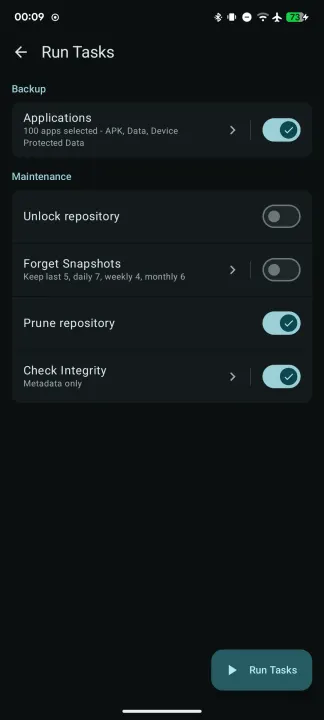
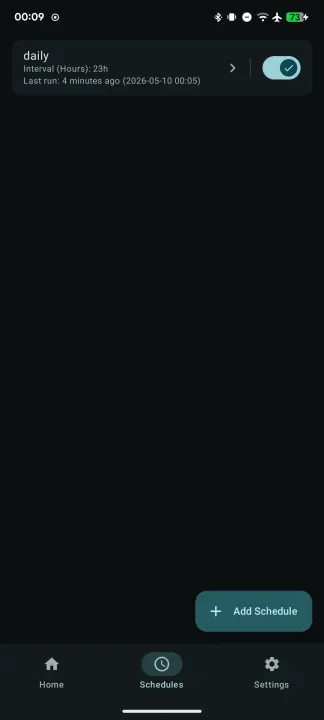
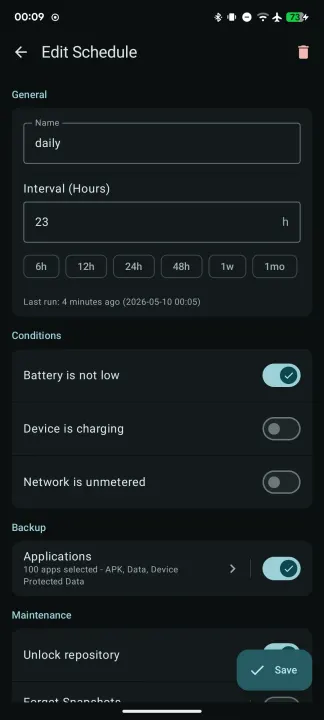
• Automated Schedules: Set up recurring backups with customizable intervals and trigger conditions (battery, charging, and network status).
• Downgrade Protection: Prevents you from accidentally restoring an older app version over a newer one.
Root access is strictly required to read and write private application data directories.
Features:
• Restic-Powered: Leverages the speed, security, and efficiency of restic for local, deduplicated, and encrypted backups.
• Selective Backup: Choose exactly which user-installed applications you want to save.
• Granular Control: Granularly select what to include for each app: APK files, user data, device-protected data, external/OBB, or media files.
• Custom Directory Backup: Back up custom directories like DCIM, Documents, etc. (works without root).
• Flexible Repository Management: Create and manage repositories across native restic backends: Local directory, SFTP, REST server, and Amazon S3/MinIO.
• Snapshot Management: Easily browse historical backup snapshots, view details of what was backed up, and forget old data to save space.
• Surgical Restore: Restore entire apps completely, or just specific parts (like restoring only app data without overwriting the APK).
• Automated Schedules: Set up recurring backups with customizable intervals and trigger conditions (battery, charging, and network status).
• Downgrade Protection: Prevents you from accidentally restoring an older app version over a newer one.
All versions
| Version | Released | Minimum Android | Size |
|---|---|---|---|
| 0.6.6 (2 builds) | Aug 5, 2026 | Android 10 | 18.9 MB |
| 0.6.5 (2 builds) | Jul 20, 2026 | Android 10 | 18.9 MB |
| 0.6.4 (2 builds) | Jul 19, 2026 | Android 13 | 18.8 MB |
| 0.6.3 (2 builds) | Jul 18, 2026 | Android 13 | 18.8 MB |
| 0.6.2 (2 builds) | Jul 16, 2026 | Android 13 | 18.8 MB |
| 0.6.1 (2 builds) | Jul 15, 2026 | Android 13 | 18.8 MB |
| 0.6.0 (2 builds) | Jul 5, 2026 | Android 13 | 18.8 MB |
| 0.5.4 (2 builds) | Jun 22, 2026 | Android 13 | 18.5 MB |
| 0.5.3 (2 builds) | May 20, 2026 | Android 13 | 18.5 MB |
| 0.5.2 (2 builds) | May 13, 2026 | Android 13 | 18.4 MB |
| 0.5.1 (2 builds) | May 11, 2026 | Android 13 | 18.3 MB |
| 0.5.0 (2 builds) | May 10, 2026 | Android 13 | 18.1 MB |
| 0.4.3 (2 builds) | May 3, 2026 | Android 13 | 69.8 MB |
| 0.4.2 (2 builds) | May 2, 2026 | Android 13 | 69.7 MB |
| 0.4.1 (2 builds) | Apr 30, 2026 | Android 13 | 69.6 MB |
| 0.4.0 (2 builds) | Apr 29, 2026 | Android 13 | 71.1 MB |
How to install an older version of an Android app · How to install an APK file on Android
From the developer (GitHub)
APK files published by the developer on GitHub. They are signed by the developer and may not install over the other builds on this page (different signature). Links open github.com.
v0.7.0
· Nov 4, 2026
app-arm64-v8a-release.apk
17.7 MB app-universal-release.apk
31.1 MB app-x86_64-release.apk
19.1 MB v0.6.6
· Aug 4, 2026
app-arm64-v8a-release.apk
17.6 MB app-universal-release.apk
31 MB app-x86_64-release.apk
18.9 MB v0.6.5
· Jul 18, 2026
app-arm64-v8a-release.apk
17.6 MB app-universal-release.apk
30.9 MB app-x86_64-release.apk
18.9 MB Similar apps
-
 Screenshot Tile (NoRoot)
Customizable screenshot tool with quick settings shortcut and floating button
-
 Coffee
Keep display awake
-
 Mute reminder
Remind you to mute media
-
 Prepaid Balance
Keep track your prepaid balance
-
 Auto Auto-Rotate
Automatically remembers your auto-rotate setting for every app
-
 Drowser
Simple background app killer
-
 Scrambled Exif
Remove the metadata from your pictures before sharing them
-
 WaveUp
Turn on the display by waving