

Privacy Flip
Manage your device privacy based on lock/unlock state
- Developer
- Doru Moraru
- License
- GPL-3.0-only
- Package
io.github.dorumrr.privacyflip- Category
- Security, System
- Latest version
- 2.4.0 · Oct 31, 2026
- Minimum Android
- Android 8.0
Screenshots
Description
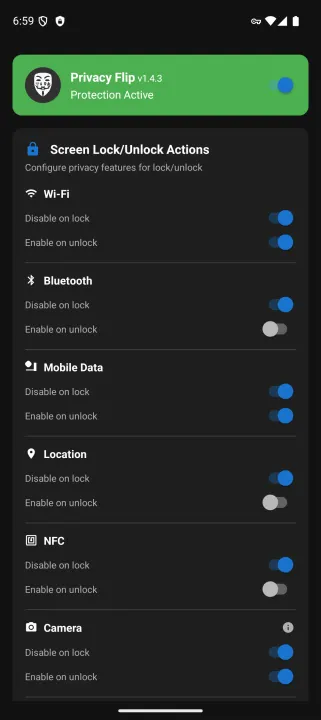
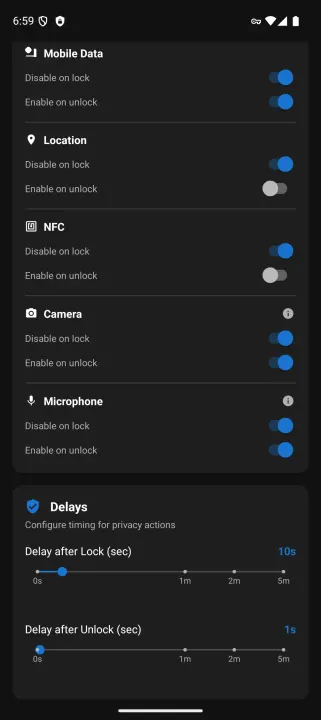
Privacy Flip automatically manages your device's privacy features based on screen lock/unlock state. When you lock your device, it can disable Wi-Fi, Bluetooth, mobile data, location services, NFC, and even camera/microphone sensors. When you unlock, it intelligently restores the features you want back on.
Works with Sui, Root, Dhizuku or Shizuku - Choose your preferred privilege method!
Features:
• Manage your device privacy based on lock/unlock state
• Four privilege methods: Sui, Root, Dhizuku or Shizuku (no root needed for Dhizuku or Shizuku)
• Automatic privilege detection (Sui > Root > Dhizuku > Shizuku)
• Configurable feature control (Wi-Fi, Bluetooth, Mobile Data, Location, NFC, Camera, Microphone, Airplane Mode, Battery Saver)
• Customizable timing delays (0-60 seconds granular, 2 minutes, or 5 minutes)
• Smart "only if unused/not connected" modes for WiFi, Bluetooth, Location, and Mobile Data while media plays
• App exemption system (skip privacy for specific foreground apps)
• Detects NFC being turned back on by a payment or wallet app, with opt-in auto-retry
• Optional Accessibility Service as an extra lock and unlock signal
• Advanced multi-tier Bluetooth connection detection
• Background service for persistent monitoring
• Quick Settings tile integration
• Home screen widget
Privacy Features Controlled:
• Wi-Fi - Disable/enable wireless connectivity
• Bluetooth - Control Bluetooth radio
• Mobile data - Manage cellular data connection
• Location services - Control GPS and location tracking
• NFC - Control NFC sensor
• Camera - Disable/enable camera sensor privacy (Android 12+)
• Microphone - Disable/enable microphone sensor privacy (Android 12+)
• Airplane Mode - Enable on lock (opt-in, disables all radios at once)
• Battery Saver - Enable on lock (opt-in, reduces background activity)
Note: Camera and microphone ignore custom delays and trigger immediately, due to Android limitations. Microphone can skip this during a phone or VoIP call if enabled in settings; camera cannot detect active use, so it always triggers immediately
Requirements:
• Android 8.0+ (API level 26)
• Android 12+ (API level 31) for camera/microphone features
Choose your privilege method:
Option 1: Shizuku (No root required!)
• Shizuku app installed and running
• ADB privileges via USB or wireless debugging
• Perfect for non-rooted devices
Option 2: Root Access (Recommended for rooted devices)
• Root access via Magisk, SuperSU, or similar
• Best performance with UID 0 privileges
Option 3: Dhizuku (Device Owner method, 5 of 9 features)
• Device set as Device Owner
• No root required, no ADB after setup
• Persistent privileges across reboots
• Works for, each needing its own Android version: Camera and Microphone (Android 12+),
Bluetooth (Android 9+), Location (Android 11+), NFC (Android 15+). Below Android 9 a Dhizuku
setup can switch nothing at all.
• Cannot do WiFi, Mobile Data, Airplane Mode or Battery Saver - Android gives a Device Owner no
way to switch those. Use Root or Shizuku for them.
Option 4: Sui (Best of both worlds)
• Rooted device with Magisk
• Sui Magisk module installed
• Best user experience - automatic startup, no prompts
Privacy & Security:
• Zero telemetry - Nothing is sent to us or any third party
• Settings and the app's own lock state stay on your device, and in your own Android backup if you have one turned on - never sent anywhere else
• No network permissions - App cannot access internet
• Open source - https://github.com/dorumrr/privacyFlip
Works with Sui, Root, Dhizuku or Shizuku - Choose your preferred privilege method!
Features:
• Manage your device privacy based on lock/unlock state
• Four privilege methods: Sui, Root, Dhizuku or Shizuku (no root needed for Dhizuku or Shizuku)
• Automatic privilege detection (Sui > Root > Dhizuku > Shizuku)
• Configurable feature control (Wi-Fi, Bluetooth, Mobile Data, Location, NFC, Camera, Microphone, Airplane Mode, Battery Saver)
• Customizable timing delays (0-60 seconds granular, 2 minutes, or 5 minutes)
• Smart "only if unused/not connected" modes for WiFi, Bluetooth, Location, and Mobile Data while media plays
• App exemption system (skip privacy for specific foreground apps)
• Detects NFC being turned back on by a payment or wallet app, with opt-in auto-retry
• Optional Accessibility Service as an extra lock and unlock signal
• Advanced multi-tier Bluetooth connection detection
• Background service for persistent monitoring
• Quick Settings tile integration
• Home screen widget
Privacy Features Controlled:
• Wi-Fi - Disable/enable wireless connectivity
• Bluetooth - Control Bluetooth radio
• Mobile data - Manage cellular data connection
• Location services - Control GPS and location tracking
• NFC - Control NFC sensor
• Camera - Disable/enable camera sensor privacy (Android 12+)
• Microphone - Disable/enable microphone sensor privacy (Android 12+)
• Airplane Mode - Enable on lock (opt-in, disables all radios at once)
• Battery Saver - Enable on lock (opt-in, reduces background activity)
Note: Camera and microphone ignore custom delays and trigger immediately, due to Android limitations. Microphone can skip this during a phone or VoIP call if enabled in settings; camera cannot detect active use, so it always triggers immediately
Requirements:
• Android 8.0+ (API level 26)
• Android 12+ (API level 31) for camera/microphone features
Choose your privilege method:
Option 1: Shizuku (No root required!)
• Shizuku app installed and running
• ADB privileges via USB or wireless debugging
• Perfect for non-rooted devices
Option 2: Root Access (Recommended for rooted devices)
• Root access via Magisk, SuperSU, or similar
• Best performance with UID 0 privileges
Option 3: Dhizuku (Device Owner method, 5 of 9 features)
• Device set as Device Owner
• No root required, no ADB after setup
• Persistent privileges across reboots
• Works for, each needing its own Android version: Camera and Microphone (Android 12+),
Bluetooth (Android 9+), Location (Android 11+), NFC (Android 15+). Below Android 9 a Dhizuku
setup can switch nothing at all.
• Cannot do WiFi, Mobile Data, Airplane Mode or Battery Saver - Android gives a Device Owner no
way to switch those. Use Root or Shizuku for them.
Option 4: Sui (Best of both worlds)
• Rooted device with Magisk
• Sui Magisk module installed
• Best user experience - automatic startup, no prompts
Privacy & Security:
• Zero telemetry - Nothing is sent to us or any third party
• Settings and the app's own lock state stay on your device, and in your own Android backup if you have one turned on - never sent anywhere else
• No network permissions - App cannot access internet
• Open source - https://github.com/dorumrr/privacyFlip
All versions
| Version | Released | Minimum Android | Size |
|---|---|---|---|
| 2.4.0 | Oct 31, 2026 | Android 8.0 | 2 MB |
| 2.3.1 | Oct 27, 2026 | Android 7.0 | 2 MB |
| 2.3.0 | Oct 15, 2026 | Android 7.0 | 2 MB |
| 2.2.3 | Oct 2, 2026 | Android 7.0 | 2 MB |
| 2.1.9 | Sep 28, 2026 | Android 7.0 | 2 MB |
| 2.1.8 | Sep 18, 2026 | Android 7.0 | 2 MB |
| 2.1.7 | Sep 14, 2026 | Android 7.0 | 2 MB |
| 2.1.4 | Sep 12, 2026 | Android 7.0 | 2 MB |
| 2.1.2 | Jan 23, 2026 | Android 7.0 | 2 MB |
| 2.1.1 | Jan 17, 2026 | Android 7.0 | 2 MB |
| 2.1.0 | Jan 9, 2026 | Android 7.0 | 2 MB |
| 2.0.9 | Dec 19, 2025 | Android 7.0 | 2 MB |
| 2.0.8 | Dec 7, 2025 | Android 7.0 | 2 MB |
| 2.0.6 | Dec 5, 2025 | Android 7.0 | 2 MB |
| 2.0.5 | Dec 5, 2025 | Android 7.0 | 2 MB |
| 2.0.3 | Nov 23, 2025 | Android 7.0 | 2 MB |
| 2.0.1 | Nov 22, 2025 | Android 7.0 | 2 MB |
| 2.0.0 | Nov 11, 2025 | Android 7.0 | 2 MB |
| 1.4.3 | Nov 7, 2025 | Android 7.0 | 1.4 MB |
| 1.4.1 | Oct 30, 2025 | Android 7.0 | 1.4 MB |
| 1.3.0 | Oct 26, 2025 | Android 7.0 | 1.4 MB |
| 1.2.0 | Oct 25, 2025 | Android 5.0 | 1.5 MB |
How to install an older version of an Android app · How to install an APK file on Android
From the developer (GitHub)
APK files published by the developer on GitHub. They are signed by the developer and may not install over the other builds on this page (different signature). Links open github.com.
Similar apps
-
 Trigger
Open doors via Wi-Fi using HTTPS/SSH.
-
 Screenshot Tile (NoRoot)
Customizable screenshot tool with quick settings shortcut and floating button
-
 Coffee
Keep display awake
-
 Mute reminder
Remind you to mute media
-
 Prepaid Balance
Keep track your prepaid balance
-
 Auto Auto-Rotate
Automatically remembers your auto-rotate setting for every app
-
 Drowser
Simple background app killer
-
 Scrambled Exif
Remove the metadata from your pictures before sharing them