

APODroid
Sets NASA's pictures of the day as your wallpaper, on its own
Promotes non-free network services
- Developer
- buerlino
- License
- GPL-3.0-only
- Package
io.github.buerlino.apodroid- Category
- Science & Education, Wallpaper
- Latest version
- 0.6.0 · Nov 6, 2026
- Minimum Android
- Android 10
Screenshots
Description
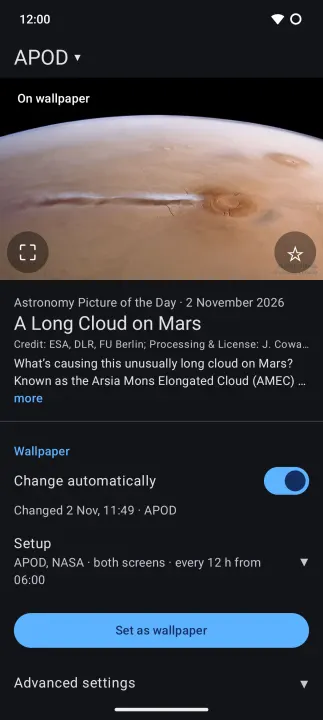
APODroid sets NASA's Astronomy Picture of the Day (APOD) as your wallpaper. A new picture comes out every day, and the app picks it up on its own. Turn on "More NASA pictures" to add NASA's Image of the Day and the Earth Observatory's Image of the Day.
The app is one page: today's picture with its title and date, and the settings below it (beside it on tablets and in landscape). With more than one source, swipe or use the name above the picture to see each one. Pull down to refresh. Tap the picture to open it on NASA's website, or tap the star to save it to your gallery. Tap the frame button to choose which part of the picture becomes the wallpaper, or the whole picture on a blurred or black background; the check mark sets it. The astronomer's explanation starts under the title; tap it to read it all.
Settings:
• Change automatically: the wallpaper, on or off, at once.
• Where (Setup, like the next two: a draft until you tap Set as wallpaper): home screen, lock screen, or both. With "More NASA pictures" on, Pictures from instead: each source on the home screen, the lock screen or both. A screen with two or more takes turns, every 24, 12, 6 or 3 hours, and shows only pictures it hasn't shown yet. NASA and Earth Observatory post on weekdays only.
• New picture at: the hour the wallpaper changes, 06:00 by default. A picture that comes out in the 3 hours after it still goes on.
• If APOD is a video: skip it, use NASA's or Earth Observatory's picture, or a picture of your own. The page shows a ▶ tile that opens the video on NASA's website.
• Set as wallpaper: saves the setup and sets the wallpaper.
• Advanced settings: save every new picture to your gallery, up to a size you choose.
If Android would pause the app because you don't open it, a note below the picture names the settings in App info that prevent it. Notes also tell you when the check fails.
Privacy: no account, no ads, no tracking. The app talks only to NASA's websites (nasa.gov). Permissions: internet access, setting the wallpaper, network state and starting after a reboot (both for the daily update). Saving to the gallery needs no permission.
APODroid is not made by or affiliated with NASA.
The app is one page: today's picture with its title and date, and the settings below it (beside it on tablets and in landscape). With more than one source, swipe or use the name above the picture to see each one. Pull down to refresh. Tap the picture to open it on NASA's website, or tap the star to save it to your gallery. Tap the frame button to choose which part of the picture becomes the wallpaper, or the whole picture on a blurred or black background; the check mark sets it. The astronomer's explanation starts under the title; tap it to read it all.
Settings:
• Change automatically: the wallpaper, on or off, at once.
• Where (Setup, like the next two: a draft until you tap Set as wallpaper): home screen, lock screen, or both. With "More NASA pictures" on, Pictures from instead: each source on the home screen, the lock screen or both. A screen with two or more takes turns, every 24, 12, 6 or 3 hours, and shows only pictures it hasn't shown yet. NASA and Earth Observatory post on weekdays only.
• New picture at: the hour the wallpaper changes, 06:00 by default. A picture that comes out in the 3 hours after it still goes on.
• If APOD is a video: skip it, use NASA's or Earth Observatory's picture, or a picture of your own. The page shows a ▶ tile that opens the video on NASA's website.
• Set as wallpaper: saves the setup and sets the wallpaper.
• Advanced settings: save every new picture to your gallery, up to a size you choose.
If Android would pause the app because you don't open it, a note below the picture names the settings in App info that prevent it. Notes also tell you when the check fails.
Privacy: no account, no ads, no tracking. The app talks only to NASA's websites (nasa.gov). Permissions: internet access, setting the wallpaper, network state and starting after a reboot (both for the daily update). Saving to the gallery needs no permission.
APODroid is not made by or affiliated with NASA.
All versions
| Version | Released | Minimum Android | Size |
|---|---|---|---|
| 0.6.0 | Nov 6, 2026 | Android 10 | 2.1 MB |
| 0.5.0 | Oct 22, 2026 | Android 10 | 1.9 MB |
| 0.3.1 | Oct 12, 2026 | Android 10 | 1.8 MB |
| 0.3.0 | Oct 8, 2026 | Android 10 | 1.8 MB |
| 0.2.1 | Oct 6, 2026 | Android 10 | 1.7 MB |
| 0.1.1 | Oct 5, 2026 | Android 10 | 1.7 MB |
How to install an older version of an Android app · How to install an APK file on Android
From the developer (GitHub)
APK files published by the developer on GitHub. They are signed by the developer and may not install over the other builds on this page (different signature). Links open github.com.
Similar apps
-
 Converter NOW: Unit Converter
A simple, immediate and fast unit converter!
-
 Braincup - Brain Training
Train your focus, memory and math skills.
-
 Shader Editor
Create and edit GLSL shaders
-
 Wave Lines Live Wallpaper
Wavy wallpaper
-
 microMathematics Plus
Computer algebra system
-
 GCompris
Multi-Activity Educational game for children 2 to 10
-
 TimeTable
Timetable viewer for VULCAN
-
 Open Note Scanner
Scan documents, handwritten notes or arts