

FilePipe: Auto Files Organizer
Your files, your rules. Automatically sort and move media with smart rules.
- Developer
- Bikram Agarwal
- License
- GPL-3.0-only
- Package
dev.bikram.filepipe.gh- Category
- File Manager, File Transfer, System
- Latest version
- 3.11.3 · Sep 28, 2026
- Minimum Android
- Android 12
Screenshots
Description
FilePipe is a powerful file management tool that turns your chaotic Download and other messy folders into a perfectly organized library — automatically. 🚀
Ever wanted all your videos in one folder, regardless of which app downloaded them? Or wished your Downloads folder would just sort itself into Documents, Music, Images, and everything else?
That's exactly what FilePipe does. Set a rule, pick a schedule, and let the pipes do the work. Move or copy any media to its rightful place.
━━ 📋 RULES ━━
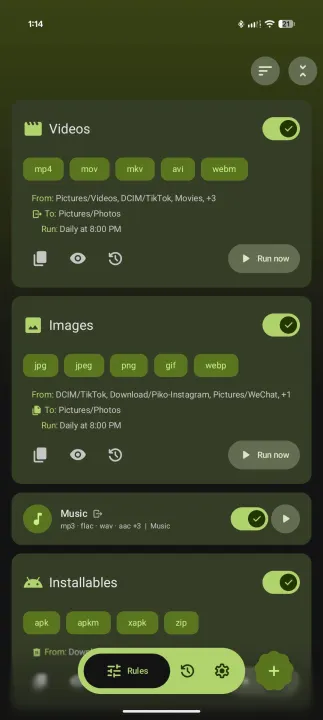
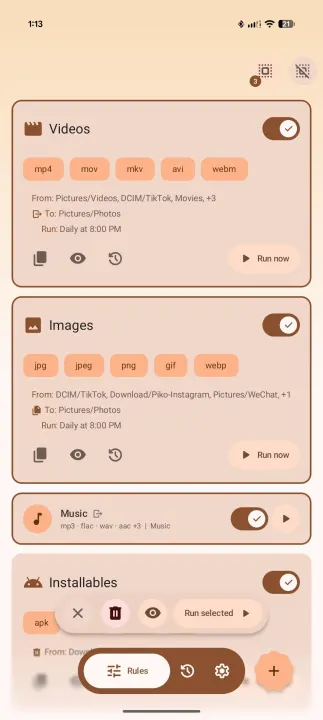
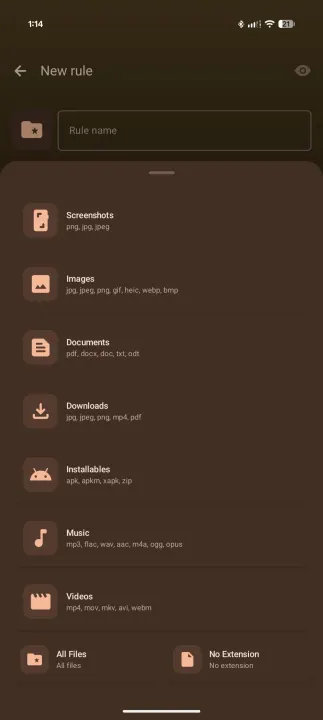
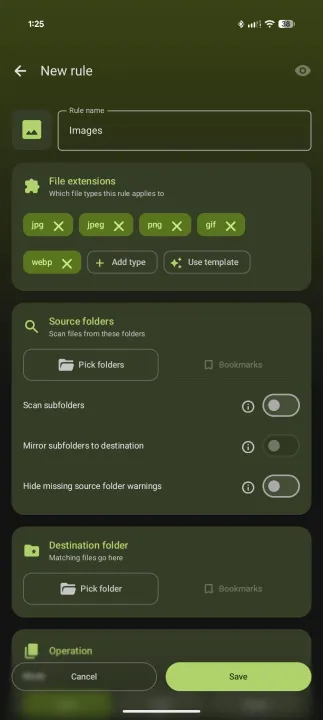
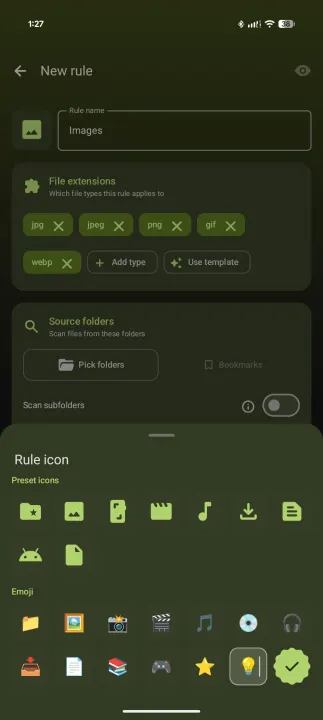
Use templates to start fast, or build your own. Create a rule by choosing source folders, file extensions, and a destination. Each rule can move, copy or delete files, and you control what happens when a filename collision occurs — skip, overwrite, or rename automatically. Rules can scan subfolders recursively and each one gets its own schedule.
Moved files keep their original date and time (copies too, with All files access), so they stay in the right order in your gallery and file manager instead of showing up as brand new.
━━ 🎛️ ADVANCED FILTERS ━━
Not every file in a folder should match. Narrow things down with:
• Filename patterns (wildcards or RegEx)
• Minimum and maximum file size
• Minimum and maximum file age
• Exclude patterns (wildcards or RegEx)
• Media orientation (portrait or landscape)
All optional, all collapsed by default so simple rules stay simple.
━━ 👁️ PREVIEW BEFORE YOU RUN ━━
Not sure a rule will pick up the right files? Preview it first. FilePipe shows exactly which files would be moved — without touching anything on disk.
━━ ⏰ FLEXIBLE SCHEDULES ━━
Run rules on demand, or schedule them to run:
• Every few hours
• Daily at a specific time
• Weekly on a specific day and time
━━ 📜 HISTORY ━━
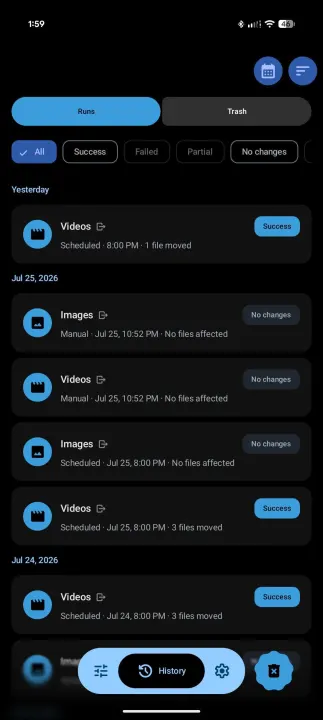
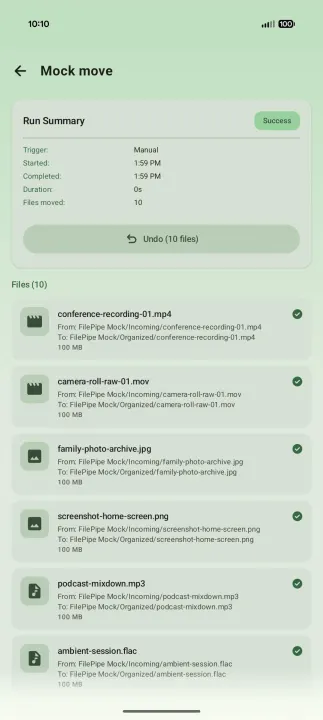
Every run is logged with a full per-file breakdown — moved, skipped, or failed. You can:
• Filter by outcome (including runs that matched nothing)
• Sort by date or rule name
• Switch between date view, rule view, or status view
• Tap a moved file to open it directly
• Undo a run to restore files when possible
━━ ⚡ APP SHORTCUTS ━━
Long-press the app icon to run any of your top four enabled rules immediately, without opening the app.
━━ 🔔 NOTIFICATIONS ━━
Scheduled runs post a summary notification showing the files that were moved. Tap Undo directly from the notification to reverse the last batch.
━━ 💾 BACKUP AND RESTORE ━━
Export your rules, run history, and settings to a JSON file and restore them at any time. Auto-export on rule change and scheduled exports are available in Settings.
━━ 🎨 LOOK AND FEEL ━━
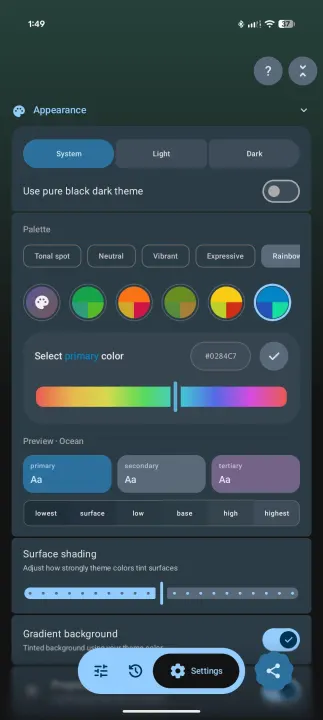
• Light, dark, black (OLED), or system-default theme
• Material You (wallpaper colors on Android 12+)
• 8 fixed accent presets and option to set your own color
• 9 palette algorithms: Tonal Spot, Vibrant, Expressive, Rainbow, Monochrome, and more
• Optional gradient background
• Optional progressive blur behind the nav bar (Android 12+)
• Use your own custom font
• UI scale from 75% to 125% to make text, icons, and spacing smaller or larger
━━ 🛡️ PRIVACY ━━
Works entirely on-device. No accounts, no cloud sync, no data collection. You control how folders are accessed - either one at a time or grant once & access everything.
Ever wanted all your videos in one folder, regardless of which app downloaded them? Or wished your Downloads folder would just sort itself into Documents, Music, Images, and everything else?
That's exactly what FilePipe does. Set a rule, pick a schedule, and let the pipes do the work. Move or copy any media to its rightful place.
━━ 📋 RULES ━━
Use templates to start fast, or build your own. Create a rule by choosing source folders, file extensions, and a destination. Each rule can move, copy or delete files, and you control what happens when a filename collision occurs — skip, overwrite, or rename automatically. Rules can scan subfolders recursively and each one gets its own schedule.
Moved files keep their original date and time (copies too, with All files access), so they stay in the right order in your gallery and file manager instead of showing up as brand new.
━━ 🎛️ ADVANCED FILTERS ━━
Not every file in a folder should match. Narrow things down with:
• Filename patterns (wildcards or RegEx)
• Minimum and maximum file size
• Minimum and maximum file age
• Exclude patterns (wildcards or RegEx)
• Media orientation (portrait or landscape)
All optional, all collapsed by default so simple rules stay simple.
━━ 👁️ PREVIEW BEFORE YOU RUN ━━
Not sure a rule will pick up the right files? Preview it first. FilePipe shows exactly which files would be moved — without touching anything on disk.
━━ ⏰ FLEXIBLE SCHEDULES ━━
Run rules on demand, or schedule them to run:
• Every few hours
• Daily at a specific time
• Weekly on a specific day and time
━━ 📜 HISTORY ━━
Every run is logged with a full per-file breakdown — moved, skipped, or failed. You can:
• Filter by outcome (including runs that matched nothing)
• Sort by date or rule name
• Switch between date view, rule view, or status view
• Tap a moved file to open it directly
• Undo a run to restore files when possible
━━ ⚡ APP SHORTCUTS ━━
Long-press the app icon to run any of your top four enabled rules immediately, without opening the app.
━━ 🔔 NOTIFICATIONS ━━
Scheduled runs post a summary notification showing the files that were moved. Tap Undo directly from the notification to reverse the last batch.
━━ 💾 BACKUP AND RESTORE ━━
Export your rules, run history, and settings to a JSON file and restore them at any time. Auto-export on rule change and scheduled exports are available in Settings.
━━ 🎨 LOOK AND FEEL ━━
• Light, dark, black (OLED), or system-default theme
• Material You (wallpaper colors on Android 12+)
• 8 fixed accent presets and option to set your own color
• 9 palette algorithms: Tonal Spot, Vibrant, Expressive, Rainbow, Monochrome, and more
• Optional gradient background
• Optional progressive blur behind the nav bar (Android 12+)
• Use your own custom font
• UI scale from 75% to 125% to make text, icons, and spacing smaller or larger
━━ 🛡️ PRIVACY ━━
Works entirely on-device. No accounts, no cloud sync, no data collection. You control how folders are accessed - either one at a time or grant once & access everything.
All versions
| Version | Released | Minimum Android | Size |
|---|---|---|---|
| 3.11.3 | Sep 28, 2026 | Android 12 | 5.4 MB |
| 3.10.1 | Sep 5, 2026 | Android 12 | 5.3 MB |
| 3.10.0 | Sep 3, 2026 | Android 12 | 5.3 MB |
| 3.9.9 | Aug 19, 2026 | Android 12 | 5.2 MB |
| 3.9.8 | Aug 10, 2026 | Android 12 | 5.2 MB |
| 3.9.7 | Jul 31, 2026 | Android 12 | 5.2 MB |
| 3.9.5 | Jul 28, 2026 | Android 12 | 5.2 MB |
| 3.9.4 | Jul 26, 2026 | Android 12 | 5.1 MB |
| 3.9.1 | Jul 16, 2026 | Android 12 | 5.1 MB |
| 3.9.0 | Jul 12, 2026 | Android 12 | 5.5 MB |
| 3.8.9 | Jul 11, 2026 | Android 12 | 5.5 MB |
| 3.8.6 | Jul 10, 2026 | Android 12 | 5.5 MB |
How to install an older version of an Android app · How to install an APK file on Android
From the developer (GitHub)
APK files published by the developer on GitHub. They are signed by the developer and may not install over the other builds on this page (different signature). Links open github.com.
v3.11.3
· Sep 26, 2026
filepipe-v3.11.3-fdroid.apk
5.4 MB filepipe-v3.11.3-github.apk
5.4 MB filepipe-v3.11.3-offline.apk
5.3 MB Similar apps
-
 Screenshot Tile (NoRoot)
Customizable screenshot tool with quick settings shortcut and floating button
-
 Coffee
Keep display awake
-
 Mute reminder
Remind you to mute media
-
 Prepaid Balance
Keep track your prepaid balance
-
 Auto Auto-Rotate
Automatically remembers your auto-rotate setting for every app
-
 Drowser
Simple background app killer
-
 Scrambled Exif
Remove the metadata from your pictures before sharing them
-
 WaveUp
Turn on the display by waving