

xnotes
Handwriting notes and sketching app with stylus support
- Developer
- Shardul Vikram Singh
- License
- MIT
- Package
com.xnotes- Category
- Writing
- Latest version
- 0.9.7 · Nov 4, 2026
- Minimum Android
- Android 8.0
Screenshots
Description
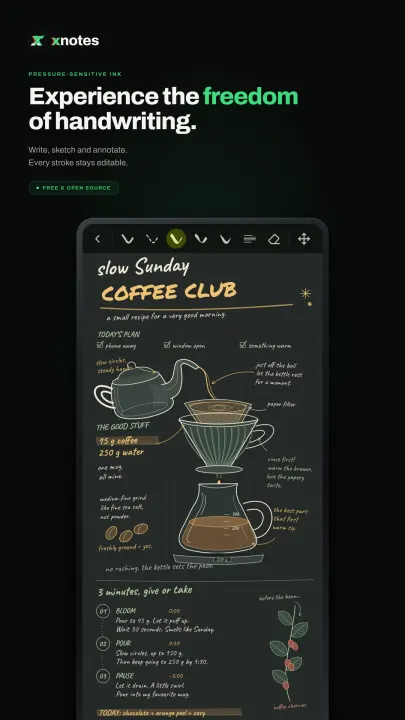
xnotes is a handwriting notebook for Android, built for the stylus. Take notes, sketch and annotate PDFs with ink that feels like a pen on paper.
• Ink that feels like a pen: pressure-sensitive and low latency, with pens and highlighters.
• Neon glow: make any pen glow.
• Disappearing ink: ink that fades away on its own, great for teaching and presenting.
• Tape: cover answers with tape and tap to peel it back, for testing yourself.
• Shape snapping: draw a rough shape, hold, and it snaps clean.
• Sharp at any zoom: ink and PDFs stay crisp however far you zoom in.
• Notebooks and an infinite canvas: pages when you want structure, endless space when you don't.
• Book layouts: single, double or cover pages, scrolling or page flips.
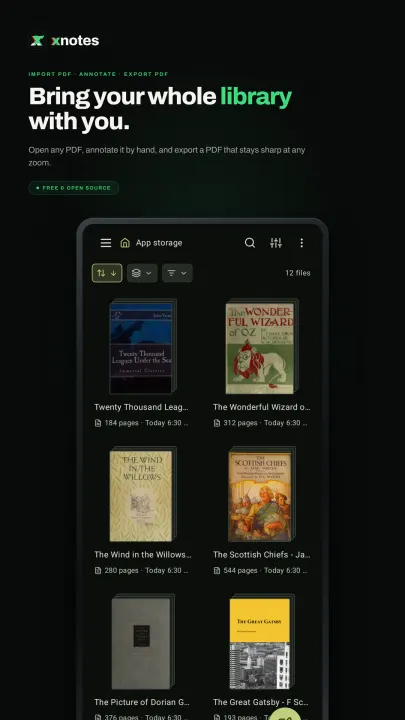
• PDF import: bring in any PDF and write all over it.
• Room for side notes: widen a PDF's margins on any edge and take notes on the side.
• Insert space: drag anywhere on a page to open up room there, even in the middle of a PDF.
• PDF text markups: highlight, underline and strike out text, add comments, search it.
• PDF colour filters: invert, sepia, contrast, brightness, multiply and screen.
• Images stay untouched: filter a PDF and its photos and images keep their true colours.
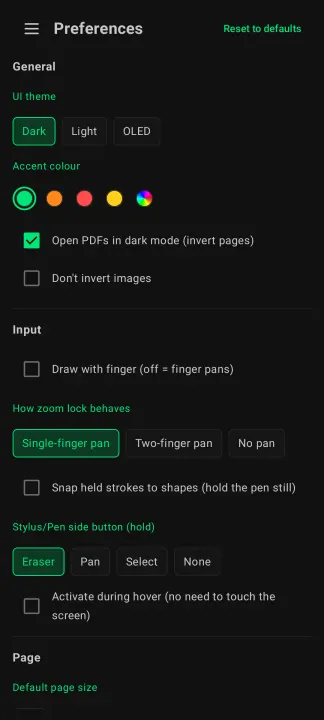
• Dark and OLED modes: easy on the eyes at night, true black on OLED screens.
• Real PDF export: sharp vector output with selectable text, links and bookmarks.
• Markdown: write in markdown and it formats as you type.
• Typed notes: tables, LaTeX equations and code highlighting, right on the page.
• Audio recording: record a lecture as you write, and your ink replays in sync with it.
• 20+ page templates: Cornell, planners, music staves, isometric and more.
• Endless themes: any accent colour, eight styles for each, dual tone and Material You.
• Make it yours: rearrange the toolbar, float it or dock it on any edge, and pick its size.
• Split view: two notes side by side.
• A real file explorer: grid, gallery, list, column and timeline views, with plenty to customise.
• Your notes, your folders: notes are saved as files in a folder you choose, not locked away in an app's database, so you stay in full control of them.
• Works with stylus pens: S Pen and many others.
• Always editable: nothing gets flattened, so every stroke can be moved, restyled or erased later.
• Private: open source, no account, no ads, no tracking, no internet access.
• Ink that feels like a pen: pressure-sensitive and low latency, with pens and highlighters.
• Neon glow: make any pen glow.
• Disappearing ink: ink that fades away on its own, great for teaching and presenting.
• Tape: cover answers with tape and tap to peel it back, for testing yourself.
• Shape snapping: draw a rough shape, hold, and it snaps clean.
• Sharp at any zoom: ink and PDFs stay crisp however far you zoom in.
• Notebooks and an infinite canvas: pages when you want structure, endless space when you don't.
• Book layouts: single, double or cover pages, scrolling or page flips.
• PDF import: bring in any PDF and write all over it.
• Room for side notes: widen a PDF's margins on any edge and take notes on the side.
• Insert space: drag anywhere on a page to open up room there, even in the middle of a PDF.
• PDF text markups: highlight, underline and strike out text, add comments, search it.
• PDF colour filters: invert, sepia, contrast, brightness, multiply and screen.
• Images stay untouched: filter a PDF and its photos and images keep their true colours.
• Dark and OLED modes: easy on the eyes at night, true black on OLED screens.
• Real PDF export: sharp vector output with selectable text, links and bookmarks.
• Markdown: write in markdown and it formats as you type.
• Typed notes: tables, LaTeX equations and code highlighting, right on the page.
• Audio recording: record a lecture as you write, and your ink replays in sync with it.
• 20+ page templates: Cornell, planners, music staves, isometric and more.
• Endless themes: any accent colour, eight styles for each, dual tone and Material You.
• Make it yours: rearrange the toolbar, float it or dock it on any edge, and pick its size.
• Split view: two notes side by side.
• A real file explorer: grid, gallery, list, column and timeline views, with plenty to customise.
• Your notes, your folders: notes are saved as files in a folder you choose, not locked away in an app's database, so you stay in full control of them.
• Works with stylus pens: S Pen and many others.
• Always editable: nothing gets flattened, so every stroke can be moved, restyled or erased later.
• Private: open source, no account, no ads, no tracking, no internet access.
All versions
| Version | Released | Minimum Android | Size |
|---|---|---|---|
| 0.9.7 | Nov 4, 2026 | Android 8.0 | 34.5 MB |
| 0.9.6 | Oct 31, 2026 | Android 8.0 | 34.4 MB |
| 0.9.5 | Oct 27, 2026 | Android 8.0 | 34.3 MB |
| 0.9.3 | Oct 25, 2026 | Android 8.0 | 32.7 MB |
| 0.9.2 | Oct 22, 2026 | Android 8.0 | 28.9 MB |
| 0.9.1 | Oct 14, 2026 | Android 8.0 | 28.9 MB |
| 0.9.0 | Oct 4, 2026 | Android 8.0 | 28.6 MB |
| 0.8.23 | Sep 28, 2026 | Android 8.0 | 21.6 MB |
| 0.8.22 | Sep 26, 2026 | Android 8.0 | 21.6 MB |
| 0.8.21 | Sep 25, 2026 | Android 8.0 | 21.6 MB |
| 0.8.20 | Sep 23, 2026 | Android 8.0 | 20.8 MB |
| 0.8.19 | Sep 22, 2026 | Android 8.0 | 20.7 MB |
| 0.8.18 | Sep 21, 2026 | Android 8.0 | 20.6 MB |
| 0.8.17 | Sep 15, 2026 | Android 8.0 | 20.2 MB |
| 0.8.16 | Sep 9, 2026 | Android 8.0 | 20.2 MB |
| 0.8.15 | Sep 7, 2026 | Android 8.0 | 20.2 MB |
| 0.8.14 | Sep 3, 2026 | Android 8.0 | 20.2 MB |
| 0.8.13 | Aug 23, 2026 | Android 8.0 | 20.2 MB |
| 0.8.12 | Aug 19, 2026 | Android 8.0 | 20.2 MB |
| 0.8.11 | Aug 17, 2026 | Android 8.0 | 20.2 MB |
| 0.8.10 | Aug 4, 2026 | Android 8.0 | 20.1 MB |
| 0.8.9 | Jul 28, 2026 | Android 8.0 | 20.1 MB |
| 0.8.8 | Jul 26, 2026 | Android 8.0 | 20.1 MB |
| 0.8.5 | Jul 16, 2026 | Android 8.0 | 20 MB |
| 0.8.4 | Jul 13, 2026 | Android 8.0 | 20 MB |
| 0.8.2 | Jul 7, 2026 | Android 8.0 | 20 MB |
| 0.7.18 | Jul 1, 2026 | Android 8.0 | 8 MB |
| 0.7.16 | Jun 30, 2026 | Android 8.0 | 8 MB |
| 0.7.12 | Jun 27, 2026 | Android 8.0 | 8 MB |
| 0.7.11 | Jun 26, 2026 | Android 8.0 | 8 MB |
| 0.7.10 | Jun 25, 2026 | Android 8.0 | 7.9 MB |
| 0.7.9 | Jun 24, 2026 | Android 8.0 | 7.9 MB |
| 0.7.8 | Jun 22, 2026 | Android 8.0 | 7.9 MB |
| 0.7.1 | Jun 16, 2026 | Android 8.0 | 20.6 MB |
| 0.6.6 | Jun 9, 2026 | Android 8.0 | 20.6 MB |
| 0.6.4 | Jun 4, 2026 | Android 8.0 | 20.6 MB |
| 0.6.2 | Jun 3, 2026 | Android 8.0 | 20.6 MB |
| 0.5.3 | Jun 2, 2026 | Android 8.0 | 20.6 MB |
| 0.5.1 | Jun 2, 2026 | Android 8.0 | 20.6 MB |
| 0.5.0 | Jun 1, 2026 | Android 8.0 | 20.6 MB |
| 0.4.1 | May 30, 2026 | Android 8.0 | 20.5 MB |
| 0.4.0 | May 29, 2026 | Android 8.0 | 12.5 MB |
| 0.3.0 | May 28, 2026 | Android 8.0 | 12.5 MB |
| 0.2.0 | May 27, 2026 | Android 8.0 | 12.4 MB |
How to install an older version of an Android app · How to install an APK file on Android
From the developer (GitHub)
APK files published by the developer on GitHub. They are signed by the developer and may not install over the other builds on this page (different signature). Links open github.com.
Similar apps
-
 NoNonsense Notes
A simple notepad and to-do app with an excellent navigation
-
 Butterfly
Take notes, draw freely, and organize ideas across an endless workspace
-
 Linwood Butterfly Nightly
Take notes, draw freely, and organize ideas across an endless workspace
-
 Thunderbird: Free Your Inbox
Thunderbird is a 100% open source, privacy focused email app.
-
 Thunderbird Beta for Testers
Thunderbird is a 100% open source, privacy focused email app.
-
 Nextcloud Notes
View and edit notes on Nextcloud
-
 Poet Assistant
Dictionary and TTS tools for editing poems
-
 BeeCount Knitting Counter
Knitting row counter