

Wear Sync for Breezy
send Breezy weather data from your phone to your Wear OS watch
- Developer
- steel johnson
- License
- GPL-3.0-only
- Package
com.steel101.wearsyncforbreezy- Category
- Connectivity, Weather
- Latest version
- 1.0.67 · Jul 28, 2026
- Minimum Android
- Android 8.0
Screenshots
Description
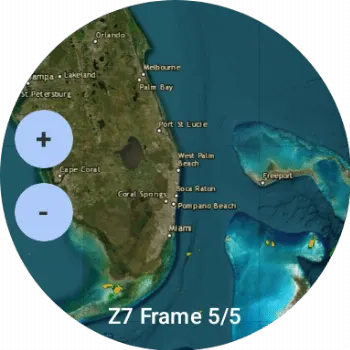
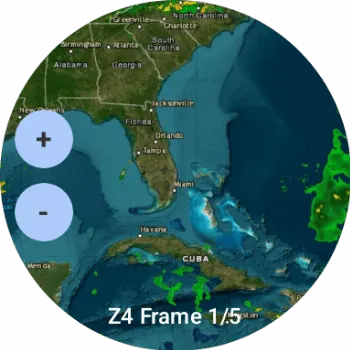
major update added radar to phone and watch app.
Wear Sync for Breezy A lightweight bridge application that syncs detailed weather data from the Breezy Weather Android app to your Wear OS watch.
What it does Breezy Weather is a fantastic open-source weather app, but it doesn't always have a native way to send its rich data to every Wear OS watch face or tile. This app acts as a "sync bridge":
• It reads weather data directly from Breezy Weather's internal database (using a secure Content Provider).
• It processes current conditions, detailed metrics (UV, Humidity, Wind, etc.), and forecasts.
• It pushes that data to your connected Wear OS device instantly.
Key Features * Detailed Metrics: Syncs more than just temperature: * Current Temp & "Feels Like" * Humidity, Pressure, UV Index, and Visibility * Wind Speed and Direction * Air Quality Index (AQI) and Dew Point * Precipitation Probability (Rain Chance) * Forecasts: * 7-Day daily forecast (Highs/Lows/Icons). * 6-Hour hourly forecast. * Unit Support: Automatically detects and respects your preference for Celsius or Fahrenheit.
Installation & Setup
• Breezy Weather: Ensure you have Breezy Weather installed and configured on your phone.
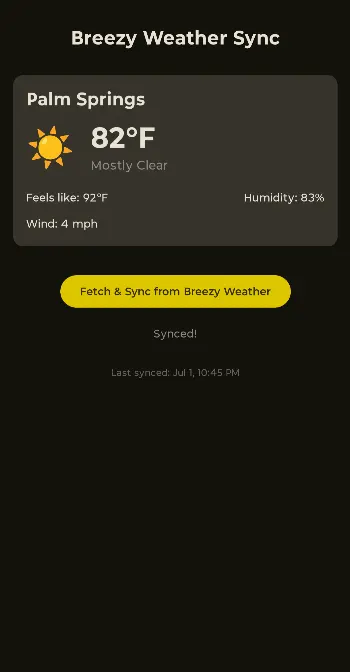
• Permissions: When you first open this sync app, tap "Fetch & Sync". It will request permission to read data from Breezy Weather.
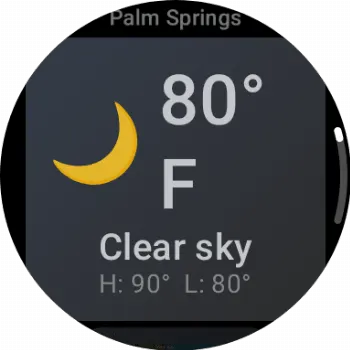
• Watch App: Ensure the companion app is installed on your Wear OS watch to receive and display the data.
• Optimization: For reliable background syncing, it is recommended to disable "Battery Optimization" for this app so Android doesn't kill the background sync service.
How it works
• The Phone App: Displays a preview of the data being synced and the "Last Synced" timestamp so you know your watch is up to date.
• The Service: Runs a START_STICKY background service that listens for system changes and handles the communication with Google Play Services Wearable API.
• Data Privacy: This app does not have internet access. It only reads data locally from one app on your phone and sends it locally to your own watch.
Disclaimer: This is an independent companion app and is not officially affiliated with the main Breezy Weather development team.
Wear Sync for Breezy A lightweight bridge application that syncs detailed weather data from the Breezy Weather Android app to your Wear OS watch.
What it does Breezy Weather is a fantastic open-source weather app, but it doesn't always have a native way to send its rich data to every Wear OS watch face or tile. This app acts as a "sync bridge":
• It reads weather data directly from Breezy Weather's internal database (using a secure Content Provider).
• It processes current conditions, detailed metrics (UV, Humidity, Wind, etc.), and forecasts.
• It pushes that data to your connected Wear OS device instantly.
Key Features * Detailed Metrics: Syncs more than just temperature: * Current Temp & "Feels Like" * Humidity, Pressure, UV Index, and Visibility * Wind Speed and Direction * Air Quality Index (AQI) and Dew Point * Precipitation Probability (Rain Chance) * Forecasts: * 7-Day daily forecast (Highs/Lows/Icons). * 6-Hour hourly forecast. * Unit Support: Automatically detects and respects your preference for Celsius or Fahrenheit.
Installation & Setup
• Breezy Weather: Ensure you have Breezy Weather installed and configured on your phone.
• Permissions: When you first open this sync app, tap "Fetch & Sync". It will request permission to read data from Breezy Weather.
• Watch App: Ensure the companion app is installed on your Wear OS watch to receive and display the data.
• Optimization: For reliable background syncing, it is recommended to disable "Battery Optimization" for this app so Android doesn't kill the background sync service.
How it works
• The Phone App: Displays a preview of the data being synced and the "Last Synced" timestamp so you know your watch is up to date.
• The Service: Runs a START_STICKY background service that listens for system changes and handles the communication with Google Play Services Wearable API.
• Data Privacy: This app does not have internet access. It only reads data locally from one app on your phone and sends it locally to your own watch.
Disclaimer: This is an independent companion app and is not officially affiliated with the main Breezy Weather development team.
All versions
| Version | Released | Minimum Android | Size |
|---|---|---|---|
| 1.0.67 | Jul 28, 2026 | Android 8.0 | 5.8 MB |
| 1.0.66 | Jul 23, 2026 | Android 8.0 | 5.8 MB |
| 1.0.65 | Jul 15, 2026 | Android 8.0 | 5.6 MB |
How to install an older version of an Android app · How to install an APK file on Android
From the developer (GitHub)
APK files published by the developer on GitHub. They are signed by the developer and may not install over the other builds on this page (different signature). Links open github.com.
Release-Build-v1.0.67
· Jul 28, 2026
floss-phone.apk
5.8 MB floss-watch.apk
3.2 MB google-phone.apk
8.3 MB google-watch.apk
2.1 MB Release-Build-v1.0.66
· Jul 23, 2026
floss-phone.apk
5.8 MB floss-watch.apk
3.2 MB google-phone.apk
8.2 MB google-watch.apk
2.1 MB Release-Build-v1.0.65
· Jul 15, 2026
floss-phone.apk
5.6 MB floss-watch.apk
3.1 MB google-phone.apk
7.9 MB google-watch.apk
2 MB Similar apps
-
 URLCheck
Allows analyzing (or sharing) URLs before opening them.
-
 Thunderbird: Free Your Inbox
Thunderbird is a 100% open source, privacy focused email app.
-
 Thunderbird Beta for Testers
Thunderbird is a 100% open source, privacy focused email app.
-
 NeoStumbler
Application for collecting wireless networks to geolocation services
-
 MultiVNC
VNC viewer that aims to be easy to use and fast
-
 Home Assistant
Control all your devices in your Home Assistant instance
-
 Mastodon
Where conversations happen
-
 Presence Publisher
Regularly publish to an MQTT topic