

kboard
Keyboard with customisable one-click responses and powerful automation commands.
- License
- GPL-3.0-only
- Package
com.adgad.kboard- Category
- Keyboard & IME, System
- Latest version
- 5.0.1 · Feb 9, 2022
- Minimum Android
- Android 4.4
Screenshots
Description
Do you hate people as much as I do?
Do you find yourself wasting time trying to find the right condescending message in order to get rid of them?
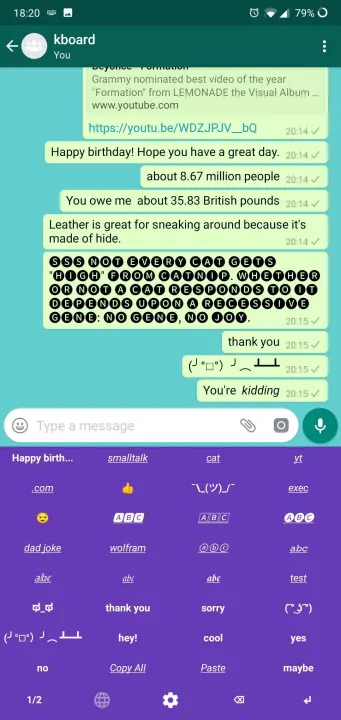
Then you need kboard - a keyboard designed specifically to end conversations. Don't waste time with all those other superfluous letters when all you really need is 'k.'.
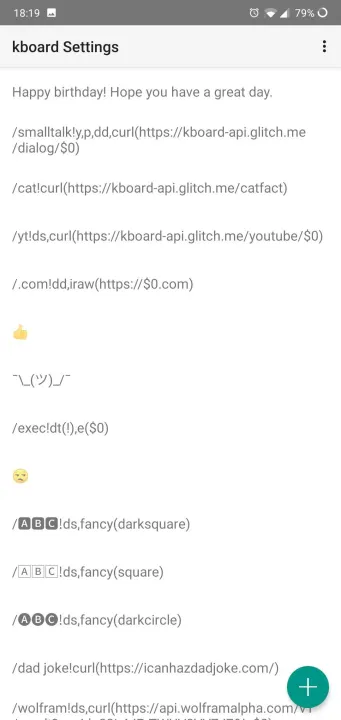
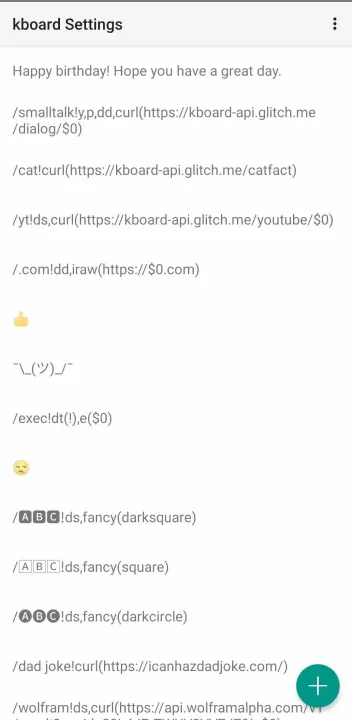
• *NEW* Commands - a powerful VIM-like macro system for your own custom command keys /like this!5dw,i($0!!!!)
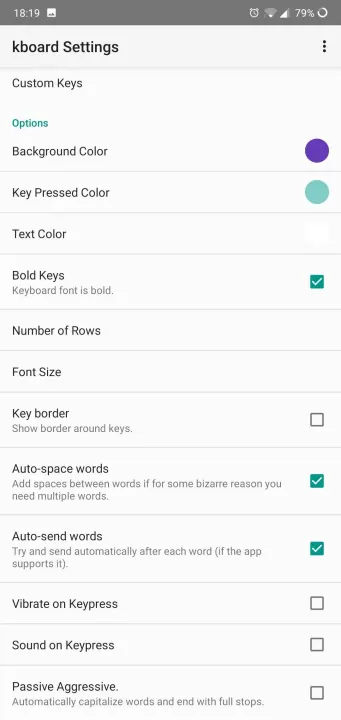
• Add as many custom keys as you need.
• Quickly switch between kboard and your other keyboards
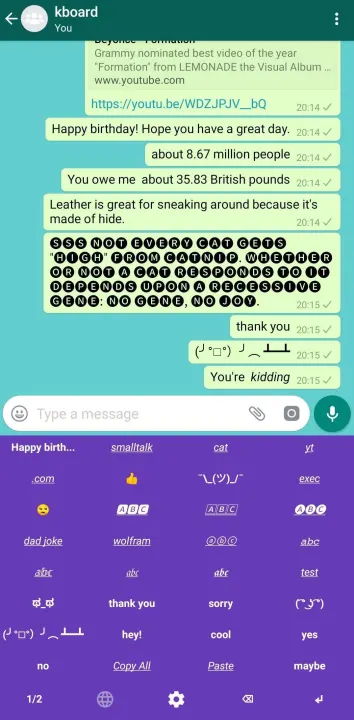
• One-click send option for the pinnacle of laziness - no need to even press enter!
• Choose from 5 material design color schemes
It will literally save you hours of pointless talking!
With kboard the world is your oyster:
• Add your favourite hashtags
• Easily Italicise/bolden things in WhatsApp
• More powerful copy/paste automation with Commands
• Use to speed up github peer reviews (e.g. thumbs up, +1, LGTM)
• Add long names that are awkward to type
• Custom text emoji/faces (e.g. ¯\_(ツ)_/¯, ( ͡° ͜ʖ ͡°))
• Automate sweet nothings to your partner
COMMANDS (New in v3)
Commands is a VIM-like system for adding keys that do special things. For example:
/WhatsApp italicise!dw,i(_$0_)
/WhatsApp bolden!dw,i(*$0*)
/WhatsApp italics!i(__),j
/Copy All!yy
/Repeat word x4!dw,4p
/rly sad!1000i(😥 )
Full list:
d=delete previous character
dw=delete previous word
3dw=delete previous three words
dd=delete all
yy=copy all
y=copy selection
p=paste from clipboard
i(text)=output the content of the brackets ($0 gets replaced with the last deleted/copied content)
upper(text)=as o, but in upper case
lower(text)=as o, but lower case
j=move cursor back by a character
k=move cursor forward by a character
b=move cursor back by a word
w=move cursor forward by a word
s=trigger a send command
Do you find yourself wasting time trying to find the right condescending message in order to get rid of them?
Then you need kboard - a keyboard designed specifically to end conversations. Don't waste time with all those other superfluous letters when all you really need is 'k.'.
• *NEW* Commands - a powerful VIM-like macro system for your own custom command keys /like this!5dw,i($0!!!!)
• Add as many custom keys as you need.
• Quickly switch between kboard and your other keyboards
• One-click send option for the pinnacle of laziness - no need to even press enter!
• Choose from 5 material design color schemes
It will literally save you hours of pointless talking!
With kboard the world is your oyster:
• Add your favourite hashtags
• Easily Italicise/bolden things in WhatsApp
• More powerful copy/paste automation with Commands
• Use to speed up github peer reviews (e.g. thumbs up, +1, LGTM)
• Add long names that are awkward to type
• Custom text emoji/faces (e.g. ¯\_(ツ)_/¯, ( ͡° ͜ʖ ͡°))
• Automate sweet nothings to your partner
COMMANDS (New in v3)
Commands is a VIM-like system for adding keys that do special things. For example:
/WhatsApp italicise!dw,i(_$0_)
/WhatsApp bolden!dw,i(*$0*)
/WhatsApp italics!i(__),j
/Copy All!yy
/Repeat word x4!dw,4p
/rly sad!1000i(😥 )
Full list:
d=delete previous character
dw=delete previous word
3dw=delete previous three words
dd=delete all
yy=copy all
y=copy selection
p=paste from clipboard
i(text)=output the content of the brackets ($0 gets replaced with the last deleted/copied content)
upper(text)=as o, but in upper case
lower(text)=as o, but lower case
j=move cursor back by a character
k=move cursor forward by a character
b=move cursor back by a word
w=move cursor forward by a word
s=trigger a send command
All versions
| Version | Released | Minimum Android | Size |
|---|---|---|---|
| 5.0.1 | Feb 9, 2022 | Android 4.4 | 1.2 MB |
| 5.0.0 | Dec 30, 2021 | Android 4.4 | 1.2 MB |
| 4.1.4 | Feb 13, 2019 | Android 4.4 | 1.2 MB |
How to install an older version of an Android app · How to install an APK file on Android
From the developer (GitHub)
APK files published by the developer on GitHub. They are signed by the developer and may not install over the other builds on this page (different signature). Links open github.com.
Similar apps
-
 Screenshot Tile (NoRoot)
Customizable screenshot tool with quick settings shortcut and floating button
-
 Coffee
Keep display awake
-
 Mute reminder
Remind you to mute media
-
 Prepaid Balance
Keep track your prepaid balance
-
 Auto Auto-Rotate
Automatically remembers your auto-rotate setting for every app
-
 Drowser
Simple background app killer
-
 Scrambled Exif
Remove the metadata from your pictures before sharing them
-
 WaveUp
Turn on the display by waving