

Voxscribe - Offline Voice Input
Voxscribe is an offline voice keyboard that transcribes speech on-device.
- Developer
- y20k
- License
- MIT
- Package
org.y20k.voxscribe- Category
- Keyboard & IME, Speech Recognizer
- Latest version
- 1.0.4 · Oct 2, 2026
- Minimum Android
- Android 10
Screenshots
Description
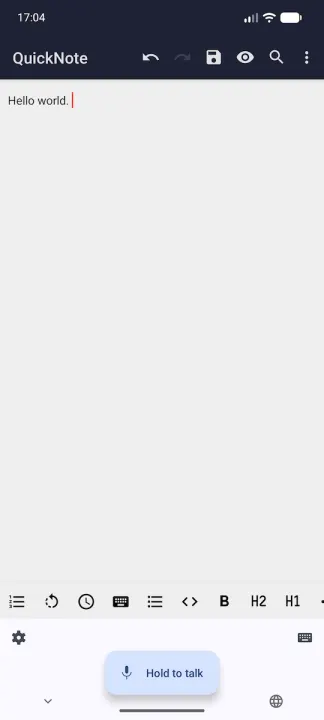
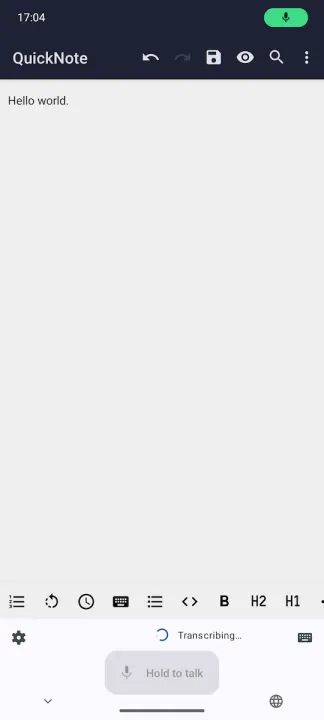
Voxscribe is an offline voice-input keyboard (input method) for Android. Hold the mic button to record; your speech is transcribed entirely on-device with whisper.cpp using a Whisper model file you supply yourself, and the result is written into the focused text field.
Voxscribe is free software. It is published under the MIT open-source license. Voxscribe uses whisper.cpp for on-device transcription, which is also free software published under the MIT license.
SETUP
Voxscribe does not ship a speech model. You download one yourself and point the app at it.
• Download a Whisper model file in GGML format from the Hugging Face repository ggerganov/whisper.cpp: https://huggingface.co/ggerganov/whisper.cpp/tree/main
Recommended files:
• ggml-base-q5_1.bin (~60 MB), the recommended default
• ggml-small-q5_1.bin (~190 MB), better quality but slower
• ggml-tiny-q5_1.bin (~32 MB), for older or weak devices
Use a multilingual model only. The .en (English-only) variants break both language modes.
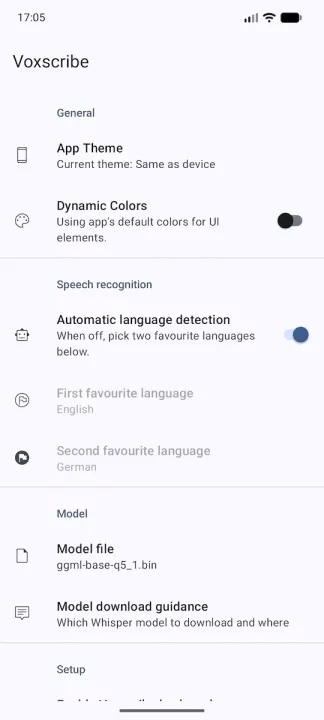
• Open Voxscribe, tap "Model file", and pick the file you downloaded.
• Under "Setup", tap "Enable Voxscribe keyboard" and turn Voxscribe on in the system keyboard settings.
• Under "Setup", tap "Microphone permission" and allow recording. You can also grant it the first time you hold the mic button.
• In any text field, switch to Voxscribe with the keyboard's mic button or the system input-method switcher, then hold the mic button to record and release to insert the transcript.
FEATURES
• Offline, on-device transcription, so nothing leaves your phone
• Push-to-talk: hold to record, release to transcribe
• Two favourite languages to switch between on the panel, or automatic language detection
• Light and dark themes, plus Material You dynamic colors
A WORD ON PRIVACY
Voxscribe works entirely on your device. Your speech is recorded while you hold the mic button, transcribed locally by whisper.cpp. There is no web service behind Voxscribe. The Whisper model stays wherever you saved it. The only permission Voxscribe requests is microphone access, needed to record your voice. Voxscribe does not hold the INTERNET permission. It cannot transmit data.
Voxscribe is free software. It is published under the MIT open-source license. Voxscribe uses whisper.cpp for on-device transcription, which is also free software published under the MIT license.
SETUP
Voxscribe does not ship a speech model. You download one yourself and point the app at it.
• Download a Whisper model file in GGML format from the Hugging Face repository ggerganov/whisper.cpp: https://huggingface.co/ggerganov/whisper.cpp/tree/main
Recommended files:
• ggml-base-q5_1.bin (~60 MB), the recommended default
• ggml-small-q5_1.bin (~190 MB), better quality but slower
• ggml-tiny-q5_1.bin (~32 MB), for older or weak devices
Use a multilingual model only. The .en (English-only) variants break both language modes.
• Open Voxscribe, tap "Model file", and pick the file you downloaded.
• Under "Setup", tap "Enable Voxscribe keyboard" and turn Voxscribe on in the system keyboard settings.
• Under "Setup", tap "Microphone permission" and allow recording. You can also grant it the first time you hold the mic button.
• In any text field, switch to Voxscribe with the keyboard's mic button or the system input-method switcher, then hold the mic button to record and release to insert the transcript.
FEATURES
• Offline, on-device transcription, so nothing leaves your phone
• Push-to-talk: hold to record, release to transcribe
• Two favourite languages to switch between on the panel, or automatic language detection
• Light and dark themes, plus Material You dynamic colors
A WORD ON PRIVACY
Voxscribe works entirely on your device. Your speech is recorded while you hold the mic button, transcribed locally by whisper.cpp. There is no web service behind Voxscribe. The Whisper model stays wherever you saved it. The only permission Voxscribe requests is microphone access, needed to record your voice. Voxscribe does not hold the INTERNET permission. It cannot transmit data.
All versions
| Version | Released | Minimum Android | Size |
|---|---|---|---|
| 1.0.4 | Oct 2, 2026 | Android 10 | 11.7 MB |
| 1.0.3 | Sep 12, 2026 | Android 10 | 11.8 MB |
| 1.0.2 | Sep 5, 2026 | Android 10 | 21.6 MB |
| 1.0.1 | Jul 31, 2026 | Android 10 | 21.5 MB |
How to install an older version of an Android app · How to install an APK file on Android
Similar apps
-
 KeePassDX Passkey Vault
Manage Passkey / Password in a local and open-source vault
-
 HeliBoard
Customizable open-source keyboard
-
 Trime
Chinese IME with Rime Input Method Engine
-
 DroidTR IME
 (Turkish F/Q keyboard)
- Kõnele Speech-to-text provider
-
 LeanType
Private, customizable open-source keyboard with smart productivity tools
-
 Morse
Translate text to Morse code or vice versa in real time
-
 Unexpected Keyboard
Lightweight and privacy-conscious virtual keyboard for Android.