

Screenlite Web Kiosk
displays web content in full-screen mode
- Developer
- Screenlite
- License
- MIT
- Package
org.screenlite.webkiosk- Category
- Connectivity
- Latest version
- 0.0.11 · Sep 23, 2025
- Minimum Android
- Android 5.1
Screenshots
Description
Screenlite Web Kiosk is a simple Android kiosk browser app that displays web content in full-screen mode.
Key Features
• Displays any website in immersive full-screen mode
• Automatically launches on device boot
• Brings itself back to the foreground if minimized
• Clicking and scrolling are disabled in WebView on TV
• Supports website rotation (0°, 90°, 180°, 270°), even if the device doesn’t support orientation changes
• Automatic retry mechanism with exponential backoff for network failures
• Automatically injects responsive viewport meta tags
• Special UI adaptations for Android TV devices
• Hides system bars and navigation elements
• Prevents device from going to sleep
• Real-time network connectivity monitoring
• Error handling with user-friendly messages
• Compatible with both Android TV and mobile devices
Usage Instructions
• Install the APK on your Android device.
• Grant the Display over other apps permission to Screenlite Web Kiosk.
• Launch the app.
• Access settings by tapping the screen 5 times quickly in the bottom-left corner on a mobile device, or by pressing the center button (OK) on a TV remote.
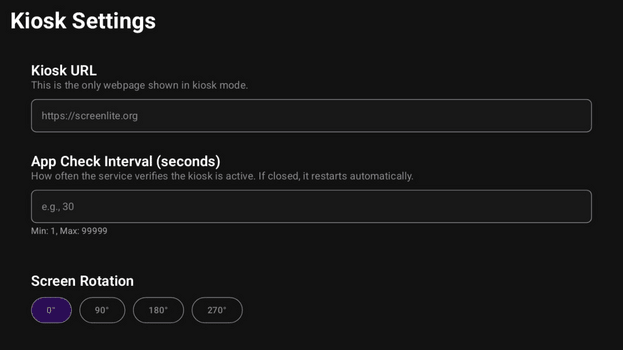
• Enter the website URL you want to display.
• Set the app visibility check interval (recommended 5–10 seconds). If you need time to configure the device, set a higher number.
• Choose screen rotation if needed.
• Save your settings; the app will restart with the new configuration.
Key Features
• Displays any website in immersive full-screen mode
• Automatically launches on device boot
• Brings itself back to the foreground if minimized
• Clicking and scrolling are disabled in WebView on TV
• Supports website rotation (0°, 90°, 180°, 270°), even if the device doesn’t support orientation changes
• Automatic retry mechanism with exponential backoff for network failures
• Automatically injects responsive viewport meta tags
• Special UI adaptations for Android TV devices
• Hides system bars and navigation elements
• Prevents device from going to sleep
• Real-time network connectivity monitoring
• Error handling with user-friendly messages
• Compatible with both Android TV and mobile devices
Usage Instructions
• Install the APK on your Android device.
• Grant the Display over other apps permission to Screenlite Web Kiosk.
• Launch the app.
• Access settings by tapping the screen 5 times quickly in the bottom-left corner on a mobile device, or by pressing the center button (OK) on a TV remote.
• Enter the website URL you want to display.
• Set the app visibility check interval (recommended 5–10 seconds). If you need time to configure the device, set a higher number.
• Choose screen rotation if needed.
• Save your settings; the app will restart with the new configuration.
All versions
| Version | Released | Minimum Android | Size |
|---|---|---|---|
| 0.0.11 | Sep 23, 2025 | Android 5.1 | 9.6 MB |
| 0.0.9 | Sep 18, 2025 | Android 5.1 | 9.6 MB |
| 0.0.8 | Sep 17, 2025 | Android 5.1 | 9.6 MB |
How to install an older version of an Android app · How to install an APK file on Android
From the developer (GitHub)
APK files published by the developer on GitHub. They are signed by the developer and may not install over the other builds on this page (different signature). Links open github.com.
Similar apps
-
 URLCheck
Allows analyzing (or sharing) URLs before opening them.
-
 Thunderbird: Free Your Inbox
Thunderbird is a 100% open source, privacy focused email app.
-
 Thunderbird Beta for Testers
Thunderbird is a 100% open source, privacy focused email app.
-
 NeoStumbler
Application for collecting wireless networks to geolocation services
-
 MultiVNC
VNC viewer that aims to be easy to use and fast
-
 Home Assistant
Control all your devices in your Home Assistant instance
-
 Mastodon
Where conversations happen
-
 Presence Publisher
Regularly publish to an MQTT topic