

Quiet Rebellion
Control your Bose QC Ultra 2 directly — no Bose app, no cloud, no account.
- License
- MIT
- Package
net.quietrebellion- Category
- Multimedia, System
- Latest version
- 0.7 · Aug 4, 2026
- Minimum Android
- Android 8.0
Screenshots
Description
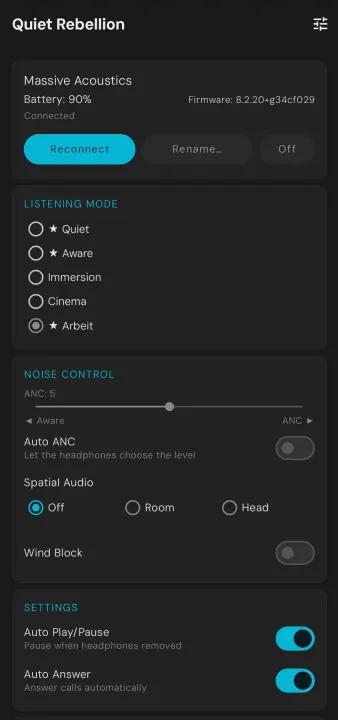
Quiet Rebellion gives you full control over your Bose QC Ultra Headphones (2nd Gen) directly over Bluetooth — without the Bose app, without a cloud account, and without sending any data off your device.
It implements the BMAP protocol (Bose Messaging and Protocol), the same protocol the official app uses, accessed through the unauthenticated SETGET and START operators. No keys are extracted, no encryption is broken, no traffic is replayed.
Supported device
Bose QuietComfort Ultra Headphones (2nd Gen) — codename "wolverine"
Noise Control
• ANC level 0–10 (0 = full isolation, 10 = full awareness)
• Wind Block on/off
• Spatial Audio: Off / Room / Head
Sound
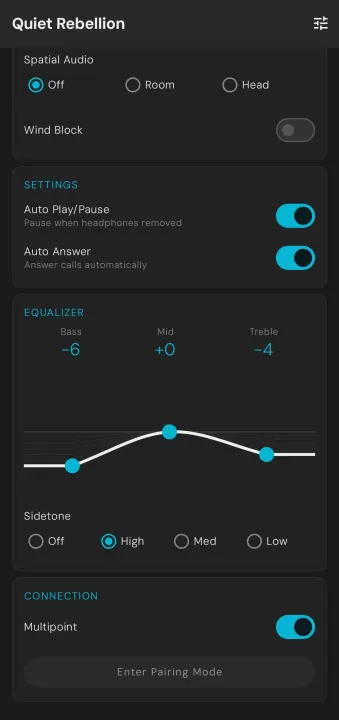
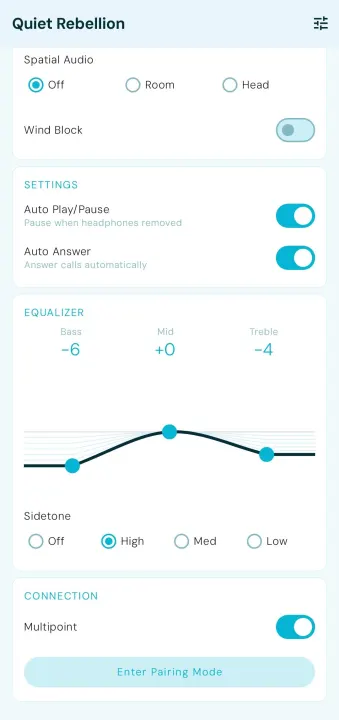
• 3-band graphic equalizer (Bass / Mid / Treble, –10 to +10 dB)
• Sidetone level (Off / Low / Medium / High)
• Self Voice Persistence toggle: keep sidetone behavior persistent across context changes (experimental)
Listening Modes
• Switch between Quiet, Aware, Immersion, Cinema
• Custom mode slots (up to 7 user profiles)
• Favourite modes — mark modes with ★, long-press any mode to toggle
Connections
• Multipoint on/off
• Switch active audio source between paired devices (names resolved from headphone memory)
• Enter Bluetooth pairing mode
Device Settings
• Auto Play/Pause (pause when headphones removed)
• Auto-answer calls
• Device rename
• Power off
Appearance
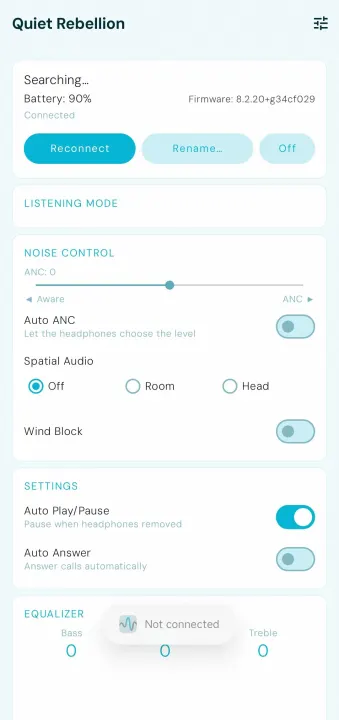
• Two built-in themes: Fresh & Clean (cyan) and Monochrome, each in Light and Dark
• Material You (Android 12+): colours follow your wallpaper
• Tap the settings icon (top right) to switch themes
System Integration
• Persistent foreground notification — connection stays alive when the app is in the background
• Notification actions: ANC toggle · Switch to [next mode] · Power Off
• Mode cycling respects your favourite list
Requirements
• Android 8.0+ (API 26)
• Bose QC Ultra Headphones (2nd Gen) already paired via Android Bluetooth settings
• The Bose app must not be running while this app is active (both hold the RFCOMM channel)
Privacy
No network access. No analytics. No accounts. All communication is local Bluetooth only.
Open Source
Source code: github.com/MadEyez/quietrebellion
Fork of the original aaronsb/bosectl protocol library.
It implements the BMAP protocol (Bose Messaging and Protocol), the same protocol the official app uses, accessed through the unauthenticated SETGET and START operators. No keys are extracted, no encryption is broken, no traffic is replayed.
Supported device
Bose QuietComfort Ultra Headphones (2nd Gen) — codename "wolverine"
Noise Control
• ANC level 0–10 (0 = full isolation, 10 = full awareness)
• Wind Block on/off
• Spatial Audio: Off / Room / Head
Sound
• 3-band graphic equalizer (Bass / Mid / Treble, –10 to +10 dB)
• Sidetone level (Off / Low / Medium / High)
• Self Voice Persistence toggle: keep sidetone behavior persistent across context changes (experimental)
Listening Modes
• Switch between Quiet, Aware, Immersion, Cinema
• Custom mode slots (up to 7 user profiles)
• Favourite modes — mark modes with ★, long-press any mode to toggle
Connections
• Multipoint on/off
• Switch active audio source between paired devices (names resolved from headphone memory)
• Enter Bluetooth pairing mode
Device Settings
• Auto Play/Pause (pause when headphones removed)
• Auto-answer calls
• Device rename
• Power off
Appearance
• Two built-in themes: Fresh & Clean (cyan) and Monochrome, each in Light and Dark
• Material You (Android 12+): colours follow your wallpaper
• Tap the settings icon (top right) to switch themes
System Integration
• Persistent foreground notification — connection stays alive when the app is in the background
• Notification actions: ANC toggle · Switch to [next mode] · Power Off
• Mode cycling respects your favourite list
Requirements
• Android 8.0+ (API 26)
• Bose QC Ultra Headphones (2nd Gen) already paired via Android Bluetooth settings
• The Bose app must not be running while this app is active (both hold the RFCOMM channel)
Privacy
No network access. No analytics. No accounts. All communication is local Bluetooth only.
Open Source
Source code: github.com/MadEyez/quietrebellion
Fork of the original aaronsb/bosectl protocol library.
All versions
| Version | Released | Minimum Android | Size |
|---|---|---|---|
| 0.7 | Aug 4, 2026 | Android 8.0 | 5.3 MB |
| 0.6 | Aug 1, 2026 | Android 8.0 | 5.3 MB |
| 0.5 | Jul 29, 2026 | Android 8.0 | 5.3 MB |
| 0.4 | Jul 26, 2026 | Android 8.0 | 5.3 MB |
| 0.3 | Jul 21, 2026 | Android 8.0 | 5.3 MB |
| 0.2 | Jul 19, 2026 | Android 8.0 | 5 MB |
How to install an older version of an Android app · How to install an APK file on Android
From the developer (GitHub)
APK files published by the developer on GitHub. They are signed by the developer and may not install over the other builds on this page (different signature). Links open github.com.
Similar apps
-
 Screenshot Tile (NoRoot)
Customizable screenshot tool with quick settings shortcut and floating button
-
 Coffee
Keep display awake
-
 Mute reminder
Remind you to mute media
-
 Prepaid Balance
Keep track your prepaid balance
-
 Auto Auto-Rotate
Automatically remembers your auto-rotate setting for every app
-
 Drowser
Simple background app killer
-
 Scrambled Exif
Remove the metadata from your pictures before sharing them
-
 WaveUp
Turn on the display by waving