

Auto Off Bluetooth
Monitors and auto-disables Bluetooth and Wi-Fi connections.
- Developer
- The-First-King
- License
- GPL-3.0-only
- Package
com.mine.autooffbluetooth- Category
- System
- Latest version
- 2.0 · Oct 10, 2026
- Minimum Android
- Android API 15
Screenshots
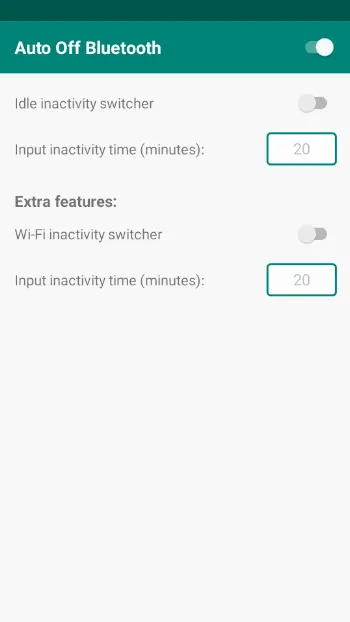
Description
Auto Off Bluetooth
Auto Off Bluetooth is a lightweight utility for Android designed to preserve battery life and increase device security. The app monitors your Bluetooth and Wi-Fi connection status and automatically turns off either service when no longer in use.
How it works
The app listens for Bluetooth state changes in the stack and for Asynchronous Connection-Less disconnection events and Wi-Fi state changes in the background. When a device disconnects, the app starts a timer. If the timer reaches the specified duration without reconnecting, the app automatically turns off the respective service (Bluetooth or Wi-Fi) to save battery and reduce security risks.
The Bluetooth radio turns off automatically after 20 seconds if no devices are connected.
The Wi-Fi radio automatically turns off if it has not been connected to any SSID for the predefined timeout set in the settings, starting after it disconnects from the last connected SSID or not being connected at all.
The Wi-Fi module automatically turns off if no connection to any SSID is established within the predefined timeout specified in the settings. The countdown for this timeout begins after disconnection from the last SSID or when there is no connection.
Permissions
The app requires the following permissions to manage your Bluetooth and Wi-Fi hardware:
• BLUETOOTH: Allows the app to see the status of Bluetooth connections.
• BLUETOOTH_ADMIN: Allows the app to toggle the Bluetooth radio on/off.
• BLUETOOTH_CONNECT: To interact with paired devices (required for Android 12+).
• BLUETOOTH_SCAN: Required on Android 12+ to monitor Bluetooth state reliably.
• ACCESS_WIFI_STATE: Allows the app to monitor Wi‑Fi connection state.
• CHANGE_WIFI_STATE: Allows the app to toggle Wi‑Fi on/off.
• ACCESS_NETWORK_STATE: Allows the app to check network connectivity state.
• REQUEST_IGNORE_BATTERY_OPTIMIZATIONS: Used to prevent Android from stopping the background timers.
• SCHEDULE_EXACT_ALARM: Required for scheduling the inactivity alarm behavior.
• RECEIVE_BOOT_COMPLETED: Allows the app to restore monitoring after device reboot.
• FOREGROUND_SERVICE: Required for running background monitoring as a foreground service.
• FOREGROUND_SERVICE_CONNECTED_DEVICE: Required for connected-device foreground service behavior.
• POST_NOTIFICATIONS: Required to show status notifications on recent Android versions.
• Disable Battery Optimization: Recommended to exclude the app from battery optimization so background timers work reliably.
• Root Access: Required on Android 10 or later for Wi‑Fi toggle functionality.
Auto Off Bluetooth is a lightweight utility for Android designed to preserve battery life and increase device security. The app monitors your Bluetooth and Wi-Fi connection status and automatically turns off either service when no longer in use.
How it works
The app listens for Bluetooth state changes in the stack and for Asynchronous Connection-Less disconnection events and Wi-Fi state changes in the background. When a device disconnects, the app starts a timer. If the timer reaches the specified duration without reconnecting, the app automatically turns off the respective service (Bluetooth or Wi-Fi) to save battery and reduce security risks.
The Bluetooth radio turns off automatically after 20 seconds if no devices are connected.
The Wi-Fi radio automatically turns off if it has not been connected to any SSID for the predefined timeout set in the settings, starting after it disconnects from the last connected SSID or not being connected at all.
The Wi-Fi module automatically turns off if no connection to any SSID is established within the predefined timeout specified in the settings. The countdown for this timeout begins after disconnection from the last SSID or when there is no connection.
Permissions
The app requires the following permissions to manage your Bluetooth and Wi-Fi hardware:
• BLUETOOTH: Allows the app to see the status of Bluetooth connections.
• BLUETOOTH_ADMIN: Allows the app to toggle the Bluetooth radio on/off.
• BLUETOOTH_CONNECT: To interact with paired devices (required for Android 12+).
• BLUETOOTH_SCAN: Required on Android 12+ to monitor Bluetooth state reliably.
• ACCESS_WIFI_STATE: Allows the app to monitor Wi‑Fi connection state.
• CHANGE_WIFI_STATE: Allows the app to toggle Wi‑Fi on/off.
• ACCESS_NETWORK_STATE: Allows the app to check network connectivity state.
• REQUEST_IGNORE_BATTERY_OPTIMIZATIONS: Used to prevent Android from stopping the background timers.
• SCHEDULE_EXACT_ALARM: Required for scheduling the inactivity alarm behavior.
• RECEIVE_BOOT_COMPLETED: Allows the app to restore monitoring after device reboot.
• FOREGROUND_SERVICE: Required for running background monitoring as a foreground service.
• FOREGROUND_SERVICE_CONNECTED_DEVICE: Required for connected-device foreground service behavior.
• POST_NOTIFICATIONS: Required to show status notifications on recent Android versions.
• Disable Battery Optimization: Recommended to exclude the app from battery optimization so background timers work reliably.
• Root Access: Required on Android 10 or later for Wi‑Fi toggle functionality.
All versions
| Version | Released | Minimum Android | Size |
|---|---|---|---|
| 2.0 | Oct 10, 2026 | Android API 15 | 1.8 MB |
| 1.7 | Mar 31, 2026 | Android API 15 | 1.8 MB |
| 1.6 | Mar 30, 2026 | Android API 15 | 1.8 MB |
How to install an older version of an Android app · How to install an APK file on Android
From the developer (GitHub)
APK files published by the developer on GitHub. They are signed by the developer and may not install over the other builds on this page (different signature). Links open github.com.
Similar apps
-
 Screenshot Tile (NoRoot)
Customizable screenshot tool with quick settings shortcut and floating button
-
 Coffee
Keep display awake
-
 Mute reminder
Remind you to mute media
-
 Prepaid Balance
Keep track your prepaid balance
-
 Auto Auto-Rotate
Automatically remembers your auto-rotate setting for every app
-
 Drowser
Simple background app killer
-
 Scrambled Exif
Remove the metadata from your pictures before sharing them
-
 WaveUp
Turn on the display by waving