

Moonlight Game Streaming
Play games from your PC on Android
- Developer
- Cameron Gutman
- License
- GPL-3.0-or-later
- Package
com.limelight- Category
- Emulator
- Latest version
- 12.1 · Mar 5, 2024
- Minimum Android
- Android 4.1
Screenshots
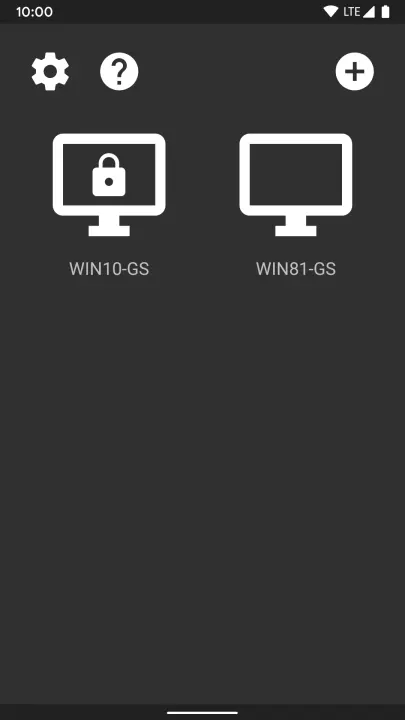
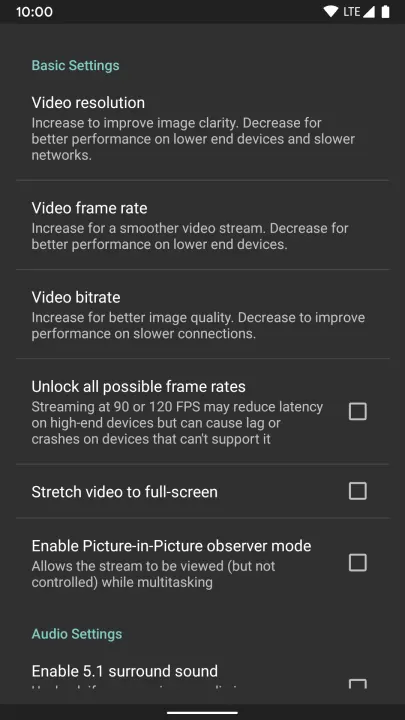
Description
This app streams games, programs, or your full desktop from your PC or Sunshine on your local network or the Internet. Mouse, keyboard, and controller input is sent from your Android device to the PC.
Streaming performance may vary based on your client device and network setup. HDR requires an HDR10-capable device, a GPU that can encode HEVC Main 10, and an HDR10-enabled game.
'''Features'''
• Open-source and completely free (no ads, IAPs, or "Pro")
• Streams games purchased from any store
• Works on your home network or over the Internet/LTE
• Up to 4K 120 FPS HDR streaming with 7.1 surround sound
• H.264, HEVC, and AV1 codec support (AV1 requires Sunshine and a supported host GPU)
• Keyboard and mouse support (best with Android 8.0 or later)
• Stylus/S-Pen support
• Supports PS3/4/5, Xbox 360/One/Series, and Android gamepads
• Local co-op with up to 16 connected controllers (max of 4 controllers with GFE)
• Force feedback and gamepad motion sensor support
• Mouse control via gamepad by long-pressing Start
'''Quick Setup Host Instructions for GeForce Experience (NVIDIA-only)'''
# Make sure GeForce Experience is open on your PC. Turn on GameStream in the SHIELD settings page.
# Tap on the PC in Moonlight and type the PIN on your PC
# Start streaming!
'''Quick Setup Host Instructions for Sunshine (all GPUs)'''
# Install Sunshine on your PC from https://github.com/LizardByte/Sunshine/releases
# Navigate to the Sunshine Web UI on your PC for first-time setup
# Tap on the PC in Moonlight and type the PIN in the Sunshine Web UI on your PC
# Start streaming!
To have a good experience, you need a mid to high-end wireless router with a good wireless connection to your Android device (5 GHz highly recommended) and a good connection from your PC to your router (Ethernet highly recommended).
'''Detailed Setup Instructions'''
See the full setup guide https://bit.ly/1skHFjN for:
• Adding a PC manually (if your PC is not detected)
• Streaming over the Internet or LTE
• Using a controller connected directly to your PC
• Streaming your full desktop
• Adding custom apps to stream
Streaming performance may vary based on your client device and network setup. HDR requires an HDR10-capable device, a GPU that can encode HEVC Main 10, and an HDR10-enabled game.
'''Features'''
• Open-source and completely free (no ads, IAPs, or "Pro")
• Streams games purchased from any store
• Works on your home network or over the Internet/LTE
• Up to 4K 120 FPS HDR streaming with 7.1 surround sound
• H.264, HEVC, and AV1 codec support (AV1 requires Sunshine and a supported host GPU)
• Keyboard and mouse support (best with Android 8.0 or later)
• Stylus/S-Pen support
• Supports PS3/4/5, Xbox 360/One/Series, and Android gamepads
• Local co-op with up to 16 connected controllers (max of 4 controllers with GFE)
• Force feedback and gamepad motion sensor support
• Mouse control via gamepad by long-pressing Start
'''Quick Setup Host Instructions for GeForce Experience (NVIDIA-only)'''
# Make sure GeForce Experience is open on your PC. Turn on GameStream in the SHIELD settings page.
# Tap on the PC in Moonlight and type the PIN on your PC
# Start streaming!
'''Quick Setup Host Instructions for Sunshine (all GPUs)'''
# Install Sunshine on your PC from https://github.com/LizardByte/Sunshine/releases
# Navigate to the Sunshine Web UI on your PC for first-time setup
# Tap on the PC in Moonlight and type the PIN in the Sunshine Web UI on your PC
# Start streaming!
To have a good experience, you need a mid to high-end wireless router with a good wireless connection to your Android device (5 GHz highly recommended) and a good connection from your PC to your router (Ethernet highly recommended).
'''Detailed Setup Instructions'''
See the full setup guide https://bit.ly/1skHFjN for:
• Adding a PC manually (if your PC is not detected)
• Streaming over the Internet or LTE
• Using a controller connected directly to your PC
• Streaming your full desktop
• Adding custom apps to stream
All versions
| Version | Released | Minimum Android | Size |
|---|---|---|---|
| 12.1 | Mar 5, 2024 | Android 4.1 | 6.4 MB |
| 12.0.2 | Nov 5, 2023 | Android 4.1 | 6.4 MB |
| 12.0.1 | Oct 20, 2023 | Android 4.1 | 6.4 MB |
| 12.0 | Oct 20, 2023 | Android 4.1 | 6.3 MB |
| 11.0 | Mar 5, 2023 | Android 4.1 | 6.3 MB |
| 10.11 | Dec 6, 2022 | Android 4.1 | 6.3 MB |
| 10.10 | Nov 14, 2022 | Android 4.1 | 6.2 MB |
| 10.9 | Oct 15, 2022 | Android 4.1 | 6.2 MB |
| 10.8.4 | Sep 29, 2022 | Android 4.1 | 6.2 MB |
| 10.8.1 | Sep 15, 2022 | Android 4.1 | 6.2 MB |
| 10.7 | Aug 7, 2022 | Android 4.1 | 6.2 MB |
| 10.6 | Jul 10, 2022 | Android 4.1 | 6.2 MB |
| 10.5 | Jun 30, 2022 | Android 4.1 | 6.2 MB |
| 10.4 | Jun 24, 2022 | Android 4.1 | 6.2 MB |
| 10.3 | Jun 9, 2022 | Android 4.1 | 6.2 MB |
| 10.2 | Jun 5, 2022 | Android 4.1 | 6.2 MB |
| 10.1.1 | May 29, 2022 | Android 4.1 | 6.2 MB |
| 10.1 | May 22, 2022 | Android 4.1 | 6.2 MB |
| 10.0 | Mar 12, 2022 | Android 4.1 | 6.1 MB |
| 9.10.1 | Sep 1, 2021 | Android 4.1 | 6.1 MB |
| 9.10 | Jul 22, 2021 | Android 4.1 | 6.1 MB |
| 9.9.6 | Jul 2, 2021 | Android 4.1 | 6 MB |
| 9.9.5 | Jun 18, 2021 | Android 4.1 | 6 MB |
| 9.9.4 | Jun 7, 2021 | Android 4.1 | 6 MB |
| 9.9.3 | May 20, 2021 | Android 4.1 | 6 MB |
| 9.9.2 | May 11, 2021 | Android 4.1 | 6 MB |
| 9.9.1 | May 2, 2021 | Android 4.1 | 6 MB |
| 9.9 | May 2, 2021 | Android 4.1 | 6 MB |
| 9.8.7 | Apr 29, 2021 | Android 4.1 | 6 MB |
| 9.8.6 | Apr 23, 2021 | Android 4.1 | 6 MB |
| 9.8.3 | Mar 11, 2021 | Android 4.1 | 5.2 MB |
| 9.8.2 | Feb 3, 2021 | Android 4.1 | 5.2 MB |
| 9.8.1 | Jan 12, 2021 | Android 4.1 | 5.2 MB |
| 9.8 | Jan 3, 2021 | Android 4.1 | 5.2 MB |
| 9.7.7 | Nov 2, 2020 | Android 4.1 | 5.2 MB |
| 9.7.6 | Oct 31, 2020 | Android 4.1 | 5.2 MB |
| 9.7.5 | Oct 21, 2020 | Android 4.1 | 5.2 MB |
| 9.7.4 | Oct 12, 2020 | Android 4.1 | 5.2 MB |
| 9.7.3 | Sep 9, 2020 | Android 4.1 | 5.2 MB |
| 9.7.2 | Sep 7, 2020 | Android 4.1 | 5.2 MB |
| 9.7.1 | Aug 11, 2020 | Android 4.1 | 5.2 MB |
| 9.6.4 | Jul 12, 2020 | Android 4.1 | 5.2 MB |
| 9.6.1 | Jun 28, 2020 | Android 4.1 | 5.2 MB |
| 9.6 | Jun 20, 2020 | Android 4.1 | 5.2 MB |
| 9.5.1 | Jun 2, 2020 | Android 4.1 | 5.2 MB |
| 9.5 | Jun 2, 2020 | Android 4.1 | 5.2 MB |
| 9.2.1 | May 2, 2020 | Android 4.1 | 5.2 MB |
| 9.2 | Apr 23, 2020 | Android 4.1 | 5.2 MB |
| 9.1 | Apr 21, 2020 | Android 4.1 | 5.2 MB |
| 9.0 | Apr 13, 2020 | Android 4.1 | 5.1 MB |
| 8.12 | Apr 3, 2020 | Android 4.1 | 5.1 MB |
| 8.11 | Apr 1, 2020 | Android 4.1 | 5.1 MB |
| 8.10 | Mar 11, 2020 | Android 4.1 | 5.1 MB |
| 8.9 | Mar 8, 2020 | Android 4.1 | 5.1 MB |
| 8.8.1 | Jan 7, 2020 | Android 4.1 | 5.1 MB |
| 8.8 | Jan 5, 2020 | Android 4.1 | 5.1 MB |
| 8.7 | Dec 7, 2019 | Android 4.1 | 5.1 MB |
| 8.6 | Nov 14, 2019 | Android 4.1 | 5.1 MB |
| 8.5 | Nov 2, 2019 | Android 4.1 | 5.1 MB |
| 8.4.1 | Oct 18, 2019 | Android 4.1 | 5.1 MB |
| 8.3 | Sep 25, 2019 | Android 4.1 | 5.1 MB |
| 8.2 | Sep 25, 2019 | Android 4.1 | 5.1 MB |
| 8.1 | Aug 11, 2019 | Android 4.1 | 5.1 MB |
| 8.0 | Jul 22, 2019 | Android 4.1 | 5.1 MB |
| 7.4 | Jul 16, 2019 | Android 4.1 | 5 MB |
How to install an older version of an Android app · How to install an APK file on Android
From the developer (GitHub)
APK files published by the developer on GitHub. They are signed by the developer and may not install over the other builds on this page (different signature). Links open github.com.


