

SayWhen
One phrase — and it's on your calendar. No forms, no fields.
- Developer
- dmi3dmi3
- License
- GPL-3.0-only
- Package
com.dmi3dmi3.saywhen- Category
- Calendar & Agenda
- Latest version
- 3.2.0 · Nov 17, 2026
- Minimum Android
- Android 8.0
Screenshots
Description
No forms, no fields. Just say when.
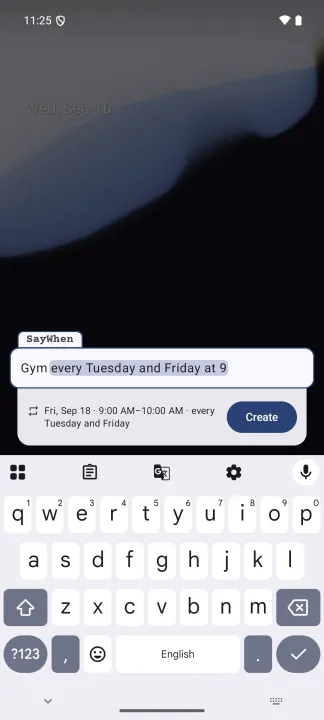
Type an event the way you'd say it, in English, Russian, Italian, Spanish, German, or French:
• Gym every tuesday and friday at 9
• Movie tomorrow at 11 for 1.5h !10
• Dentist june 3 at 12:30
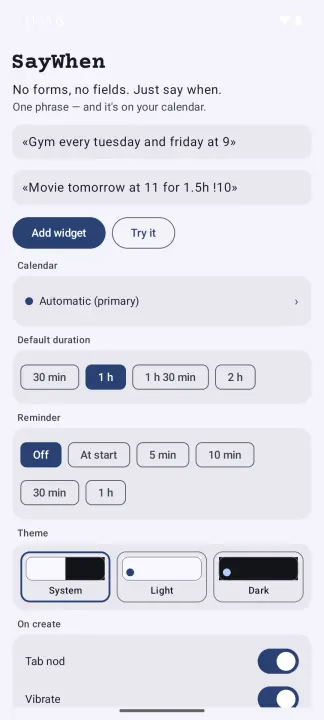
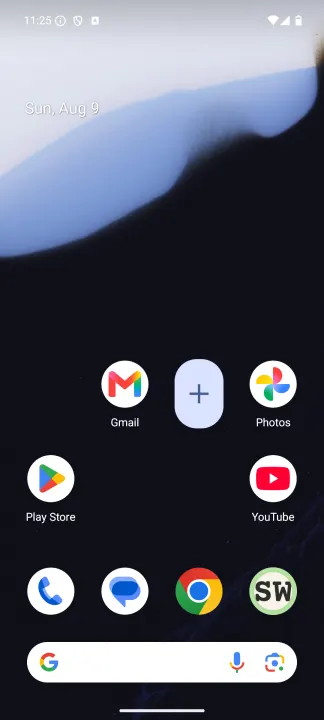
SayWhen parses the phrase as you type: date, time, duration, recurrence, a "!10" reminder. It shows a live preview of what it understood and writes the event straight to the calendar you chose. An alias in the phrase, like #work, sends one event to another calendar. Aliases come from your calendar names, and typing # brings up suggestions. With the Tasks.org integration turned on, a phrase can create a task in a Tasks.org list instead of an event: the lists appear next to your calendars. Tap the home-screen widget, type, done.
Private by construction:
• No sign-up, no server, no analytics, no identifiers
• No network access at all: the app doesn't even declare the INTERNET permission
• Two calendar permissions: read your calendar list, write the event you asked for. Two more for Tasks.org, asked only if you turn that integration on
Events go to your calendar and nowhere else. If your calendar belongs to a synced account, its own sync engine uploads the event, exactly as with any other calendar app.
Type an event the way you'd say it, in English, Russian, Italian, Spanish, German, or French:
• Gym every tuesday and friday at 9
• Movie tomorrow at 11 for 1.5h !10
• Dentist june 3 at 12:30
SayWhen parses the phrase as you type: date, time, duration, recurrence, a "!10" reminder. It shows a live preview of what it understood and writes the event straight to the calendar you chose. An alias in the phrase, like #work, sends one event to another calendar. Aliases come from your calendar names, and typing # brings up suggestions. With the Tasks.org integration turned on, a phrase can create a task in a Tasks.org list instead of an event: the lists appear next to your calendars. Tap the home-screen widget, type, done.
Private by construction:
• No sign-up, no server, no analytics, no identifiers
• No network access at all: the app doesn't even declare the INTERNET permission
• Two calendar permissions: read your calendar list, write the event you asked for. Two more for Tasks.org, asked only if you turn that integration on
Events go to your calendar and nowhere else. If your calendar belongs to a synced account, its own sync engine uploads the event, exactly as with any other calendar app.
All versions
| Version | Released | Minimum Android | Size |
|---|---|---|---|
| 3.2.0 | Nov 17, 2026 | Android 8.0 | 1.9 MB |
| 3.1.0 | Oct 6, 2026 | Android 8.0 | 1.9 MB |
| 3.0.0 | Sep 26, 2026 | Android 8.0 | 1.9 MB |
How to install an older version of an Android app · How to install an APK file on Android
From the developer (GitHub)
APK files published by the developer on GitHub. They are signed by the developer and may not install over the other builds on this page (different signature). Links open github.com.
Similar apps
-
 Nextcloud Dev
Synchronization client
-
 Nextcloud
Synchronization client
-
 NoNonsense Notes
A simple notepad and to-do app with an excellent navigation
-
 KashCal
Family on iCloud, work on Google, you on CalDAV? KashCal takes everyone's side.
-
 French Calendar
French Revolutionary calendar widget
-
 Tempus Romanum
Latin date generator with a widget
-
 Giggity
Schedule viewer for conferences and other events
-
 Etar - OpenSource Calendar
Etar is a material designed open source calendar, for everyone!