

camsung
Silence camera on Samsung phones
- Developer
- Eric Park
- License
- GPL-3.0-only
- Package
android.com.ericswpark.camsung- Category
- Multimedia
- Latest version
- 1.2.1 · Oct 10, 2025
- Minimum Android
- Android 5.1
Screenshots
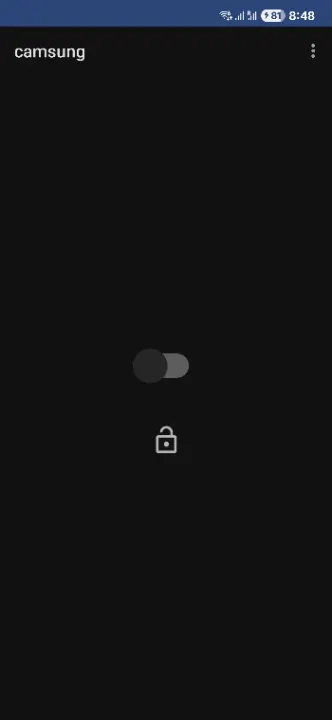
Description
Silence camera on Samsung phones
Installation
If your phone is running Android 13 or below, just sideload the APK.
If your phone is running Android 14 or above, you need to install the app via ADB as Google blocks installing apps that target SDK 22 and below. Enable Developer Mode and USB Debugging, then run:
adb install --bypass-low-target-sdk-block app-release.apk
Make sure to replace app-release.apk if you've renamed the file.
Usage
Install, open, and click on the switch to enable the mute function. Click on the lock icon to enable on boot.
Note that your phone needs to be on vibrate or mute for the camera shutter to be muted!
Uninstall
Turn off the switch, then uninstall. If you uninstalled before turning off the switch, re-install
the app, toggle the switch at least once until it is in the off position (so if it shows as off,
then turn on and then turn off. If it shows as on, just turn it off), then uninstall.
If you still get unexpected behavior after following the removal steps, try the following command on your computer while your phone is connected via USB and in ADB developer mode:
adb shell settings delete system csc_pref_camera_forced_shuttersound_key
This deletes the prop set by camsung.
Warning
Please do not use this app for malicious purposes. It's only made for situations where you don't
want to disturb other people (such as in restaurants or in a library).
This app directly modifies system settings. While it should be relatively safe things can still go
wrong. I am not responsible for any problems that may arise from using this app.
This app only works with recent Android versions paired with One UI releases. Future software
updates may block the mechanism that this app uses.
Installation
If your phone is running Android 13 or below, just sideload the APK.
If your phone is running Android 14 or above, you need to install the app via ADB as Google blocks installing apps that target SDK 22 and below. Enable Developer Mode and USB Debugging, then run:
adb install --bypass-low-target-sdk-block app-release.apk
Make sure to replace app-release.apk if you've renamed the file.
Usage
Install, open, and click on the switch to enable the mute function. Click on the lock icon to enable on boot.
Note that your phone needs to be on vibrate or mute for the camera shutter to be muted!
Uninstall
Turn off the switch, then uninstall. If you uninstalled before turning off the switch, re-install
the app, toggle the switch at least once until it is in the off position (so if it shows as off,
then turn on and then turn off. If it shows as on, just turn it off), then uninstall.
If you still get unexpected behavior after following the removal steps, try the following command on your computer while your phone is connected via USB and in ADB developer mode:
adb shell settings delete system csc_pref_camera_forced_shuttersound_key
This deletes the prop set by camsung.
Warning
Please do not use this app for malicious purposes. It's only made for situations where you don't
want to disturb other people (such as in restaurants or in a library).
This app directly modifies system settings. While it should be relatively safe things can still go
wrong. I am not responsible for any problems that may arise from using this app.
This app only works with recent Android versions paired with One UI releases. Future software
updates may block the mechanism that this app uses.
All versions
| Version | Released | Minimum Android | Size |
|---|---|---|---|
| 1.2.1 | Oct 10, 2025 | Android 5.1 | 2.3 MB |
| 1.2.0 | Oct 9, 2025 | Android 5.1 | 2.3 MB |
| 1.1.2 | May 20, 2025 | Android 5.1 | 2.1 MB |
How to install an older version of an Android app · How to install an APK file on Android
From the developer (GitHub)
APK files published by the developer on GitHub. They are signed by the developer and may not install over the other builds on this page (different signature). Links open github.com.
Similar apps
-
 Screenshot Tile (NoRoot)
Customizable screenshot tool with quick settings shortcut and floating button
-
 Enhanced Music Controller Lite
Remote controller for Onkyo devices
-
 Classical Music Tagger
A plain audio file metadata editor especially for classical music
-
 Kreate
A multilingual YouTube Music frontend for Android, prioritize performance.
-
 Ultrasonic
A music streaming client for Subsonic servers
-
 Sensors2OSC
Send sensor data via Open Sound Control (OSC).
-
 SicMu Player
Folder based music player. Shows and follows folder hierarchy.
-
 RootlessJamesDSP
System-wide JamesDSP implementation for non-rooted devices