

Atmo Engine
Live wallpapers with transitions, wake effects, a wallpaper clock and playlists.
- License
- MIT
- Package
com.saad_khan_rind.atmosphere_effect- Category
- Wallpaper
- Latest version
- 7.4.2 · Oct 25, 2026
- Minimum Android
- Android 13
Screenshots
Description
Atmo Engine turns your images into customizable live wallpapers, with optional lock-screen-to-home-screen transitions.
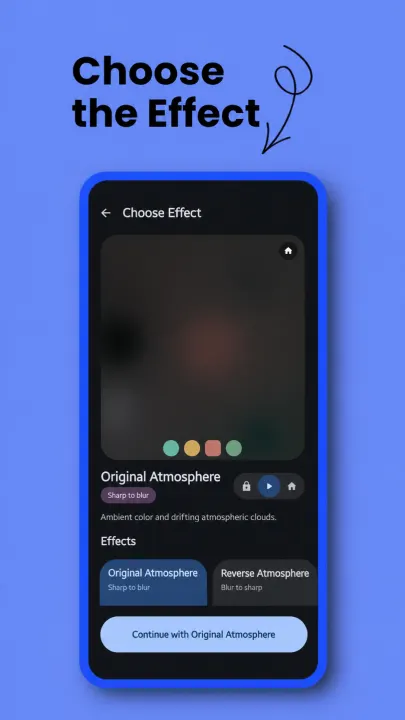
Atmo Engine is an open-source wallpaper studio inspired by the Atmosphere effect in Nothing OS. Choose an image, preview and fine-tune the effect, then apply it through Android's live wallpaper screen.
EFFECTS (each with a reverse)
• Atmosphere, with optional reeded glass
• Glass
• Color Fill
• Canvas Sketch
• Simple Frosted
• Halftone Print
• VHS Tape
• Zoom In and Zoom Out
Previews use the same image, settings, and graphics API as the live wallpaper.
TRANSITIONS OR ALWAYS-APPLIED EFFECTS
Turn transitions off to keep the effect on Home, Lock, or Both, with the original image on the other screen. Atmo stays a live wallpaper, so playlists, the clock and every setting keep working. Keep Atmo selected for both Home and Lock in Android's wallpaper picker.
WAKE TRANSITIONS
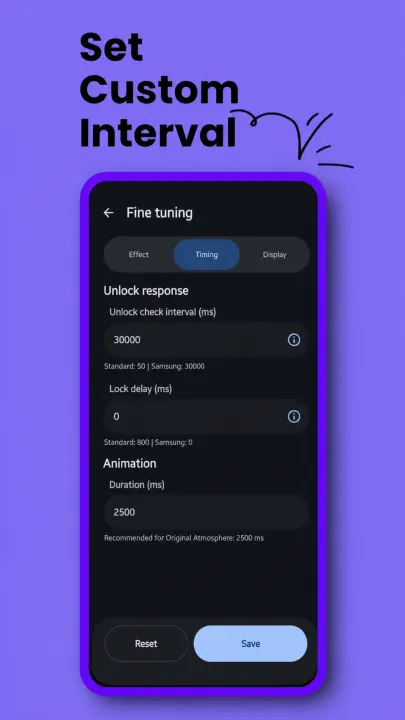
An animation as the lock screen arrives from off or from the always-on display: Zoom (up to 150%), Colour fill, Blur, Corner stretch, Shake, Ripple, Glitch, Venetian blind, Breathe, or Random. Each style has its own settings and a length of 50–1000 ms. Random shuffles every style, and the direction of Stretch, Shake and Blinds, so each plays before any repeats, with its own copy of every style's settings.
WALLPAPER CLOCK
A Glass, Translucent, or Adaptive clock drawn into the wallpaper, with drawn fonts, colour, date, depth behind the subject, and drag-and-pinch placement. The date follows the clock's font.
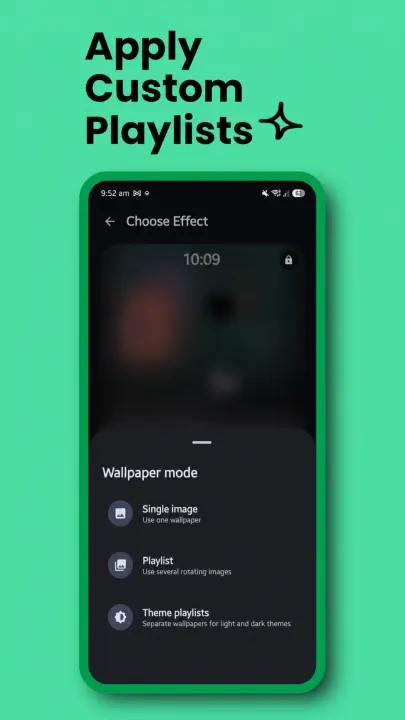
WALLPAPER MODES
• Single Image
• Playlist, from picked images or from folders that stay in sync
• Theme Playlists with separate Light and Dark collections
• Saved playlists to switch back to any time
Playlists shuffle through every image before repeating, never show the same image twice in a row, and keep recent images away from the start of the next round. The order survives setting changes and restarts. A switch delay can stop a quick lock and unlock from changing the image.
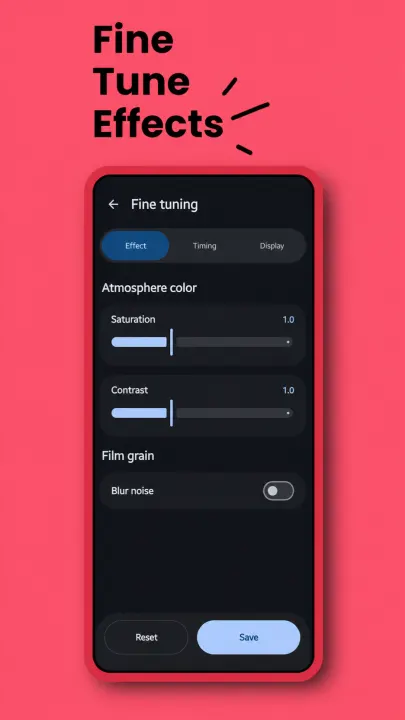
FINE TUNING
Animation duration, dimness, glass ribs and transition style, blur, film grain, Atmosphere colour, Halftone dots, Canvas lines, fingerprint position, image fit, wallpaper scrolling, and playlist timing.
Canvas Sketch, Glass, and Halftone share on-device subject isolation: Canvas can anchor its drawing to the subject, and Background only keeps the subject clear for Glass and Halftone.
MATERIAL 3 INTERFACE
Material Expressive styling can follow the system palette or use fixed colors, with System, Light, or Dark appearance and an optional pitch-black background.
VULKAN OR OPENGL ES
Automatic (recommended), Vulkan, or OpenGL ES, applied at once to previews and the wallpaper. Atmo negotiates Vulkan 1.4 down to 1.1. If Vulkan fails, only that effect falls back to OpenGL ES. The main screen shows the API that really rendered the wallpaper.
OFFLINE-FIRST PRIVACY
Images, crops, sketches, palettes, and playlists stay on-device. Atmo requests neither Internet nor network-state permission and contains no advertising or analytics. The F-Droid build bundles an open-source subject model, so it needs no download.
Sync System Colors publishes a locally extracted wallpaper palette through Android's wallpaper API. System-wide theme refresh remains up to the phone manufacturer.
Atmo Engine is released under the MIT License.
Atmo Engine is an open-source wallpaper studio inspired by the Atmosphere effect in Nothing OS. Choose an image, preview and fine-tune the effect, then apply it through Android's live wallpaper screen.
EFFECTS (each with a reverse)
• Atmosphere, with optional reeded glass
• Glass
• Color Fill
• Canvas Sketch
• Simple Frosted
• Halftone Print
• VHS Tape
• Zoom In and Zoom Out
Previews use the same image, settings, and graphics API as the live wallpaper.
TRANSITIONS OR ALWAYS-APPLIED EFFECTS
Turn transitions off to keep the effect on Home, Lock, or Both, with the original image on the other screen. Atmo stays a live wallpaper, so playlists, the clock and every setting keep working. Keep Atmo selected for both Home and Lock in Android's wallpaper picker.
WAKE TRANSITIONS
An animation as the lock screen arrives from off or from the always-on display: Zoom (up to 150%), Colour fill, Blur, Corner stretch, Shake, Ripple, Glitch, Venetian blind, Breathe, or Random. Each style has its own settings and a length of 50–1000 ms. Random shuffles every style, and the direction of Stretch, Shake and Blinds, so each plays before any repeats, with its own copy of every style's settings.
WALLPAPER CLOCK
A Glass, Translucent, or Adaptive clock drawn into the wallpaper, with drawn fonts, colour, date, depth behind the subject, and drag-and-pinch placement. The date follows the clock's font.
WALLPAPER MODES
• Single Image
• Playlist, from picked images or from folders that stay in sync
• Theme Playlists with separate Light and Dark collections
• Saved playlists to switch back to any time
Playlists shuffle through every image before repeating, never show the same image twice in a row, and keep recent images away from the start of the next round. The order survives setting changes and restarts. A switch delay can stop a quick lock and unlock from changing the image.
FINE TUNING
Animation duration, dimness, glass ribs and transition style, blur, film grain, Atmosphere colour, Halftone dots, Canvas lines, fingerprint position, image fit, wallpaper scrolling, and playlist timing.
Canvas Sketch, Glass, and Halftone share on-device subject isolation: Canvas can anchor its drawing to the subject, and Background only keeps the subject clear for Glass and Halftone.
MATERIAL 3 INTERFACE
Material Expressive styling can follow the system palette or use fixed colors, with System, Light, or Dark appearance and an optional pitch-black background.
VULKAN OR OPENGL ES
Automatic (recommended), Vulkan, or OpenGL ES, applied at once to previews and the wallpaper. Atmo negotiates Vulkan 1.4 down to 1.1. If Vulkan fails, only that effect falls back to OpenGL ES. The main screen shows the API that really rendered the wallpaper.
OFFLINE-FIRST PRIVACY
Images, crops, sketches, palettes, and playlists stay on-device. Atmo requests neither Internet nor network-state permission and contains no advertising or analytics. The F-Droid build bundles an open-source subject model, so it needs no download.
Sync System Colors publishes a locally extracted wallpaper palette through Android's wallpaper API. System-wide theme refresh remains up to the phone manufacturer.
Atmo Engine is released under the MIT License.
All versions
| Version | Released | Minimum Android | Size |
|---|---|---|---|
| 7.4.2 | Oct 25, 2026 | Android 13 | 22.5 MB |
| 7.3.7 | Oct 16, 2026 | Android 13 | 22.4 MB |
| 7.3.5 | Oct 12, 2026 | Android 13 | 22.4 MB |
| 7.3.1 | Sep 29, 2026 | Android 13 | 22 MB |
| 7.3.0 | Sep 27, 2026 | Android 13 | 21.9 MB |
| 7.2.6 | Sep 26, 2026 | Android 13 | 21.9 MB |
| 7.2.3 | Sep 12, 2026 | Android 13 | 21.6 MB |
| 7.1.9 | Sep 11, 2026 | Android 13 | 21.3 MB |
| 7.1.8 | Aug 26, 2026 | Android 13 | 21.3 MB |
| 7.1.7 | Aug 26, 2026 | Android 13 | 21.3 MB |
| 7.1.1 | Jul 31, 2026 | Android 13 | 21.2 MB |
| 7.0.4 | Jul 28, 2026 | Android 13 | 19.9 MB |
| 7.0.2 | Jul 26, 2026 | Android 13 | 19.8 MB |
| 6.0.6 | Jul 15, 2026 | Android 13 | 3.2 MB |
| 6.0.5 | Jul 14, 2026 | Android 13 | 3.2 MB |
| 6.0.1 | Jun 20, 2026 | Android 13 | 3.2 MB |
| 5.8.9 | Jun 18, 2026 | Android 13 | 3.2 MB |
| 5.8.2 | May 24, 2026 | Android 13 | 1.9 MB |
| 5.8.0 | May 24, 2026 | Android 13 | 2.3 MB |
| 5.5.1 | Mar 19, 2026 | Android 13 | 9.7 MB |
| 5.4.3 | Mar 11, 2026 | Android 13 | 9.7 MB |
How to install an older version of an Android app · How to install an APK file on Android
From the developer (GitHub)
APK files published by the developer on GitHub. They are signed by the developer and may not install over the other builds on this page (different signature). Links open github.com.
v7.4.6
· Nov 10, 2026
atmo-engine-android-13-plus-foss-fdroid.apk
22 MB atmo-engine-android-13-plus-mlkit.apk
6.4 MB atmo-engine-android-16-plus-foss.apk
22.1 MB atmo-engine-android-16-plus-mlkit.apk
6.4 MB v7.4.2
· Oct 21, 2026
atmo-engine-android-13-plus-foss-fdroid.apk
22.5 MB atmo-engine-android-13-plus-mlkit.apk
6.8 MB atmo-engine-android-16-plus-foss.apk
22.5 MB atmo-engine-android-16-plus-mlkit.apk
6.9 MB v7.3.7
· Oct 14, 2026
atmo-engine-android-13-plus-foss-fdroid.apk
22.4 MB atmo-engine-android-13-plus-mlkit.apk
6.7 MB atmo-engine-android-16-plus-foss.apk
22.4 MB atmo-engine-android-16-plus-mlkit.apk
6.8 MB Similar apps
-
 Shader Editor
Create and edit GLSL shaders
-
 Wave Lines Live Wallpaper
Wavy wallpaper
-
 Muzei
Live wallpaper of famous art
-
 Dark Mode Live Wallpaper
Live wallpaper that respects dark theme mode
- Nounours and friends Nounours the teddy bear and friends
-
 National Geographic for Muzei
National Geographic pictures for Muzei
-
 Peristyle
Simple wallpaper manager app with Auto Wallpaper and Multi Folder support.
-
 Discreet Launcher
Enjoy a clean home screen while accessing everything in an instant