

VocaPhone
Voice dictation keyboard that transcribes on hardware you control
- Developer
- VocaHQ
- License
- AGPL-3.0-only
- Package
com.vocahq.vocaphone- Category
- Keyboard & IME, Writing
- Latest version
- 0.2.7 · Nov 6, 2026
- Minimum Android
- Android 13
Screenshots
Description
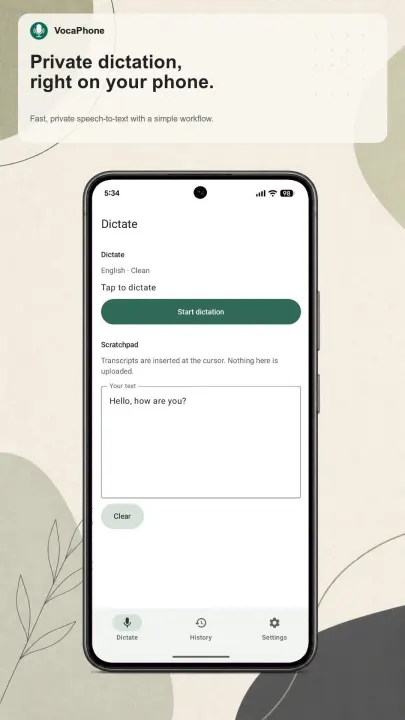
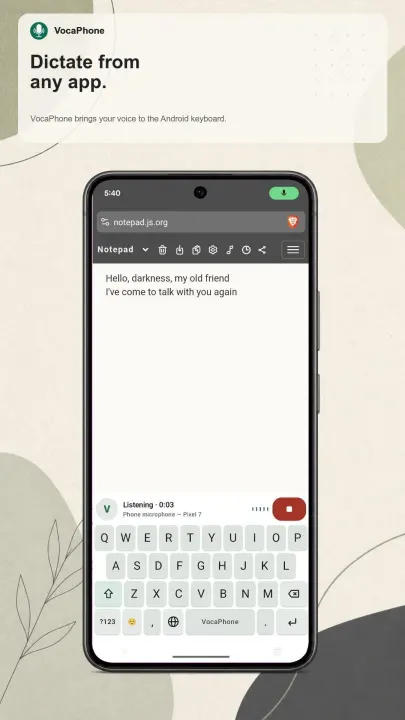
Speak into your phone and the text shows up where you are already typing. VocaPhone is a system keyboard: switch to it in any app, dictate, and the transcript is inserted at your cursor through Android's normal input method interface.
Transcription never touches a cloud speech service. It runs either on your own device or on a machine you already own and administer via a self-hosted gateway. There are no accounts, no analytics SDK, and no subscription. The Play build offers optional anonymous usage reporting, off unless you turn it on, reporting to a server the developers self-host; it never includes your speech, your text, or your gateway address. The F-Droid build has it compiled out entirely.
Two ways to transcribe
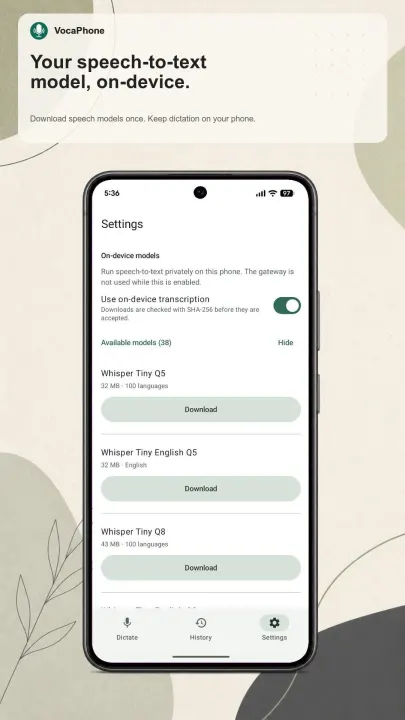
• On device. Download a Whisper model once and dictate with no network at all. The speech engine is whisper.cpp, compiled from source as part of the app. Models range from a few tens of megabytes to several gigabytes, and the app recommends one that fits your phone's memory. Where available, the catalog also includes sherpa-onnx models such as Parakeet.
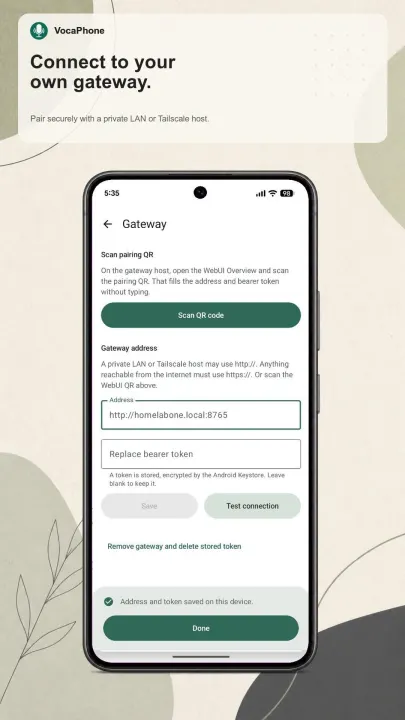
• Through your own gateway. Point the app at VocaGateway running on your Mac, Linux desktop, or home server, and that machine does the work. This is the faster option for large models and lets a phone use hardware it does not have.
You choose the network path to your gateway: a trusted LAN, a private Tailscale network, or HTTPS behind your own reverse proxy. Access uses bearer tokens issued per device, which you can name and revoke individually, and pairing can be done by scanning a QR code.
Dictation
• 54 selectable languages plus automatic detection: English, Mandarin Chinese, Cantonese, Spanish, French, German, Russian, Portuguese, Italian, Dutch, Polish, Ukrainian, Czech, Slovak, Slovenian, Croatian, Serbian, Bulgarian, Romanian, Hungarian, Greek, Danish, Swedish, Norwegian, Finnish, Estonian, Latvian, Lithuanian, Maltese, Catalan, Turkish, Arabic, Hebrew, Persian, Swahili, Japanese, Korean, Vietnamese, Thai, Indonesian, Malay and Filipino, along with Hindi, Bengali, Tamil, Telugu, Marathi, Gujarati, Urdu, Kannada, Malayalam, Punjabi, Assamese and Nepali
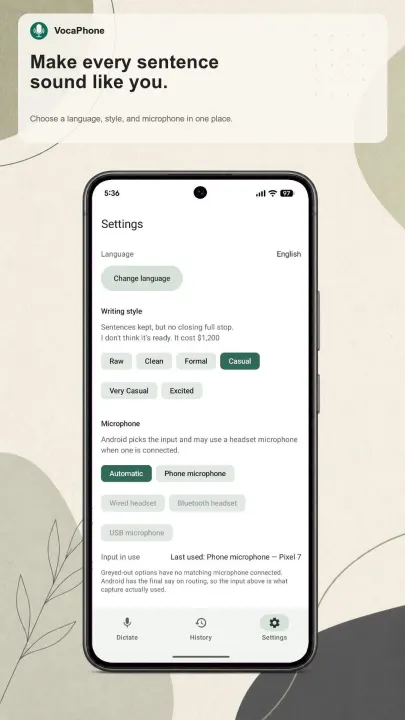
• Four writing styles: Formal, Casual, Very Casual and Excited, with punctuation that follows the script rather than assuming a Latin full stop
• Start, finish, cancel, retry and undo, all from the keyboard
• Automatic microphone routing, or pick an input explicitly, with the microphone in use shown in the app
• Bluetooth headset microphones are supported
Permissions
The keyboard writes through InputConnection and never reads the contents of the field you are typing into. Camera access is requested only when you tap "Scan QR" to pair with a gateway, and the microphone is used only while a dictation is running, with a foreground service notification for the duration.
About this build
The build distributed here is compiled entirely from source. It leaves out the optional sherpa-onnx speech engine, which upstream ships as a prebuilt binary library, so on-device transcription uses the Whisper model catalog. Gateway transcription is unaffected and can use any engine your gateway supports. On supported builds, sherpa-onnx models such as Parakeet are available alongside Whisper.
VocaPhone is part of the Voca family alongside VocaLinux and VocaMac. Report issues on the GitHub issue tracker.
Transcription never touches a cloud speech service. It runs either on your own device or on a machine you already own and administer via a self-hosted gateway. There are no accounts, no analytics SDK, and no subscription. The Play build offers optional anonymous usage reporting, off unless you turn it on, reporting to a server the developers self-host; it never includes your speech, your text, or your gateway address. The F-Droid build has it compiled out entirely.
Two ways to transcribe
• On device. Download a Whisper model once and dictate with no network at all. The speech engine is whisper.cpp, compiled from source as part of the app. Models range from a few tens of megabytes to several gigabytes, and the app recommends one that fits your phone's memory. Where available, the catalog also includes sherpa-onnx models such as Parakeet.
• Through your own gateway. Point the app at VocaGateway running on your Mac, Linux desktop, or home server, and that machine does the work. This is the faster option for large models and lets a phone use hardware it does not have.
You choose the network path to your gateway: a trusted LAN, a private Tailscale network, or HTTPS behind your own reverse proxy. Access uses bearer tokens issued per device, which you can name and revoke individually, and pairing can be done by scanning a QR code.
Dictation
• 54 selectable languages plus automatic detection: English, Mandarin Chinese, Cantonese, Spanish, French, German, Russian, Portuguese, Italian, Dutch, Polish, Ukrainian, Czech, Slovak, Slovenian, Croatian, Serbian, Bulgarian, Romanian, Hungarian, Greek, Danish, Swedish, Norwegian, Finnish, Estonian, Latvian, Lithuanian, Maltese, Catalan, Turkish, Arabic, Hebrew, Persian, Swahili, Japanese, Korean, Vietnamese, Thai, Indonesian, Malay and Filipino, along with Hindi, Bengali, Tamil, Telugu, Marathi, Gujarati, Urdu, Kannada, Malayalam, Punjabi, Assamese and Nepali
• Four writing styles: Formal, Casual, Very Casual and Excited, with punctuation that follows the script rather than assuming a Latin full stop
• Start, finish, cancel, retry and undo, all from the keyboard
• Automatic microphone routing, or pick an input explicitly, with the microphone in use shown in the app
• Bluetooth headset microphones are supported
Permissions
The keyboard writes through InputConnection and never reads the contents of the field you are typing into. Camera access is requested only when you tap "Scan QR" to pair with a gateway, and the microphone is used only while a dictation is running, with a foreground service notification for the duration.
About this build
The build distributed here is compiled entirely from source. It leaves out the optional sherpa-onnx speech engine, which upstream ships as a prebuilt binary library, so on-device transcription uses the Whisper model catalog. Gateway transcription is unaffected and can use any engine your gateway supports. On supported builds, sherpa-onnx models such as Parakeet are available alongside Whisper.
VocaPhone is part of the Voca family alongside VocaLinux and VocaMac. Report issues on the GitHub issue tracker.
All versions
| Version | Released | Minimum Android | Size |
|---|---|---|---|
| 0.2.7 | Nov 6, 2026 | Android 13 | 20.6 MB |
| 0.2.6 | Nov 4, 2026 | Android 13 | 18.7 MB |
| 0.2.5 | Oct 22, 2026 | Android 13 | 18.7 MB |
| 0.2.4 | Oct 12, 2026 | Android 13 | 18.2 MB |
| 0.2.2 | Oct 6, 2026 | Android 13 | 18.1 MB |
| 0.2.1 | Oct 4, 2026 | Android 13 | 17.4 MB |
How to install an older version of an Android app · How to install an APK file on Android
From the developer (GitHub)
APK files published by the developer on GitHub. They are signed by the developer and may not install over the other builds on this page (different signature). Links open github.com.
android/v0.2.7
· Nov 3, 2026
vocaphone-fdroid.apk
20.6 MB vocaphone-x.apk
64.4 MB vocaphone.apk
64.8 MB android/v0.2.6
· Oct 31, 2026
vocaphone-fdroid.apk
18.7 MB vocaphone-x.apk
62.7 MB vocaphone.apk
62.9 MB android/v0.2.5
· Oct 16, 2026
vocaphone-fdroid.apk
18.7 MB vocaphone-x.apk
62.6 MB vocaphone.apk
62.8 MB Similar apps
-
 KeePassDX Passkey Vault
Manage Passkey / Password in a local and open-source vault
-
 NoNonsense Notes
A simple notepad and to-do app with an excellent navigation
-
 Butterfly
Take notes, draw freely, and organize ideas across an endless workspace
-
 Linwood Butterfly Nightly
Take notes, draw freely, and organize ideas across an endless workspace
-
 HeliBoard
Customizable open-source keyboard
-
 Thunderbird: Free Your Inbox
Thunderbird is a 100% open source, privacy focused email app.
-
 Thunderbird Beta for Testers
Thunderbird is a 100% open source, privacy focused email app.
-
 Nextcloud Notes
View and edit notes on Nextcloud