

Ridm
Ridm is a powerful, open-source media download manager supporting 9 languages
Promotes non-free network services
- Developer
- mremiyum
- License
- MIT
- Package
com.mremiyum.ridmapp- Category
- Download
- Latest version
- 1.1.2 · Oct 22, 2026
- Minimum Android
- Android 7.0
Screenshots
Description
Raid - inspect - download - manage
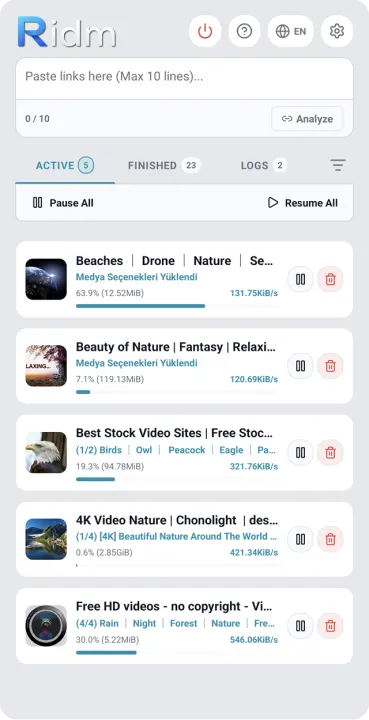
Ridm is a powerful, open-source media download manager supporting 9 languages. Besides being a basic download manager, it can download media from platforms like YouTube and Instagram individually or in bulk. It uses the power of the yt-dlp engine in the background.
🌟 Features
• Multi-Language Support: Full support for English, Turkish, Arabic, Chinese, Hindi, Spanish, French, Bengali, and Russian. (The app starts in English by default for universal use; the language can be changed instantly in settings).
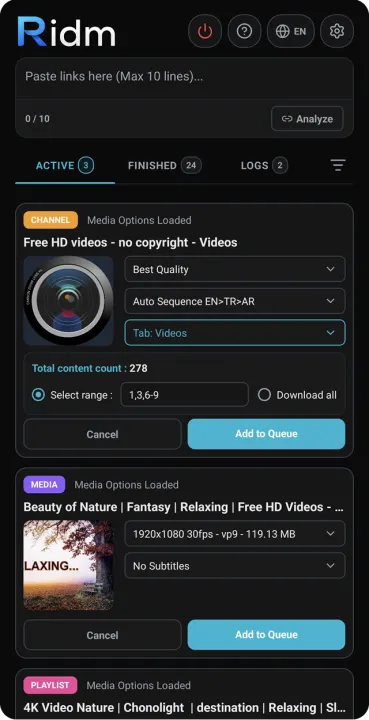
• Basic Usage and Integration: You can add up to 10 links simultaneously, separated by pressing the Enter key. If you tap "Share" on any video in the YouTube app (or others) and select Ridm, the link is automatically analyzed and ready for download.
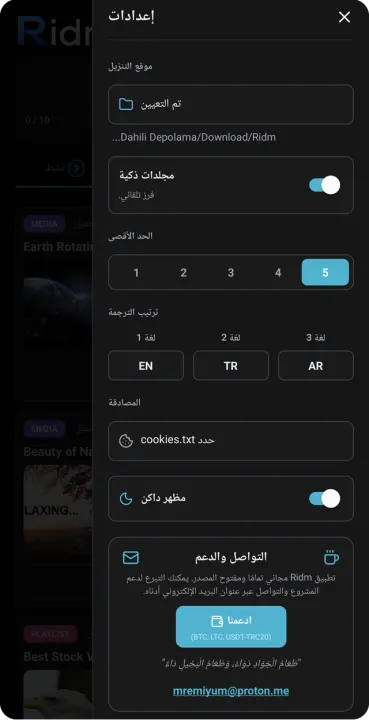
• Smart Folders: When enabled, downloads are automatically sorted into subfolders based on media type (Video, Audio, etc.).
• Advanced Format Selection: Selecting "Best Quality" in format options for Playlist and Channel downloads fetches the highest resolution and quality videos from the source server. If 2160p (4K) or 1080p is selected and that resolution is unavailable, it skips that file and moves to the next.
• Audio and Subtitle Support: MP3, M4A, and Opus formats only download audio files. If you want to download an audio file with embedded subtitles, you can choose the MP3 or M4A format.
• Bulk Subtitle Preference: The 'Subtitle Preference Order' in the Settings menu saves you from the hassle of selecting subtitles for each video individually during bulk downloads. If you enable "Auto Sort", the system checks your 3 specified languages in order and automatically embeds the first one it finds.
⚠️ Important Warnings
• Battery Restrictions: To ensure the download process continues uninterrupted in the background, the app's battery usage must be set to "Unrestricted" in Android power options.
• Download Location: Upon first launch, you are required to select a download folder from the Settings menu.
🍪 Cookies / Authentication
To download content from Instagram or age-restricted YouTube videos, you need to connect your account to the app:
• Install a "cookies.txt" extension from the extension store (Chrome, Firefox, etc.) on your desktop browser or mobile device.
• Log in to YouTube or Instagram from your browser.
• Click the extension icon and use the Download option to save the cookies.txt file to any location on your mobile device.
• Go to App Settings, click the "Select cookies.txt" button, and link this file to the app.
☕ Support and Contact
Ridm is completely free and open-source. You can contact us via email ([email protected]) to report bugs, contribute to the development process, or support the project.
Crypto Donation Addresses:
• Bitcoin (BTC): bc1qa5v5vlppp5nn9kdtt2wz4x9pfuupm92hjpd6eu
• Litecoin (LTC): Lf4HincsmEvEJ1cxwJkomXLN72JH7etWRY
• Tron (USDT-TRC20): TUZksjGTYmSeKaprQJQtomTdPXb4ew9mrp
Developed by mremiyum
Ridm is a powerful, open-source media download manager supporting 9 languages. Besides being a basic download manager, it can download media from platforms like YouTube and Instagram individually or in bulk. It uses the power of the yt-dlp engine in the background.
🌟 Features
• Multi-Language Support: Full support for English, Turkish, Arabic, Chinese, Hindi, Spanish, French, Bengali, and Russian. (The app starts in English by default for universal use; the language can be changed instantly in settings).
• Basic Usage and Integration: You can add up to 10 links simultaneously, separated by pressing the Enter key. If you tap "Share" on any video in the YouTube app (or others) and select Ridm, the link is automatically analyzed and ready for download.
• Smart Folders: When enabled, downloads are automatically sorted into subfolders based on media type (Video, Audio, etc.).
• Advanced Format Selection: Selecting "Best Quality" in format options for Playlist and Channel downloads fetches the highest resolution and quality videos from the source server. If 2160p (4K) or 1080p is selected and that resolution is unavailable, it skips that file and moves to the next.
• Audio and Subtitle Support: MP3, M4A, and Opus formats only download audio files. If you want to download an audio file with embedded subtitles, you can choose the MP3 or M4A format.
• Bulk Subtitle Preference: The 'Subtitle Preference Order' in the Settings menu saves you from the hassle of selecting subtitles for each video individually during bulk downloads. If you enable "Auto Sort", the system checks your 3 specified languages in order and automatically embeds the first one it finds.
⚠️ Important Warnings
• Battery Restrictions: To ensure the download process continues uninterrupted in the background, the app's battery usage must be set to "Unrestricted" in Android power options.
• Download Location: Upon first launch, you are required to select a download folder from the Settings menu.
🍪 Cookies / Authentication
To download content from Instagram or age-restricted YouTube videos, you need to connect your account to the app:
• Install a "cookies.txt" extension from the extension store (Chrome, Firefox, etc.) on your desktop browser or mobile device.
• Log in to YouTube or Instagram from your browser.
• Click the extension icon and use the Download option to save the cookies.txt file to any location on your mobile device.
• Go to App Settings, click the "Select cookies.txt" button, and link this file to the app.
☕ Support and Contact
Ridm is completely free and open-source. You can contact us via email ([email protected]) to report bugs, contribute to the development process, or support the project.
Crypto Donation Addresses:
• Bitcoin (BTC): bc1qa5v5vlppp5nn9kdtt2wz4x9pfuupm92hjpd6eu
• Litecoin (LTC): Lf4HincsmEvEJ1cxwJkomXLN72JH7etWRY
• Tron (USDT-TRC20): TUZksjGTYmSeKaprQJQtomTdPXb4ew9mrp
Developed by mremiyum
All versions
| Version | Released | Minimum Android | Size |
|---|---|---|---|
| 1.1.2 | Oct 22, 2026 | Android 7.0 | 66.4 MB |
How to install an older version of an Android app · How to install an APK file on Android
From the developer (GitHub)
APK files published by the developer on GitHub. They are signed by the developer and may not install over the other builds on this page (different signature). Links open github.com.
Similar apps
-
 SuperX Video Downloader
Video downloader with browser for downloading videos from everywhere
-
 Odin
IPFS Lite node with modern UI to support standard use cases of IPFS
- Transdroid Torrent Search Plugin for Transdroid
-
 BiglyBT, Torrent Downloader
Ad-free, open source torrenting for phone, tablet, Chromebook, & Android TV
-
 Seal
Video/Audio downloader designed and themed with Material You
-
 LibreTorrent
Copylefted libre software torrent client.
-
 Transdroid
Manage BitTorrent clients
-
 Trireme for Deluge
Deluge thin client