

Launch - Minimalist Launcher
A clean, efficient, and minimalist Android launcher.
Promotes non-free network services
- Developer
- Guru Swarupa
- License
- MIT
- Package
com.guruswarupa.launchh- Category
- Launcher, System
- Latest version
- 5.8 · Feb 19, 2026
- Minimum Android
- Android 7.0
Screenshots
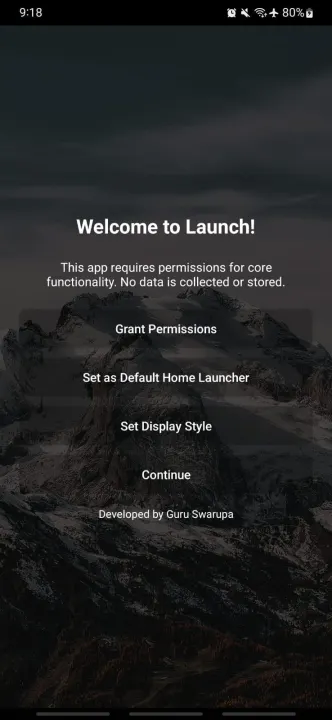
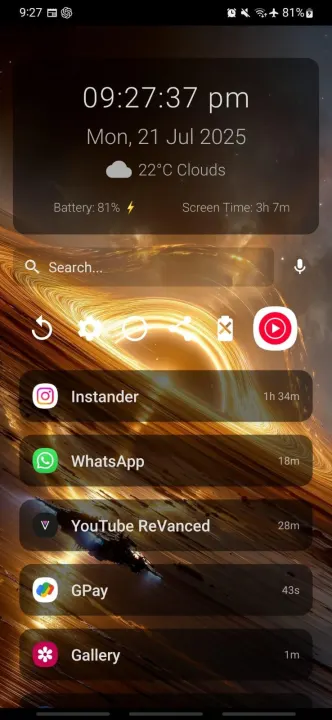
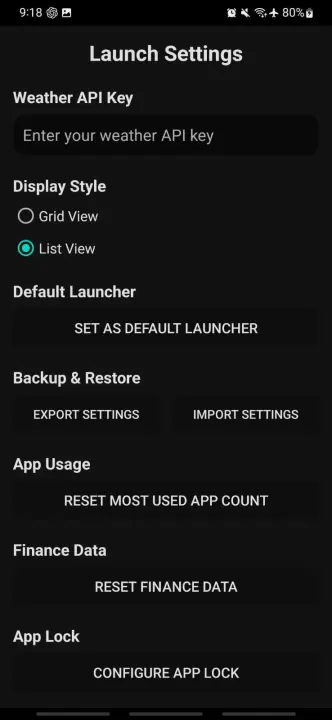
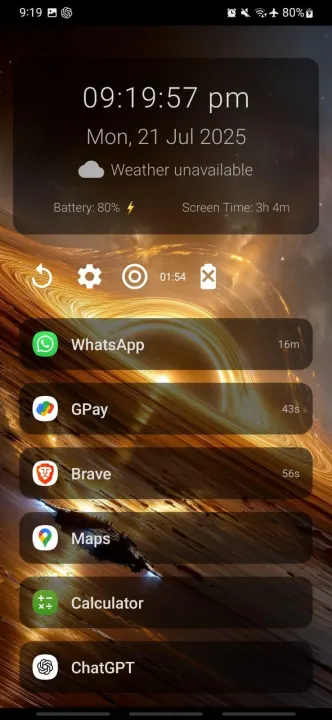
Description
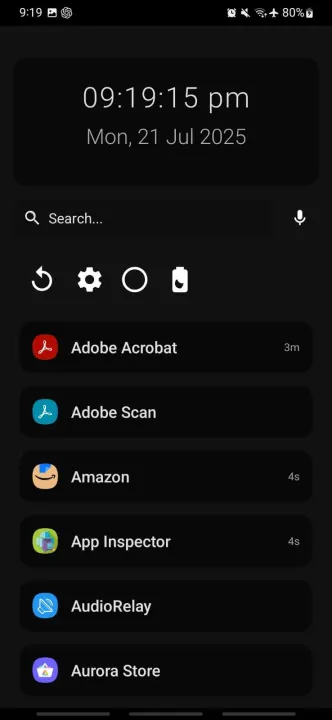
Launch is a clean, efficient, and minimalist Android launcher designed to maximize simplicity, focus, and productivity.
Built for those who value speed, clarity, and control.
Simple. Clean. Powerful.
---
🧠 **Smart App Management**
• Apps sorted automatically by usage frequency
• Rarely used apps grouped alphabetically
• App usage time displayed beside icons
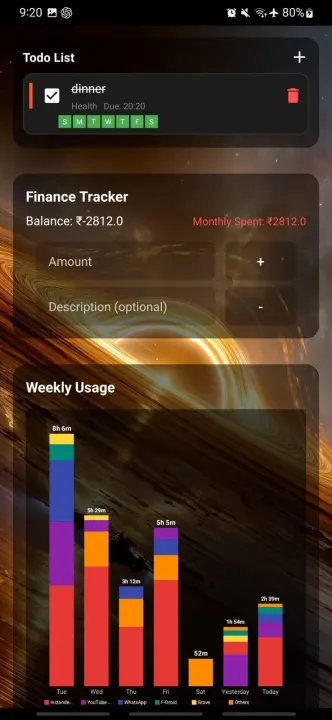
• Weekly phone usage graph (last 7 days)
• Tap any day for detailed breakdown
• Interactive daily pie charts
• Total screen time per day
• One-tap uninstall via long press
• Switch between smooth grid and list view
• Mark apps as favorites
• Toggle between “Favorites Only” and “Show All”
• Organize apps by categories (Social, Productivity, Games, etc.)
• Filter apps by category
---
🔍 **Smart Universal Search**
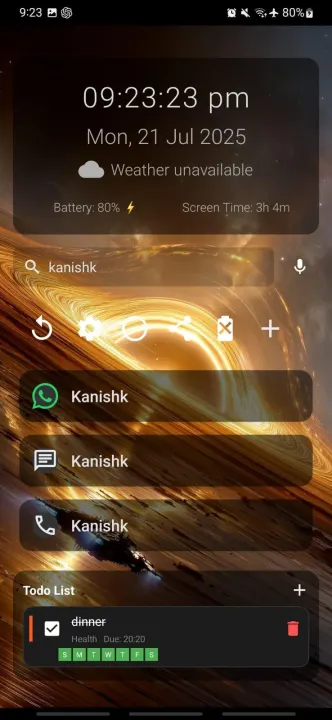
• Search apps, contacts, and perform web searches
• Built-in calculator in search bar
• Scientific calculations supported
• Quick links to Play Store, YouTube, Maps, and browser
• Tap to call, SMS, or WhatsApp contacts directly
• Voice command support
Example voice commands:
• Call Swaroop
• Message Swaroop
• WhatsApp Swaroop
• Open YouTube
• Search weather tomorrow
• Uninstall WhatsApp
• Bangalore to Mysore (opens Maps route)
---
⚡ **Quick Actions & Widgets**
• Time widget → Opens Clock
• Date widget → Opens Calendar
• Weather widget with live data (OpenWeatherMap API supported)
• Battery widget with charging status
• Notifications widget (view & dismiss notifications)
• Todo list widget (full task management)
• Full calculator widget (Basic, Scientific & Converter modes)
• Third-party Android widget support
• Long press search bar → Google in browser
---
🔕 **Focus Mode**
• Temporarily hide distracting apps
• Select allowed apps (whitelist)
• Set countdown timer
• Cannot exit until timer ends
• Visible timer countdown on screen
---
⏱️ **App Usage Limits & Session Timers**
• Set daily usage limits for any app
• Icons gray out when limit is reached
• Automatically returns to home when limit expires
• Quick session timers (1, 5, 10 minutes)
• Custom timer durations supported
• Helps reduce screen addiction and improve discipline
---
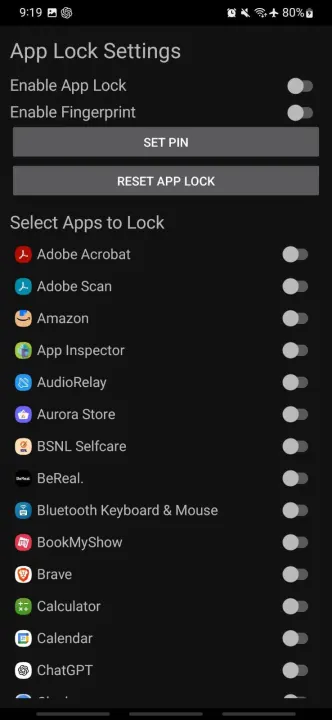
🔐 **App Lock**
• Lock individual apps with PIN
• Fingerprint unlock support (if device supports it)
• 1-minute unlock timeout window
• Protect sensitive apps like WhatsApp, Instagram, etc.
---
✅ **Advanced Todo List Widget**
• Add tasks with due time
• Assign priority (High / Medium / Low)
• Recurring tasks (Daily / Weekly / Custom)
• Visual completion tracking
• Persistent clean task interface
---
🔔 **Notifications Widget**
• View unread notification counts
• Quick access to recent notifications
• Swipe to dismiss directly
• Tap to open related app
---
🧮 **Calculator Widget**
• Basic arithmetic operations
• Scientific mode (sin, cos, log, etc.)
• Converter mode (unit & base conversions)
• Calculation history
• Radians/Degrees toggle
---
💰 **Finance Tracker**
• Track income and expenses
• Add notes to transactions
• View recent transaction history
• Monthly savings overview
• Offline-first and lightweight
---
📦 **APK Sharing**
• Share installed APKs
• Send via Bluetooth, email, or messaging apps
• Access from app context menu or dock
---
🎨 **Dock Customization**
• Add, rename, or group favorite apps
• Customize dock layout and icon count
• Long press to edit or remove
---
📊 **Enhanced Usage Statistics**
• Weekly usage graph
• Daily detailed breakdown
• Interactive pie charts
• App-by-app time analysis
• Total screen time tracking
• Auto refresh when date changes
---
📱 **Shake to Toggle Torch**
• Shake device twice to toggle flashlight
• Works in background
• Battery efficient (active only when screen on)
• Quick access without unlocking
---
🎓 **Onboarding & Interactive Tutorial**
• First-run setup wizard
• Guided feature introduction
• Step-by-step walkthrough
• Smart navigation & auto highlights
• Resume if interrupted
• Skip anytime
---
🤏 **Gestures**
• Tap widgets for quick actions
• Long
Built for those who value speed, clarity, and control.
Simple. Clean. Powerful.
---
🧠 **Smart App Management**
• Apps sorted automatically by usage frequency
• Rarely used apps grouped alphabetically
• App usage time displayed beside icons
• Weekly phone usage graph (last 7 days)
• Tap any day for detailed breakdown
• Interactive daily pie charts
• Total screen time per day
• One-tap uninstall via long press
• Switch between smooth grid and list view
• Mark apps as favorites
• Toggle between “Favorites Only” and “Show All”
• Organize apps by categories (Social, Productivity, Games, etc.)
• Filter apps by category
---
🔍 **Smart Universal Search**
• Search apps, contacts, and perform web searches
• Built-in calculator in search bar
• Scientific calculations supported
• Quick links to Play Store, YouTube, Maps, and browser
• Tap to call, SMS, or WhatsApp contacts directly
• Voice command support
Example voice commands:
• Call Swaroop
• Message Swaroop
• WhatsApp Swaroop
• Open YouTube
• Search weather tomorrow
• Uninstall WhatsApp
• Bangalore to Mysore (opens Maps route)
---
⚡ **Quick Actions & Widgets**
• Time widget → Opens Clock
• Date widget → Opens Calendar
• Weather widget with live data (OpenWeatherMap API supported)
• Battery widget with charging status
• Notifications widget (view & dismiss notifications)
• Todo list widget (full task management)
• Full calculator widget (Basic, Scientific & Converter modes)
• Third-party Android widget support
• Long press search bar → Google in browser
---
🔕 **Focus Mode**
• Temporarily hide distracting apps
• Select allowed apps (whitelist)
• Set countdown timer
• Cannot exit until timer ends
• Visible timer countdown on screen
---
⏱️ **App Usage Limits & Session Timers**
• Set daily usage limits for any app
• Icons gray out when limit is reached
• Automatically returns to home when limit expires
• Quick session timers (1, 5, 10 minutes)
• Custom timer durations supported
• Helps reduce screen addiction and improve discipline
---
🔐 **App Lock**
• Lock individual apps with PIN
• Fingerprint unlock support (if device supports it)
• 1-minute unlock timeout window
• Protect sensitive apps like WhatsApp, Instagram, etc.
---
✅ **Advanced Todo List Widget**
• Add tasks with due time
• Assign priority (High / Medium / Low)
• Recurring tasks (Daily / Weekly / Custom)
• Visual completion tracking
• Persistent clean task interface
---
🔔 **Notifications Widget**
• View unread notification counts
• Quick access to recent notifications
• Swipe to dismiss directly
• Tap to open related app
---
🧮 **Calculator Widget**
• Basic arithmetic operations
• Scientific mode (sin, cos, log, etc.)
• Converter mode (unit & base conversions)
• Calculation history
• Radians/Degrees toggle
---
💰 **Finance Tracker**
• Track income and expenses
• Add notes to transactions
• View recent transaction history
• Monthly savings overview
• Offline-first and lightweight
---
📦 **APK Sharing**
• Share installed APKs
• Send via Bluetooth, email, or messaging apps
• Access from app context menu or dock
---
🎨 **Dock Customization**
• Add, rename, or group favorite apps
• Customize dock layout and icon count
• Long press to edit or remove
---
📊 **Enhanced Usage Statistics**
• Weekly usage graph
• Daily detailed breakdown
• Interactive pie charts
• App-by-app time analysis
• Total screen time tracking
• Auto refresh when date changes
---
📱 **Shake to Toggle Torch**
• Shake device twice to toggle flashlight
• Works in background
• Battery efficient (active only when screen on)
• Quick access without unlocking
---
🎓 **Onboarding & Interactive Tutorial**
• First-run setup wizard
• Guided feature introduction
• Step-by-step walkthrough
• Smart navigation & auto highlights
• Resume if interrupted
• Skip anytime
---
🤏 **Gestures**
• Tap widgets for quick actions
• Long
All versions
| Version | Released | Minimum Android | Size |
|---|---|---|---|
| 5.8 | Feb 19, 2026 | Android 7.0 | 3 MB |
| 5.7 | Feb 16, 2026 | Android 7.0 | 3 MB |
| 5.6 | Feb 11, 2026 | Android 7.0 | 2.8 MB |
| 5.5 | Feb 8, 2026 | Android 7.0 | 2.8 MB |
| 5.4 | Feb 3, 2026 | Android 7.0 | 2.7 MB |
| 5.3 | Jan 27, 2026 | Android 7.0 | 2.7 MB |
| 5.2 | Jan 26, 2026 | Android 7.0 | 2.6 MB |
| 5.1 | Jan 25, 2026 | Android 7.0 | 7.5 MB |
| 5.0 | Jan 23, 2026 | Android 7.0 | 7.5 MB |
| 4.9 | Jan 17, 2026 | Android 7.0 | 7.4 MB |
| 4.8 | Jan 16, 2026 | Android 7.0 | 7.3 MB |
How to install an older version of an Android app · How to install an APK file on Android
From the developer (GitHub)
APK files published by the developer on GitHub. They are signed by the developer and may not install over the other builds on this page (different signature). Links open github.com.
Similar apps
-
 Screenshot Tile (NoRoot)
Customizable screenshot tool with quick settings shortcut and floating button
-
 Coffee
Keep display awake
-
 Mute reminder
Remind you to mute media
-
 Prepaid Balance
Keep track your prepaid balance
-
 Auto Auto-Rotate
Automatically remembers your auto-rotate setting for every app
-
 Drowser
Simple background app killer
-
 Scrambled Exif
Remove the metadata from your pictures before sharing them
-
 WaveUp
Turn on the display by waving