

Permission Pilot
Android app permission overview
Contains non-free assets
- Developer
- Matthias Urhahn
- License
- GPL-3.0-only
- Package
eu.darken.myperm- Category
- System
- Latest version
- 2.2.4-rc0 · Sep 14, 2026
- Minimum Android
- Android 6
Screenshots
Description
Permission Pilot is a new kind of app to help you review apps and their permissions.
With each Android update permissions are getting more complex.
Android showing permissions in various different locations, doesn't make it easier to review them:
• App Info page
• Special Access
• Permissions Manager
• and more...
Permission Pilot lists all permissions in a single location, giving you a bird's eye view of app permissions.
Two perspectives are available: You can either view all permissions an app requests, or view all apps that request a permission.
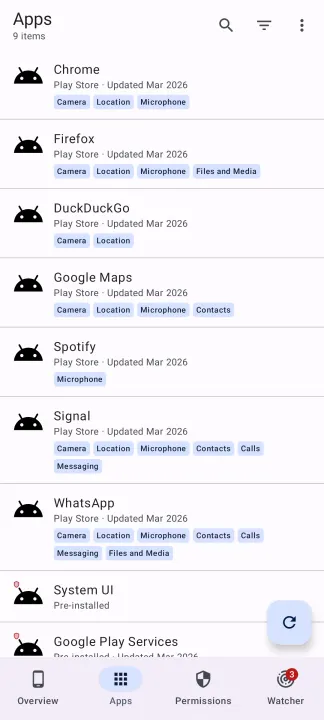
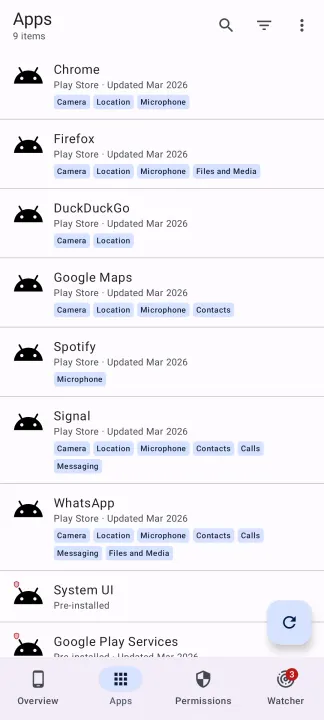
Apps tab
All installed apps, including system apps and work profile apps.
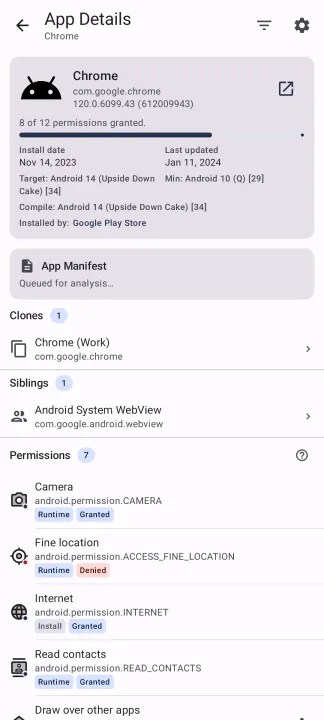
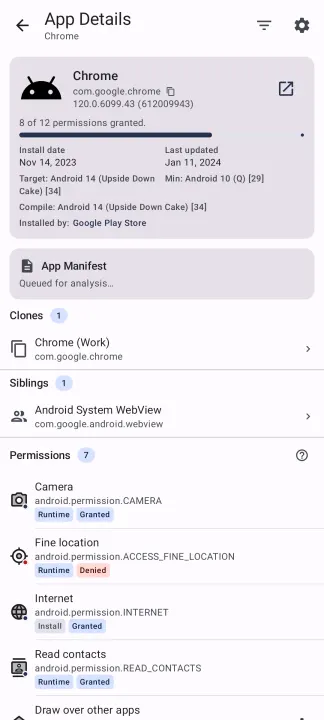
Clicking on any app will list all permissions that the app has requested, including those that show up under Permissions Manager and Special Access, along with their status.
This will also include internet permissions, SharedUserID status!
Permissions tab
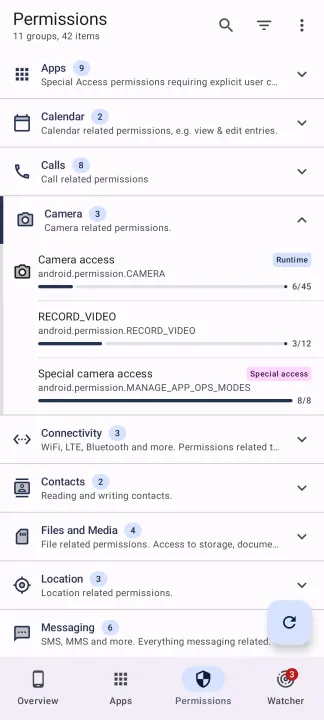
All permissions that exist on your device, including those that show up under Permissions Manager and Special Access.
Permissions are pre-grouped for easier navigation, e.g. Contacts, Microphone, Camera, etc.
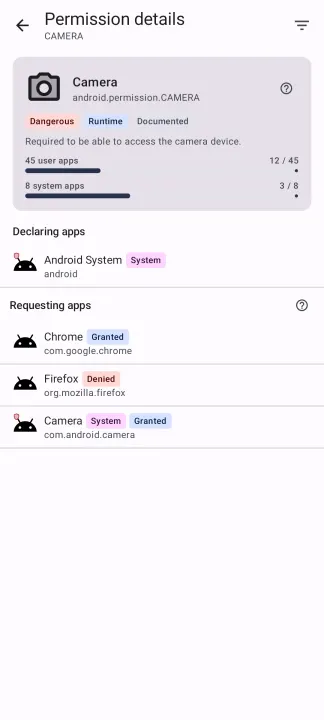
Clicking on a permission shows all the apps that request access to that permission.
Apps and permissions can be searched using free-text, sorted and filtered by different criteria.
Overview
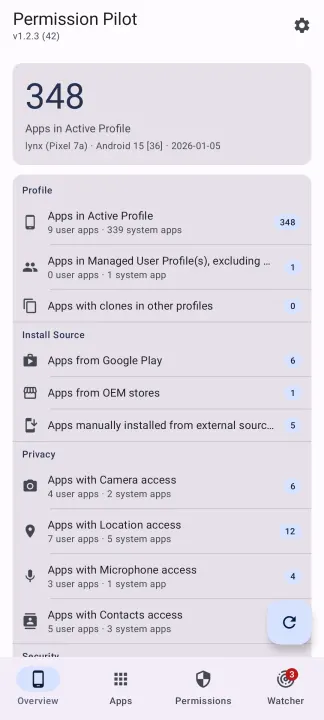
A summary dashboard showing app counts by category — privacy, security, install source, and more. Each category row navigates directly to a filtered app list.
Permission Watcher
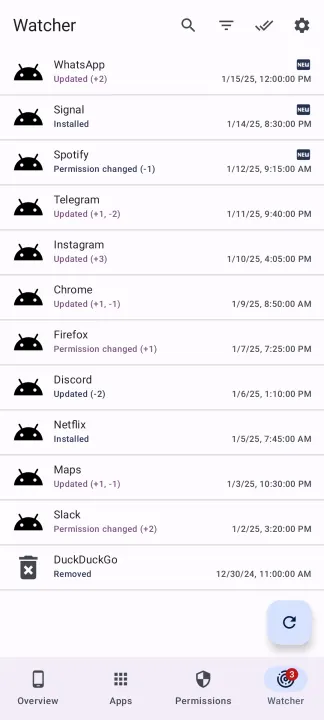
Get notified when an app update adds new permissions or changes existing ones. Permission Watcher checks your apps after each update and creates a report if anything changed.
Data Export
Export app or permission data in Markdown, CSV, or JSON.
Manifest Viewer
Browse raw app manifests with searchable, categorized sections. See which apps can discover other installed apps.
With each Android update permissions are getting more complex.
Android showing permissions in various different locations, doesn't make it easier to review them:
• App Info page
• Special Access
• Permissions Manager
• and more...
Permission Pilot lists all permissions in a single location, giving you a bird's eye view of app permissions.
Two perspectives are available: You can either view all permissions an app requests, or view all apps that request a permission.
Apps tab
All installed apps, including system apps and work profile apps.
Clicking on any app will list all permissions that the app has requested, including those that show up under Permissions Manager and Special Access, along with their status.
This will also include internet permissions, SharedUserID status!
Permissions tab
All permissions that exist on your device, including those that show up under Permissions Manager and Special Access.
Permissions are pre-grouped for easier navigation, e.g. Contacts, Microphone, Camera, etc.
Clicking on a permission shows all the apps that request access to that permission.
Apps and permissions can be searched using free-text, sorted and filtered by different criteria.
Overview
A summary dashboard showing app counts by category — privacy, security, install source, and more. Each category row navigates directly to a filtered app list.
Permission Watcher
Get notified when an app update adds new permissions or changes existing ones. Permission Watcher checks your apps after each update and creates a report if anything changed.
Data Export
Export app or permission data in Markdown, CSV, or JSON.
Manifest Viewer
Browse raw app manifests with searchable, categorized sections. See which apps can discover other installed apps.
All versions
| Version | Released | Minimum Android | Size |
|---|---|---|---|
| 2.2.4-rc0 | Sep 14, 2026 | Android 6 | 6.1 MB |
| 2.2.3-rc0 | Sep 7, 2026 | Android 6 | 6.1 MB |
| 2.2.1-rc0 | Aug 10, 2026 | Android 6 | 6.2 MB |
| 2.2.0-rc0 | Jul 11, 2026 | Android 6 | 6 MB |
| 2.1.1-rc0 | May 6, 2026 | Android 6 | 6 MB |
| 2.0.3-rc0 | May 6, 2026 | Android 6 | 6 MB |
How to install an older version of an Android app · How to install an APK file on Android
From the developer (GitHub)
APK files published by the developer on GitHub. They are signed by the developer and may not install over the other builds on this page (different signature). Links open github.com.
Similar apps
-
 Screenshot Tile (NoRoot)
Customizable screenshot tool with quick settings shortcut and floating button
-
 Coffee
Keep display awake
-
 Mute reminder
Remind you to mute media
-
 Prepaid Balance
Keep track your prepaid balance
-
 Auto Auto-Rotate
Automatically remembers your auto-rotate setting for every app
-
 Drowser
Simple background app killer
-
 Scrambled Exif
Remove the metadata from your pictures before sharing them
-
 WaveUp
Turn on the display by waving