

Voyager
Voyager - Material Design 3 file browser with SFTP, FTP, SMB, and WebDAV support
- Developer
- AlanHuang99
- License
- GPL-3.0-only
- Package
com.voyagerfiles- Category
- File Manager, System
- Latest version
- 1.13.0 · Oct 25, 2026
- Minimum Android
- Android 8.0
Screenshots
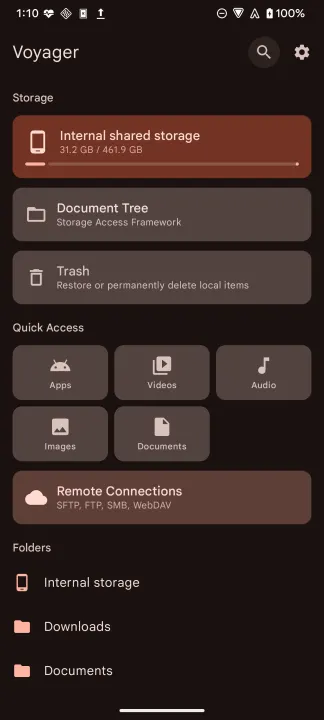
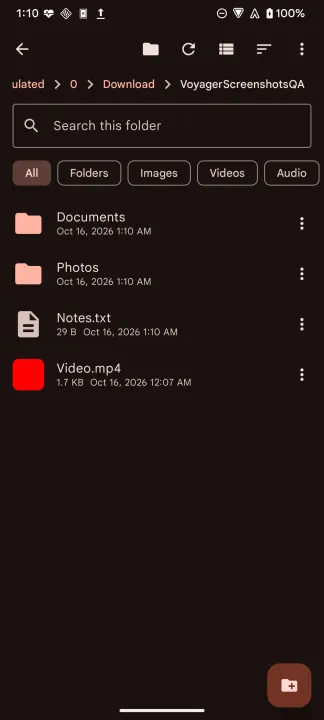
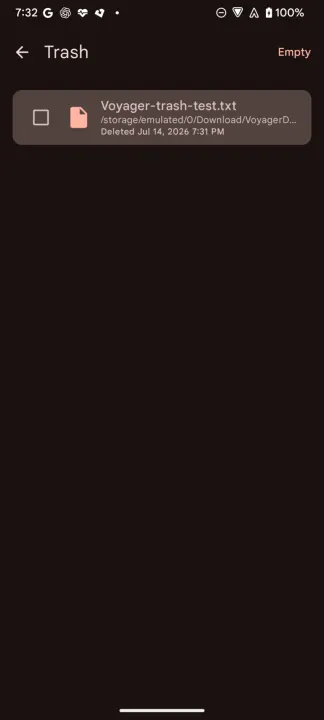
Description
Voyager is an open-source file manager for Android with built-in SFTP, FTP, SMB, and WebDAV access, built with Material Design 3 and Jetpack Compose.
Features:
• Local file browsing with file management (copy, move, rename, Trash, permanent delete, create)
• Share one or several local and document-tree files through Android's system share sheet
• File details with selectable metadata
• Local and remote image thumbnails, first-page PDF previews, and readable local APK application-icon thumbnails
• Filename search across accessible mounted shared storage, with an action to open a result's folder
• Per-file action menus in List and Compact views
• Optional root and Shizuku sessions with explicit authorization
• Storage Access Framework document-tree browsing and file management
• Open files through Android defaults or choose a handler with Open with
• Create ZIP archives and safely extract ZIP, TAR, TGZ, TBZ2, GZ, and BZ2 files with progress and cancellation
• Find duplicate files by content, with editable folder-name exclusions and recycle folders excluded by default
• SFTP remote access, with password, keyboard-interactive, private key, or generated key-pair authentication whose public key can be copied or saved
• FTP remote access
• SMB/CIFS browsing, including disk-share discovery when a connection omits the share name
• WebDAV remote access with direct audio/video playback and seeking when the server supports byte ranges
• HTTPS WebDAV trust through Android system and user-installed certificate authorities
• Copy and move files between local storage and a remote server, in both directions
• Create remote files and folders, and upload documents through Android's system picker
• Download remote files and folders to the device, with confirmation before file-tap downloads on SFTP, FTP, and SMB
• Upload and download progress with active filenames, item counts, bytes, percentage when known, and speed
• Multiple browser sessions for local and remote locations, with a session switcher
• Optional automatic closure of inactive sessions after Voyager remains in the background
• Mounted external storage volumes, such as SD cards and USB/OTG, listed alongside internal storage
• 20 built-in themes including Catppuccin, Nord, Solarized, Gruvbox, Rosé Pine, Tokyo Night, and High Contrast
• Custom theme support
• AMOLED black theme
• List, compact list, and grid view modes
• Focus-aware Android TV remote navigation with select and long-press actions
• Bookmarks, quick access, and customizable Home section visibility and order
• Storage usage overview
• Hidden files toggle
• Multiple sort options (name, size, date, type)
• Multi-select with copy/cut/paste
• Material You dynamic color support (Android 12+)
Privacy:
• No analytics or tracking
• No internet access required for local browsing
• All network connections are user-initiated
• Fully open source (GPLv3)
Help translate or review wording on Crowdin: https://crowdin.com/project/voyagerandroid
Contributor guide: https://github.com/AlanHuang99/Voyager/blob/master/CONTRIBUTING.md
Features:
• Local file browsing with file management (copy, move, rename, Trash, permanent delete, create)
• Share one or several local and document-tree files through Android's system share sheet
• File details with selectable metadata
• Local and remote image thumbnails, first-page PDF previews, and readable local APK application-icon thumbnails
• Filename search across accessible mounted shared storage, with an action to open a result's folder
• Per-file action menus in List and Compact views
• Optional root and Shizuku sessions with explicit authorization
• Storage Access Framework document-tree browsing and file management
• Open files through Android defaults or choose a handler with Open with
• Create ZIP archives and safely extract ZIP, TAR, TGZ, TBZ2, GZ, and BZ2 files with progress and cancellation
• Find duplicate files by content, with editable folder-name exclusions and recycle folders excluded by default
• SFTP remote access, with password, keyboard-interactive, private key, or generated key-pair authentication whose public key can be copied or saved
• FTP remote access
• SMB/CIFS browsing, including disk-share discovery when a connection omits the share name
• WebDAV remote access with direct audio/video playback and seeking when the server supports byte ranges
• HTTPS WebDAV trust through Android system and user-installed certificate authorities
• Copy and move files between local storage and a remote server, in both directions
• Create remote files and folders, and upload documents through Android's system picker
• Download remote files and folders to the device, with confirmation before file-tap downloads on SFTP, FTP, and SMB
• Upload and download progress with active filenames, item counts, bytes, percentage when known, and speed
• Multiple browser sessions for local and remote locations, with a session switcher
• Optional automatic closure of inactive sessions after Voyager remains in the background
• Mounted external storage volumes, such as SD cards and USB/OTG, listed alongside internal storage
• 20 built-in themes including Catppuccin, Nord, Solarized, Gruvbox, Rosé Pine, Tokyo Night, and High Contrast
• Custom theme support
• AMOLED black theme
• List, compact list, and grid view modes
• Focus-aware Android TV remote navigation with select and long-press actions
• Bookmarks, quick access, and customizable Home section visibility and order
• Storage usage overview
• Hidden files toggle
• Multiple sort options (name, size, date, type)
• Multi-select with copy/cut/paste
• Material You dynamic color support (Android 12+)
Privacy:
• No analytics or tracking
• No internet access required for local browsing
• All network connections are user-initiated
• Fully open source (GPLv3)
Help translate or review wording on Crowdin: https://crowdin.com/project/voyagerandroid
Contributor guide: https://github.com/AlanHuang99/Voyager/blob/master/CONTRIBUTING.md
All versions
| Version | Released | Minimum Android | Size |
|---|---|---|---|
| 1.13.0 | Oct 25, 2026 | Android 8.0 | 12.8 MB |
| 1.12.1 | Oct 18, 2026 | Android 8.0 | 12.7 MB |
| 1.12.0 | Oct 12, 2026 | Android 8.0 | 12.7 MB |
| 1.11.0 | Oct 2, 2026 | Android 8.0 | 12.7 MB |
| 1.10.0 | Sep 27, 2026 | Android 8.0 | 12.6 MB |
| 1.9.0 | Sep 14, 2026 | Android 8.0 | 12.5 MB |
| 1.8.0 | Aug 27, 2026 | Android 8.0 | 12.4 MB |
| 1.7.0 | Aug 10, 2026 | Android 8.0 | 12.2 MB |
| 1.6.0 | Jul 29, 2026 | Android 8.0 | 12.2 MB |
| 1.5.0 | Jul 21, 2026 | Android 8.0 | 11.5 MB |
| 1.4.0 | Jul 16, 2026 | Android 8.0 | 11.4 MB |
| 1.2.0 | Jul 10, 2026 | Android 8.0 | 11.4 MB |
| 1.1.4 | Jun 14, 2026 | Android 8.0 | 11.3 MB |
| 1.1.2 | Jun 10, 2026 | Android 8.0 | 11.2 MB |
| 1.1.1 | May 29, 2026 | Android 8.0 | 11.2 MB |
How to install an older version of an Android app · How to install an APK file on Android
From the developer (GitHub)
APK files published by the developer on GitHub. They are signed by the developer and may not install over the other builds on this page (different signature). Links open github.com.
v1.14.0
· Oct 27, 2026
voyager-v1.14.0-arm64-v8a.apk
12.7 MB voyager-v1.14.0-armeabi-v7a.apk
12.7 MB voyager-v1.14.0-universal.apk
12.8 MB voyager-v1.14.0-x86.apk
12.7 MB voyager-v1.14.0-x86_64.apk
12.7 MB v1.13.0
· Oct 16, 2026
voyager-v1.13.0-arm64-v8a.apk
12.7 MB voyager-v1.13.0-armeabi-v7a.apk
12.7 MB voyager-v1.13.0-universal.apk
12.8 MB voyager-v1.13.0-x86.apk
12.7 MB voyager-v1.13.0-x86_64.apk
12.7 MB v1.12.1
· Oct 16, 2026
voyager-v1.12.1-arm64-v8a.apk
12.6 MB voyager-v1.12.1-armeabi-v7a.apk
12.6 MB voyager-v1.12.1-universal.apk
12.7 MB voyager-v1.12.1-x86.apk
12.6 MB voyager-v1.12.1-x86_64.apk
12.6 MB Similar apps
-
 Screenshot Tile (NoRoot)
Customizable screenshot tool with quick settings shortcut and floating button
-
 Coffee
Keep display awake
-
 Mute reminder
Remind you to mute media
-
 Prepaid Balance
Keep track your prepaid balance
-
 Auto Auto-Rotate
Automatically remembers your auto-rotate setting for every app
-
 Drowser
Simple background app killer
-
 Scrambled Exif
Remove the metadata from your pictures before sharing them
-
 WaveUp
Turn on the display by waving