

LeanType
Private, customizable open-source keyboard with smart productivity tools
- License
- GPL-3.0-only
- Package
com.leanbitlab.leantype- Category
- Keyboard & IME
- Latest version
- 4.3.0 · Nov 4, 2026
- Minimum Android
- Android 6
Screenshots
Description
LeanType is a fast, privacy-focused, and highly customizable open-source keyboard for Android, built on the solid foundations of AOSP and HeliBoard. Designed for smooth typing, rich ergonomics, and modular productivity, LeanType gives you complete control over your keyboard experience with zero data tracking.
🛡️ Privacy & Offline First:
• 100% Open Source: No telemetry, no ads, and no background tracking.
• Strict Data Privacy: Your keystrokes and data remain entirely on your device.
• Zero Sensitive Permissions: Operates without contacts, location, or intrusive permissions.
⌨️ Ergonomics & Fluid Typing:
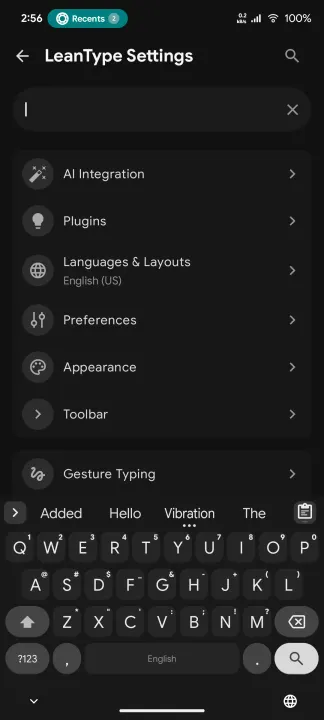
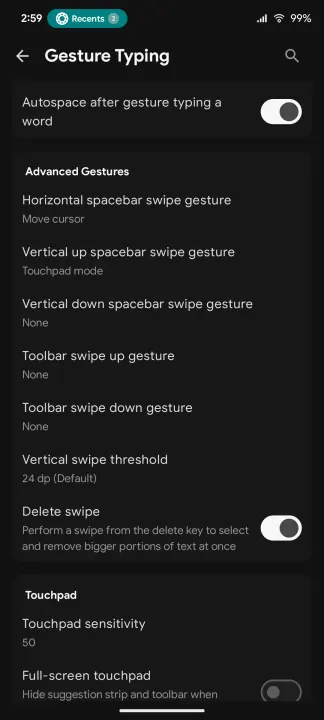
• Gesture Typing: Smooth swipe typing with adjustable sensitivity and preview.
• Multilingual Support: Multi-language typing with auto-correction, suggestions, and Gboard dictionary import.
• Trackpad Cursor & Text Editing: Swipe across the spacebar or use the dedicated DPAD text editing panel for precision cursor movement and selection.
• Floating Keyboard: Native, draggable, and resizable floating window for comfortable multitasking without overlay permissions.
• One-Handed & Split Modes: Optimized layouts for phones, foldables, and tablets.
• Hardware Keyboard Support: Full candidate selection and auto-correction for external Bluetooth/USB keyboards.
🎨 Deep Customization & Sound Packs:
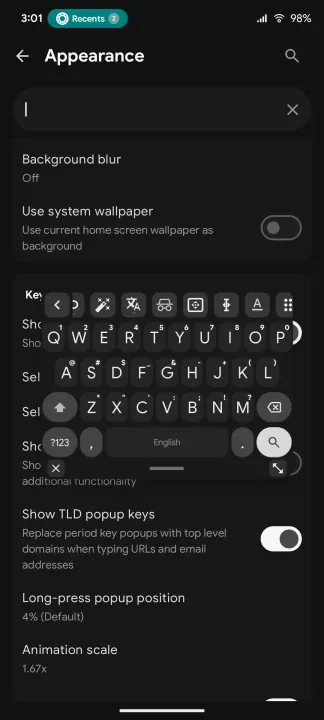
• Material You & Themes: Dynamic system color matching, dark/light themes, and custom background wallpaper with blur.
• Key Ergonomics: Independent corner radius controls for normal, function, and action keys, plus adjustable key gaps and padding scales.
• Tactile Key Audio: Built-in low-latency sound engine featuring Cherry MX, Vintage Typewriter, Retro CRT, Soft Velvet, and custom sound pack import.
⚡ Clipboard & Productivity:
• Smart Clipboard Manager: Search clips in real-time, edit text directly in the toolbar, pin favorites, and 5-second undo for deletions.
• Inline Math Solver: Type equations directly (e.g., 25*4= or 150-20%=) for instant calculation in the suggestion strip.
• Dynamic Text Expander: Expand text shortcuts with dynamic variables like date, time, and clipboard content.
• Screenshot Suggestions: Instant 1-tap sharing and text extraction for recently captured screenshots.
• Modular Backup & Restore: Selectively export and import your layouts, themes, dictionaries, and clipboard history.
🧩 Modular Input & Plugins:
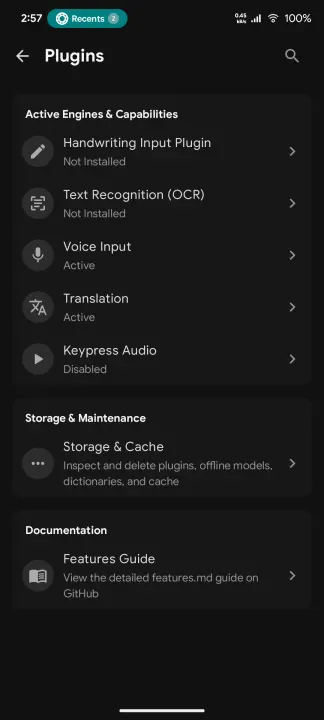
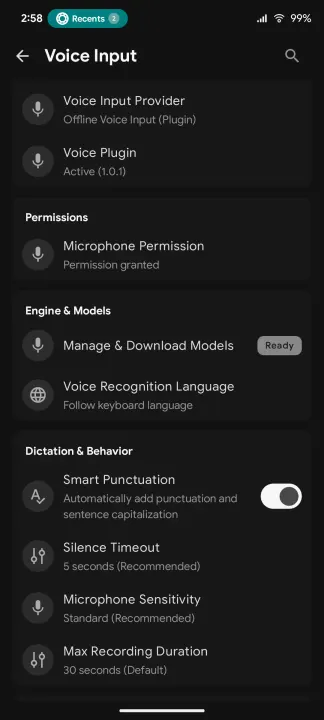
• Voice Typing: Accurate on-device speech-to-text powered by Whisper models.
• Handwriting Recognition: Draw characters and symbols directly on an in-keyboard canvas.
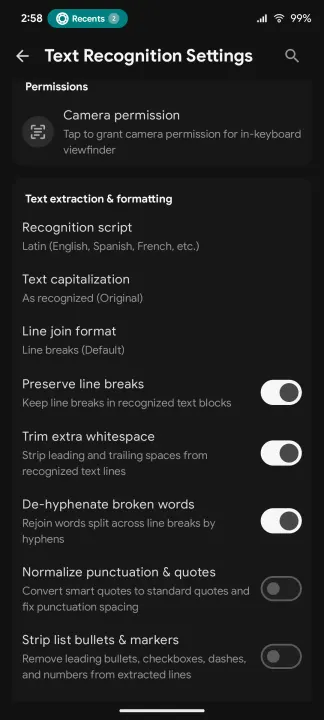
• Camera & Screenshot OCR: Extract text from real-world documents or screenshots with an in-keyboard viewfinder.
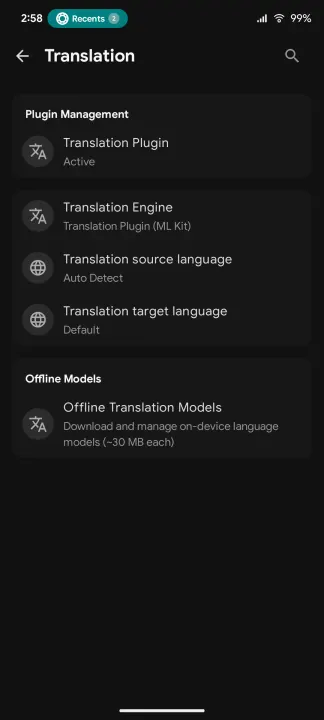
• In-Keyboard Translation: Translate text instantly via offline models or cloud translation.
🤖 Smart AI Tools (Completely Optional):
• On-Demand Proofreading: Fix grammar, adjust tone, or rephrase text when you choose to use it.
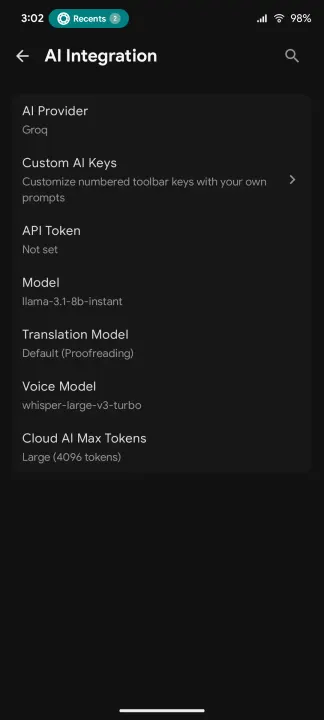
• Flexible Providers: Connect to Google Gemini, Groq, OpenAI, or self-hosted local LLMs (Ollama, LM Studio, LocalAI).
• Custom AI Keys: Program quick toolbar buttons with custom prompt instructions.
• Fully Opt-in: Network access is only used if you provide an API key and explicitly trigger an AI request.
Built with ❤️ by LeanBitLab.
🛡️ Privacy & Offline First:
• 100% Open Source: No telemetry, no ads, and no background tracking.
• Strict Data Privacy: Your keystrokes and data remain entirely on your device.
• Zero Sensitive Permissions: Operates without contacts, location, or intrusive permissions.
⌨️ Ergonomics & Fluid Typing:
• Gesture Typing: Smooth swipe typing with adjustable sensitivity and preview.
• Multilingual Support: Multi-language typing with auto-correction, suggestions, and Gboard dictionary import.
• Trackpad Cursor & Text Editing: Swipe across the spacebar or use the dedicated DPAD text editing panel for precision cursor movement and selection.
• Floating Keyboard: Native, draggable, and resizable floating window for comfortable multitasking without overlay permissions.
• One-Handed & Split Modes: Optimized layouts for phones, foldables, and tablets.
• Hardware Keyboard Support: Full candidate selection and auto-correction for external Bluetooth/USB keyboards.
🎨 Deep Customization & Sound Packs:
• Material You & Themes: Dynamic system color matching, dark/light themes, and custom background wallpaper with blur.
• Key Ergonomics: Independent corner radius controls for normal, function, and action keys, plus adjustable key gaps and padding scales.
• Tactile Key Audio: Built-in low-latency sound engine featuring Cherry MX, Vintage Typewriter, Retro CRT, Soft Velvet, and custom sound pack import.
⚡ Clipboard & Productivity:
• Smart Clipboard Manager: Search clips in real-time, edit text directly in the toolbar, pin favorites, and 5-second undo for deletions.
• Inline Math Solver: Type equations directly (e.g., 25*4= or 150-20%=) for instant calculation in the suggestion strip.
• Dynamic Text Expander: Expand text shortcuts with dynamic variables like date, time, and clipboard content.
• Screenshot Suggestions: Instant 1-tap sharing and text extraction for recently captured screenshots.
• Modular Backup & Restore: Selectively export and import your layouts, themes, dictionaries, and clipboard history.
🧩 Modular Input & Plugins:
• Voice Typing: Accurate on-device speech-to-text powered by Whisper models.
• Handwriting Recognition: Draw characters and symbols directly on an in-keyboard canvas.
• Camera & Screenshot OCR: Extract text from real-world documents or screenshots with an in-keyboard viewfinder.
• In-Keyboard Translation: Translate text instantly via offline models or cloud translation.
🤖 Smart AI Tools (Completely Optional):
• On-Demand Proofreading: Fix grammar, adjust tone, or rephrase text when you choose to use it.
• Flexible Providers: Connect to Google Gemini, Groq, OpenAI, or self-hosted local LLMs (Ollama, LM Studio, LocalAI).
• Custom AI Keys: Program quick toolbar buttons with custom prompt instructions.
• Fully Opt-in: Network access is only used if you provide an API key and explicitly trigger an AI request.
Built with ❤️ by LeanBitLab.
All versions
| Version | Released | Minimum Android | Size |
|---|---|---|---|
| 4.3.0 | Nov 4, 2026 | Android 6 | 12.9 MB |
| 4.2.9 | Oct 25, 2026 | Android 6 | 12.8 MB |
| 4.2.8 | Oct 8, 2026 | Android 6 | 11.2 MB |
| 4.2.6 | Sep 22, 2026 | Android 6 | 10.5 MB |
| 4.2.5 | Sep 21, 2026 | Android 6 | 10.5 MB |
| 4.2.4 | Sep 20, 2026 | Android 6 | 10.5 MB |
| 4.2.3 | Sep 17, 2026 | Android 6 | 10.4 MB |
| 4.2.2 | Sep 11, 2026 | Android 6 | 10.4 MB |
| 4.2.0 | Sep 7, 2026 | Android 6 | 12 MB |
| 4.1.8 | Sep 5, 2026 | Android 6 | 11 MB |
| 4.1.5 | Aug 27, 2026 | Android 6 | 10.8 MB |
| 4.1.4 | Aug 27, 2026 | Android 6 | 10.8 MB |
| 4.1.3 | Aug 26, 2026 | Android 6 | 10.6 MB |
| 4.1.2 | Aug 23, 2026 | Android 6 | 10.6 MB |
| 4.1.1 | Aug 13, 2026 | Android 6 | 10.5 MB |
| 4.1.0 | Aug 12, 2026 | Android 6 | 10.5 MB |
| 4.0.9 | Aug 11, 2026 | Android 6 | 10.5 MB |
| 4.0.8 | Aug 10, 2026 | Android 6 | 10.1 MB |
| 4.0.7 | Aug 5, 2026 | Android 6 | 10.1 MB |
| 4.0.6 | Aug 1, 2026 | Android 6 | 10.1 MB |
| 4.0.5 | Jul 31, 2026 | Android 6 | 10.1 MB |
| 4.0.4 | Jul 29, 2026 | Android 6 | 10.1 MB |
| 4.0.3 | Jul 26, 2026 | Android 6 | 10.1 MB |
| 4.0.2 | Jul 23, 2026 | Android 6 | 10.1 MB |
| 4.0.1 | Jul 20, 2026 | Android 6 | 10.1 MB |
| 4.0.0-beta1 | Jul 19, 2026 | Android 6 | 10.1 MB |
| 3.9.7 | Jul 18, 2026 | Android 6 | 10.1 MB |
| 3.9.5 | Jul 13, 2026 | Android 6 | 10.1 MB |
| 3.9.4 | Jul 11, 2026 | Android 6 | 10.1 MB |
| 3.9.3 | Jul 10, 2026 | Android 6 | 10.1 MB |
| 3.9.1 | Jul 4, 2026 | Android 6 | 12.1 MB |
| 3.9.0 | Jul 1, 2026 | Android 6 | 12.1 MB |
| 3.8.9 | Jun 30, 2026 | Android 6 | 12.1 MB |
| 3.8.2 | May 28, 2026 | Android 5.0 | 24.3 MB |
| 3.7.9 | May 24, 2026 | Android 5.0 | 23.2 MB |
| 3.7.6 | Apr 29, 2026 | Android 5.0 | 23.2 MB |
How to install an older version of an Android app · How to install an APK file on Android
From the developer (GitHub)
APK files published by the developer on GitHub. They are signed by the developer and may not install over the other builds on this page (different signature). Links open github.com.
v4.3.1
· Nov 4, 2026
1-LeanType_4.3.1-standard-release.apk
12.9 MB 2-LeanType_4.3.1-offline-release.apk
12.5 MB beta-431-3
Pre-release · Nov 3, 2026
1-LeanType_4.3.1-standard-release.apk
12.8 MB 2-LeanType_4.3.1-offline-release.apk
12.5 MB beta-431-2
Pre-release · Nov 2, 2026
1-LeanType_4.3.1-standard-release.apk
12.8 MB 2-LeanType_4.3.1-offline-release.apk
12.5 MB Similar apps
-
 KeePassDX Passkey Vault
Manage Passkey / Password in a local and open-source vault
-
 HeliBoard
Customizable open-source keyboard
-
 Trime
Chinese IME with Rime Input Method Engine
-
 DroidTR IME
 (Turkish F/Q keyboard)
- Kõnele Speech-to-text provider
-
 Morse
Translate text to Morse code or vice versa in real time
-
 Unexpected Keyboard
Lightweight and privacy-conscious virtual keyboard for Android.
-
 Hacker's Keyboard
Four- or five-row soft-keyboard