

Voice Keyboard
Speech-to-text keyboard that uses your own Whisper API key
Promotes non-free network services
- Developer
- rustemar
- License
- MIT
- Package
com.tyraen.voicekeyboard- Category
- Keyboard & IME, Speech Recognizer
- Latest version
- 1.14.0 · Nov 6, 2026
- Minimum Android
- Android 7.0
Screenshots
Description
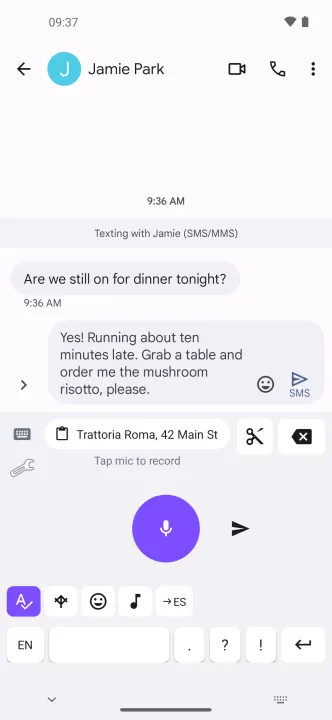
Voice Keyboard is a keyboard that types what you say. Switch to it in any text field, tap the microphone, speak, and the text lands in whatever app you are using.
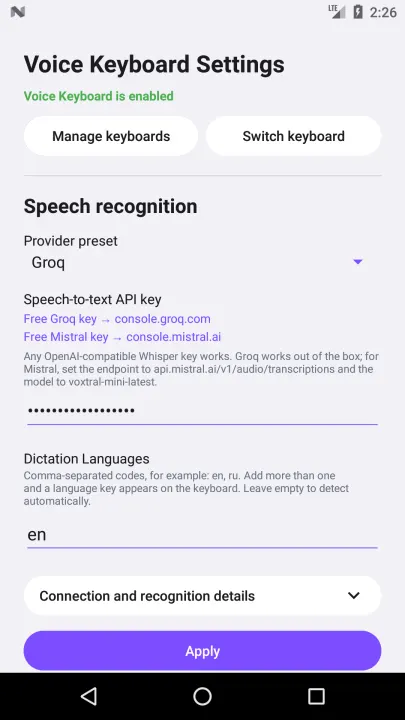
Speech recognition needs an API key for a supported service, such as Groq or Mistral, or a server of your own. Audio goes only to your configured endpoint. Compatible Chat Completions services also work; the model must accept your device's recording format.
Voice input
Optional auto-stop after a pause (0.3–3 s), off by default. Local speech detection helps distinguish speech from background noise. Other voices, singing or difficult noise can still affect stopping.
• Works in any text field, in any app
• Processing queue: start the next recording while the previous one is still being transcribed
• Cancel only the latest unfinished dictation during recording, recognition, post-processing or retry; earlier recordings continue
• Optional voice input for other apps through Android speech recognition or a dictation window. Off by default, uses your saved provider, without post-processing or context
• Offline-proof keyboard dictation: a recording that cannot be sent is kept on the device and resent automatically once the connection returns
• Several dictation languages on one key: tap to cycle, long-press to pick from the list
• Custom vocabulary for names and technical terms that get misrecognised
• Can be the voice input of another keyboard, such as HeliBoard, and hand back to it once the text is typed
Optional post-processing
• Fix punctuation, spelling and filler words
• Shorten, add emoji, rewrite as verse, or translate
• Optional recent dictation context helps recover misheard names and terms. Off by default; remembers up to 5 of your own recent dictations only in memory and sends them to the selected provider as reference. Context is shared across chats in the same app and clears when input moves to another app. It does not read conversations.
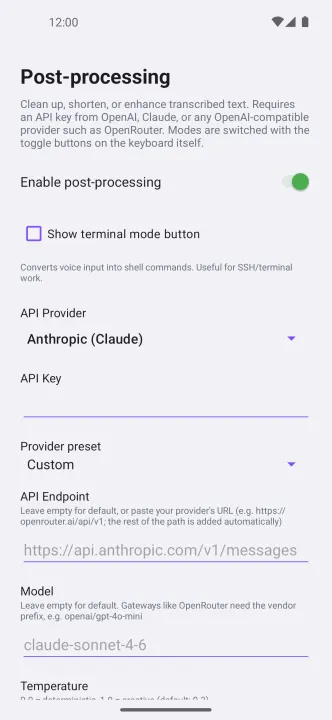
• Terminal mode turns dictation into shell commands
• Works with OpenAI, Anthropic, or any OpenAI-compatible provider such as OpenRouter; editing prompts are customizable
Optional correction tools · Beta
• Both tools are off by default in Advanced settings
• Basic letter keyboard for quick corrections: 14 layouts, including French, German, Russian, Hindi and Arabic, with accents and symbols; no predictions, swipe typing or CJK conversion
• Actions on selected text: proofread, translate or give a one-time instruction using your configured post-processing provider. Review before Apply; Undo is available while the inserted text stays selected and unchanged
Keyboard
• One tap takes you back to the keyboard you came from
• Saved texts keep dictations that finish after leaving their original field. Insert, copy or delete them individually; background results do not replace your clipboard
• Optional compact Terminal panel with full-size controls and instant expansion; off by default
• Punctuation keys, accelerating backspace, send key, persistent clipboard bar
• The Enter key runs the field's own action: Search, Go, Send, Next or Done
• The microphone is off in password fields
• Spacing around dictated text follows the text already in the field
• Light, dark and automatic themes; 17 interface languages
Privacy
• No analytics, no advertising, no tracking, no account, no servers of our own
• API keys and settings stay on the device and are excluded from cloud backup
• Audio is sent only to the endpoint you configured, authenticated with your own key
The app can also look for new versions on GitHub: automatically only if you switch that on, or when you press "Check for updates". Updates obtained that way come straight from the developer and are not reviewed by F-Droid.
Speech recognition needs an API key for a supported service, such as Groq or Mistral, or a server of your own. Audio goes only to your configured endpoint. Compatible Chat Completions services also work; the model must accept your device's recording format.
Voice input
Optional auto-stop after a pause (0.3–3 s), off by default. Local speech detection helps distinguish speech from background noise. Other voices, singing or difficult noise can still affect stopping.
• Works in any text field, in any app
• Processing queue: start the next recording while the previous one is still being transcribed
• Cancel only the latest unfinished dictation during recording, recognition, post-processing or retry; earlier recordings continue
• Optional voice input for other apps through Android speech recognition or a dictation window. Off by default, uses your saved provider, without post-processing or context
• Offline-proof keyboard dictation: a recording that cannot be sent is kept on the device and resent automatically once the connection returns
• Several dictation languages on one key: tap to cycle, long-press to pick from the list
• Custom vocabulary for names and technical terms that get misrecognised
• Can be the voice input of another keyboard, such as HeliBoard, and hand back to it once the text is typed
Optional post-processing
• Fix punctuation, spelling and filler words
• Shorten, add emoji, rewrite as verse, or translate
• Optional recent dictation context helps recover misheard names and terms. Off by default; remembers up to 5 of your own recent dictations only in memory and sends them to the selected provider as reference. Context is shared across chats in the same app and clears when input moves to another app. It does not read conversations.
• Terminal mode turns dictation into shell commands
• Works with OpenAI, Anthropic, or any OpenAI-compatible provider such as OpenRouter; editing prompts are customizable
Optional correction tools · Beta
• Both tools are off by default in Advanced settings
• Basic letter keyboard for quick corrections: 14 layouts, including French, German, Russian, Hindi and Arabic, with accents and symbols; no predictions, swipe typing or CJK conversion
• Actions on selected text: proofread, translate or give a one-time instruction using your configured post-processing provider. Review before Apply; Undo is available while the inserted text stays selected and unchanged
Keyboard
• One tap takes you back to the keyboard you came from
• Saved texts keep dictations that finish after leaving their original field. Insert, copy or delete them individually; background results do not replace your clipboard
• Optional compact Terminal panel with full-size controls and instant expansion; off by default
• Punctuation keys, accelerating backspace, send key, persistent clipboard bar
• The Enter key runs the field's own action: Search, Go, Send, Next or Done
• The microphone is off in password fields
• Spacing around dictated text follows the text already in the field
• Light, dark and automatic themes; 17 interface languages
Privacy
• No analytics, no advertising, no tracking, no account, no servers of our own
• API keys and settings stay on the device and are excluded from cloud backup
• Audio is sent only to the endpoint you configured, authenticated with your own key
The app can also look for new versions on GitHub: automatically only if you switch that on, or when you press "Check for updates". Updates obtained that way come straight from the developer and are not reviewed by F-Droid.
All versions
| Version | Released | Minimum Android | Size |
|---|---|---|---|
| 1.14.0 | Nov 6, 2026 | Android 7.0 | 10.9 MB |
| 1.12.0 | Oct 31, 2026 | Android 7.0 | 3 MB |
| 1.10.0 | Oct 27, 2026 | Android 7.0 | 2.8 MB |
| 1.9.10 | Oct 25, 2026 | Android 7.0 | 2.7 MB |
| 1.9.9 | Oct 18, 2026 | Android 7.0 | 2.7 MB |
| 1.9.8 | Oct 15, 2026 | Android 7.0 | 2.7 MB |
| 1.9.7 | Oct 14, 2026 | Android 7.0 | 2.7 MB |
How to install an older version of an Android app · How to install an APK file on Android
From the developer (GitHub)
APK files published by the developer on GitHub. They are signed by the developer and may not install over the other builds on this page (different signature). Links open github.com.
Similar apps
-
 KeePassDX Passkey Vault
Manage Passkey / Password in a local and open-source vault
-
 HeliBoard
Customizable open-source keyboard
-
 Trime
Chinese IME with Rime Input Method Engine
-
 DroidTR IME
 (Turkish F/Q keyboard)
- Kõnele Speech-to-text provider
-
 LeanType
Private, customizable open-source keyboard with smart productivity tools
-
 Morse
Translate text to Morse code or vice versa in real time
-
 Unexpected Keyboard
Lightweight and privacy-conscious virtual keyboard for Android.