

Auto Sleep
An Auto Sleep utility for Android that saves battery life overnight
- Developer
- The-First-King
- License
- GPL-3.0-or-later
- Package
com.mine.autosleep- Category
- System
- Latest version
- 3.2 · Nov 5, 2026
- Minimum Android
- Android 7.0
Screenshots
Description
Auto Sleep
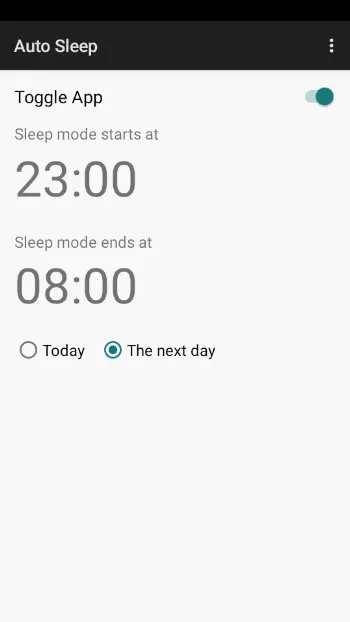
Auto Sleep is a specialized utility designed for users who prefer to rest without interruptions from their devices, whether at night or during the day for those working shift duties.
Initially designed for Android 6.0 Marshmallow, the app is built to remain compatible with most recent Android versions.
How It Works
The app automatically toggles Airplane Mode on or off based on your predefined schedule.
Note: Root access is required for this app to function properly.
Permissions & Privacy
To provide reliable system automation without compromising privacy, Auto Sleep uses:
• Root Access & Secure Settings: Necessary to grant the app elevated privileges and modify protected system-level sleep/Do Not Disturb configurations that are normally restricted by Android.
• Exact Alarm Scheduling: Used to trigger the start and end of sleep mode at precise times, ensuring the app executes its tasks exactly when you scheduled them.
• Run at Startup (Boot Completion): Ensures your sleep schedule is automatically reactivated and recalculated immediately after a device reboot.
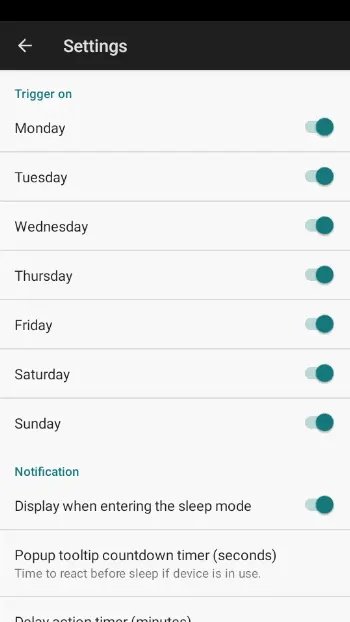
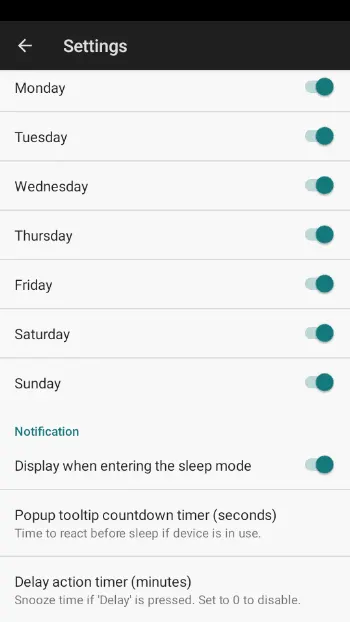
• Notifications: Used to inform you when sleep mode has been enabled automatically and to provide details on when it will be disabled.
Why these are safe:
• No Internet Access: The app does not request the INTERNET permission, meaning it is physically impossible for the app to send any of your settings or data to an external server.
• No Personal Data: The app does not access your contacts, location, messages, or files.
• Open Source Transparency: Every permission used is visible in the source code, and since it relies on Root, you (as the user) maintain ultimate control over when and how the app operates via your Superuser manager.
Auto Sleep is a specialized utility designed for users who prefer to rest without interruptions from their devices, whether at night or during the day for those working shift duties.
Initially designed for Android 6.0 Marshmallow, the app is built to remain compatible with most recent Android versions.
How It Works
The app automatically toggles Airplane Mode on or off based on your predefined schedule.
Note: Root access is required for this app to function properly.
Permissions & Privacy
To provide reliable system automation without compromising privacy, Auto Sleep uses:
• Root Access & Secure Settings: Necessary to grant the app elevated privileges and modify protected system-level sleep/Do Not Disturb configurations that are normally restricted by Android.
• Exact Alarm Scheduling: Used to trigger the start and end of sleep mode at precise times, ensuring the app executes its tasks exactly when you scheduled them.
• Run at Startup (Boot Completion): Ensures your sleep schedule is automatically reactivated and recalculated immediately after a device reboot.
• Notifications: Used to inform you when sleep mode has been enabled automatically and to provide details on when it will be disabled.
Why these are safe:
• No Internet Access: The app does not request the INTERNET permission, meaning it is physically impossible for the app to send any of your settings or data to an external server.
• No Personal Data: The app does not access your contacts, location, messages, or files.
• Open Source Transparency: Every permission used is visible in the source code, and since it relies on Root, you (as the user) maintain ultimate control over when and how the app operates via your Superuser manager.
All versions
| Version | Released | Minimum Android | Size |
|---|---|---|---|
| 3.2 | Nov 5, 2026 | Android 7.0 | 903.9 KB |
| 3.1 | Jun 19, 2026 | Android 7.0 | 894.1 KB |
| 3.0 | Jun 9, 2026 | Android 7.0 | 894.1 KB |
How to install an older version of an Android app · How to install an APK file on Android
From the developer (GitHub)
APK files published by the developer on GitHub. They are signed by the developer and may not install over the other builds on this page (different signature). Links open github.com.
Similar apps
-
 Screenshot Tile (NoRoot)
Customizable screenshot tool with quick settings shortcut and floating button
-
 Coffee
Keep display awake
-
 Mute reminder
Remind you to mute media
-
 Prepaid Balance
Keep track your prepaid balance
-
 Auto Auto-Rotate
Automatically remembers your auto-rotate setting for every app
-
 Drowser
Simple background app killer
-
 Scrambled Exif
Remove the metadata from your pictures before sharing them
-
 WaveUp
Turn on the display by waving