

Device Watch
System monitor widget with per-app usage insights and a charging screensaver
- Developer
- jrs8205
- License
- GPL-3.0-or-later
- Package
org.jarsi.devicewatch- Category
- System
- Latest version
- 1.10.0 · Oct 29, 2026
- Minimum Android
- Android 8.0
Screenshots
Description
Device Watch is an Android device monitor with a home-screen widget, per-app usage insights and an interactive screensaver for charging or docked use. It works completely offline: the app has no internet permission, and every number is real data read from Android and kernel sources — when a value is not available with the permissions granted, the app shows a dash instead of a fabricated value.
Features:
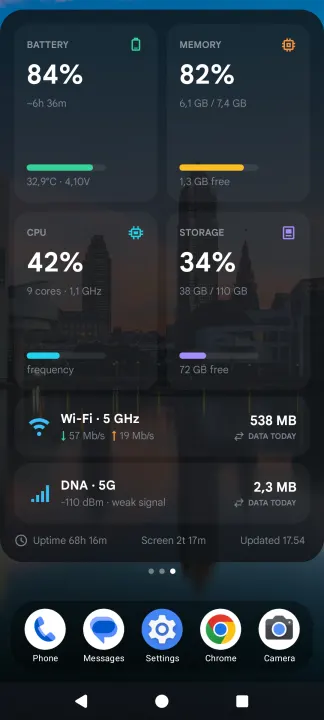
• Resizable home-screen widget: battery, memory, CPU, storage, Wi-Fi, mobile network, data usage, uptime, today's screen time and last update time; compact 2×2 widget with data-period labels; 1×1 widget with one figure of your choice
• Quick Settings tiles and live notification figures of your choice: battery, temperatures, data today, uptime, CPU load, memory, storage
• Data counters per calendar day or per one-month billing cycle with a configurable start day
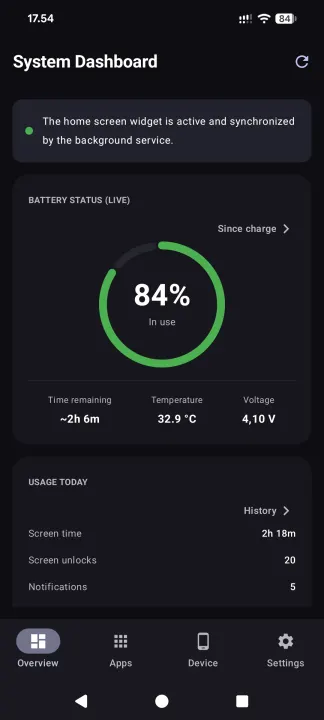
• Tabbed dashboard: Home (live battery ring, usage counters, system meters and live network traffic), Apps (usage insights), Device (hardware, SIM, Wi-Fi, camera and audio details) and Settings
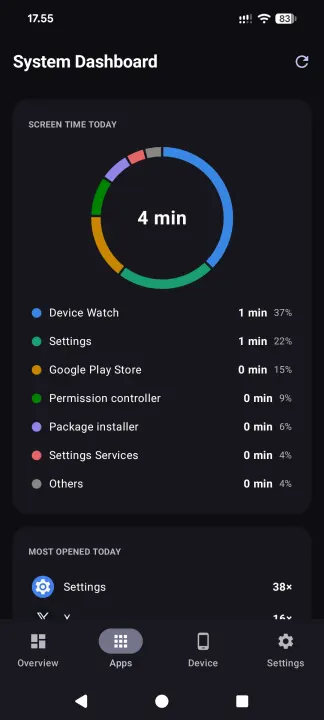
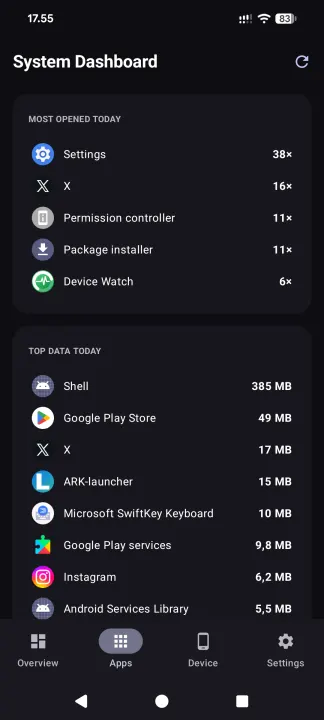
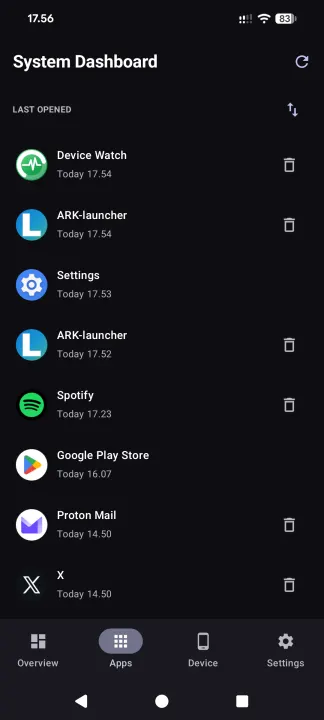
• Screen-time donut of your most-used apps, top data consumers and a last-opened list with per-app uninstall
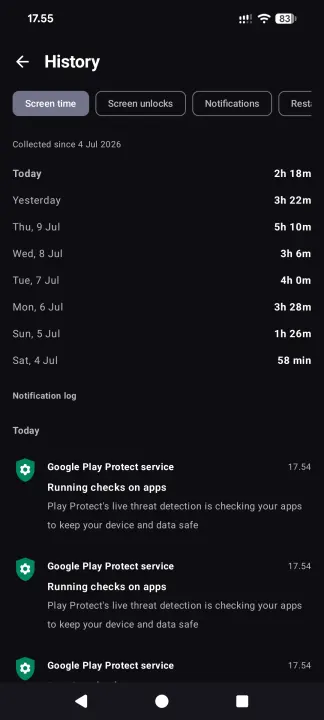
• Usage counters with a private 62-day daily history kept on the device: app screen time, screen-on time, unlocks, filtered notification count, restarts, charging sessions and used storage
• Battery history and charging sessions for 14 days, with temperatures and charging rates
• Optional charge reminders, mobile-data quota warnings and alerts for a hot battery, low storage or fast battery drain
• CSV exports and a self-contained HTML report with charts, search and date filters
• On-device notification log with 7-day retention
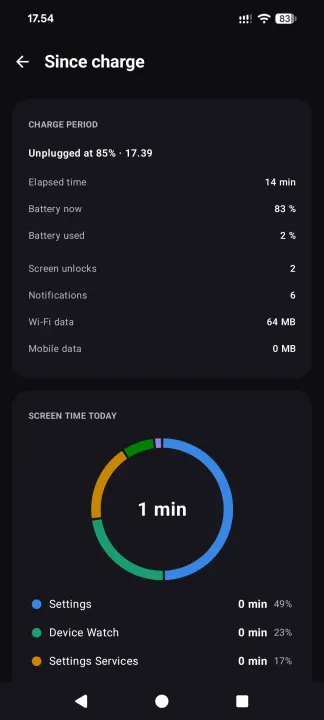
• Since-charge view: elapsed time, battery drop, average drain and per-app screen time since the battery was last charged full or unplugged
• Optional extended access through Shizuku or root, off by default: the real CPU load, chip temperatures, graphics load, the battery's own wear figures, and Android's battery statistics since the last charge (drain with the screen on and off, each app's share, what kept the phone awake)
• With root: a Kernel page (each group of processor cores with its speed, limit and range, heat throttling, GPU speeds, zRAM, kernel version, SELinux, temperature sensors) and processor profiles — Power saving, Balanced, Stock (full speed) or Custom per group of cores — that set only each group's top speed limit and return the phone's own limits on Stock, when root is switched off and at every restart unless you choose otherwise
• Privacy log with extended access: Android's own record of which apps used the camera, the microphone and the location, when, for how long and from the background or not, and on Android 17 which requests were refused — shown, never stored
• System apps page with extended access: remove preinstalled apps you do not use, for this user only, with a question before every removal, a warning for the apps the phone depends on, and Restore for a removed app; the apps the phone cannot do without cannot be removed from here
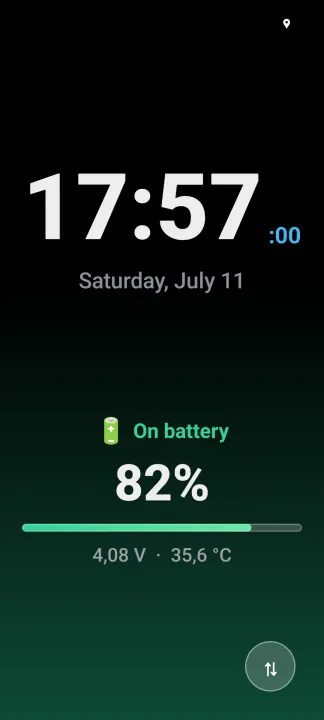
• Interactive screensaver with a large clock, the phone's name, next alarm, icons of unread notifications, charging power in watts, battery-tinted background, optional night dimming, an optional start as soon as charging begins and a battery-full notification
The app uploads nothing. Android backup carries settings only, excluding history, notification content and delivered-alert flags. You can choose to share CSV/HTML exports, including notification text, through another app.
Features:
• Resizable home-screen widget: battery, memory, CPU, storage, Wi-Fi, mobile network, data usage, uptime, today's screen time and last update time; compact 2×2 widget with data-period labels; 1×1 widget with one figure of your choice
• Quick Settings tiles and live notification figures of your choice: battery, temperatures, data today, uptime, CPU load, memory, storage
• Data counters per calendar day or per one-month billing cycle with a configurable start day
• Tabbed dashboard: Home (live battery ring, usage counters, system meters and live network traffic), Apps (usage insights), Device (hardware, SIM, Wi-Fi, camera and audio details) and Settings
• Screen-time donut of your most-used apps, top data consumers and a last-opened list with per-app uninstall
• Usage counters with a private 62-day daily history kept on the device: app screen time, screen-on time, unlocks, filtered notification count, restarts, charging sessions and used storage
• Battery history and charging sessions for 14 days, with temperatures and charging rates
• Optional charge reminders, mobile-data quota warnings and alerts for a hot battery, low storage or fast battery drain
• CSV exports and a self-contained HTML report with charts, search and date filters
• On-device notification log with 7-day retention
• Since-charge view: elapsed time, battery drop, average drain and per-app screen time since the battery was last charged full or unplugged
• Optional extended access through Shizuku or root, off by default: the real CPU load, chip temperatures, graphics load, the battery's own wear figures, and Android's battery statistics since the last charge (drain with the screen on and off, each app's share, what kept the phone awake)
• With root: a Kernel page (each group of processor cores with its speed, limit and range, heat throttling, GPU speeds, zRAM, kernel version, SELinux, temperature sensors) and processor profiles — Power saving, Balanced, Stock (full speed) or Custom per group of cores — that set only each group's top speed limit and return the phone's own limits on Stock, when root is switched off and at every restart unless you choose otherwise
• Privacy log with extended access: Android's own record of which apps used the camera, the microphone and the location, when, for how long and from the background or not, and on Android 17 which requests were refused — shown, never stored
• System apps page with extended access: remove preinstalled apps you do not use, for this user only, with a question before every removal, a warning for the apps the phone depends on, and Restore for a removed app; the apps the phone cannot do without cannot be removed from here
• Interactive screensaver with a large clock, the phone's name, next alarm, icons of unread notifications, charging power in watts, battery-tinted background, optional night dimming, an optional start as soon as charging begins and a battery-full notification
The app uploads nothing. Android backup carries settings only, excluding history, notification content and delivered-alert flags. You can choose to share CSV/HTML exports, including notification text, through another app.
All versions
| Version | Released | Minimum Android | Size |
|---|---|---|---|
| 1.10.0 | Oct 29, 2026 | Android 8.0 | 4.6 MB |
| 1.9.0 | Oct 16, 2026 | Android 8.0 | 4.5 MB |
| 1.8.0 | Oct 15, 2026 | Android 8.0 | 4.3 MB |
| 1.7.1 | Oct 14, 2026 | Android 8.0 | 4.2 MB |
| 1.7.0 | Oct 5, 2026 | Android 8.0 | 4.2 MB |
| 1.6.1 | Oct 1, 2026 | Android 8.0 | 4.1 MB |
| 1.5.0 | Aug 17, 2026 | Android 8.0 | 3.8 MB |
| 1.4.1 | Jul 18, 2026 | Android 8.0 | 3.7 MB |
How to install an older version of an Android app · How to install an APK file on Android
From the developer (GitHub)
APK files published by the developer on GitHub. They are signed by the developer and may not install over the other builds on this page (different signature). Links open github.com.
Similar apps
-
 Screenshot Tile (NoRoot)
Customizable screenshot tool with quick settings shortcut and floating button
-
 Coffee
Keep display awake
-
 Mute reminder
Remind you to mute media
-
 Prepaid Balance
Keep track your prepaid balance
-
 Auto Auto-Rotate
Automatically remembers your auto-rotate setting for every app
-
 Drowser
Simple background app killer
-
 Scrambled Exif
Remove the metadata from your pictures before sharing them
-
 WaveUp
Turn on the display by waving