

StudFinder - Stud Finder for Android
Find wall studs with your Android's built-in magnetometer. Free, no ads.
- Developer
- toadlyBroodle
- License
- Apache-2.0
- Package
org.bitanon.studfinder- Category
- System
- Latest version
- 2.0.2 · Sep 25, 2026
- Minimum Android
- Android 5.0
Screenshots



Description
StudFinder uses your Android phone's built-in magnetometer (compass sensor) to detect metal screws and nails inside wall studs. No paid subscription, no ads, no tracking — just a tool that works.
How it works:
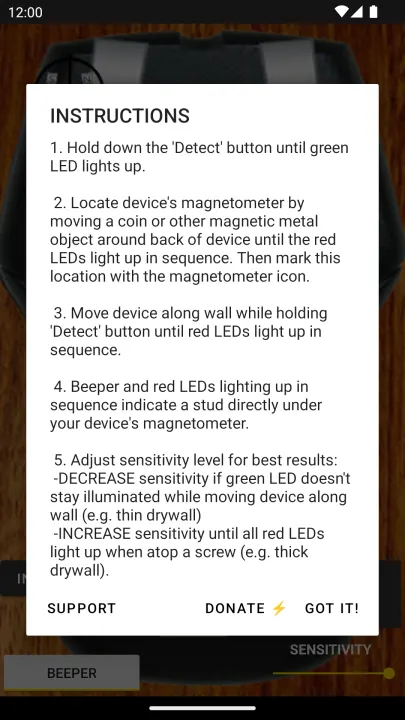
Your phone's magnetometer measures the local magnetic field. Wood studs are held in place by metal fasteners (screws or nails) that disrupt the field. StudFinder reads that disruption and shows it on a live LED bar display, letting you sweep along the wall and pinpoint where studs are.
How to use:
1. Calibrate by moving a coin slowly around the back of your phone until the LED sequence completes.
2. Hold the phone flat against the wall.
3. Sweep slowly along the wall horizontally.
4. The LEDs light up red when the magnetometer detects a metal fastener inside a stud.
5. Mark the position and repeat to confirm the stud's width.
Limitations:
The magnetometer detects metal, not wood directly. It works reliably on standard wood-framed walls with metal screws or nails. Concrete walls, steel studs, or plaster-over-metal-lath surfaces give different results — consider a dedicated hardware stud finder for those.
Open source and F-Droid:
StudFinder is fully open-source (Apache 2.0) and distributed through F-Droid. Zero proprietary dependencies: no AdMob, no Firebase, no Google Play Services. The app requires no INTERNET permission and works entirely offline. Source code: github.com/clankwright/StudFinderAndroid
How it works:
Your phone's magnetometer measures the local magnetic field. Wood studs are held in place by metal fasteners (screws or nails) that disrupt the field. StudFinder reads that disruption and shows it on a live LED bar display, letting you sweep along the wall and pinpoint where studs are.
How to use:
1. Calibrate by moving a coin slowly around the back of your phone until the LED sequence completes.
2. Hold the phone flat against the wall.
3. Sweep slowly along the wall horizontally.
4. The LEDs light up red when the magnetometer detects a metal fastener inside a stud.
5. Mark the position and repeat to confirm the stud's width.
Limitations:
The magnetometer detects metal, not wood directly. It works reliably on standard wood-framed walls with metal screws or nails. Concrete walls, steel studs, or plaster-over-metal-lath surfaces give different results — consider a dedicated hardware stud finder for those.
Open source and F-Droid:
StudFinder is fully open-source (Apache 2.0) and distributed through F-Droid. Zero proprietary dependencies: no AdMob, no Firebase, no Google Play Services. The app requires no INTERNET permission and works entirely offline. Source code: github.com/clankwright/StudFinderAndroid
All versions
| Version | Released | Minimum Android | Size |
|---|---|---|---|
| 2.0.2 | Sep 25, 2026 | Android 5.0 | 2.5 MB |
| 2.0.1 | Jul 19, 2026 | Android 5.0 | 2.5 MB |
How to install an older version of an Android app · How to install an APK file on Android
From the developer (GitHub)
APK files published by the developer on GitHub. They are signed by the developer and may not install over the other builds on this page (different signature). Links open github.com.
Similar apps
-
 Screenshot Tile (NoRoot)
Customizable screenshot tool with quick settings shortcut and floating button
-
 Coffee
Keep display awake
-
 Mute reminder
Remind you to mute media
-
 Prepaid Balance
Keep track your prepaid balance
-
 Auto Auto-Rotate
Automatically remembers your auto-rotate setting for every app
-
 Drowser
Simple background app killer
-
 Scrambled Exif
Remove the metadata from your pictures before sharing them
-
 WaveUp
Turn on the display by waving