

droidVNC-NG
VNC server app that does not require root privileges.
- Developer
- Christian Beier
- License
- GPL-2.0-only
- Package
net.christianbeier.droidvnc_ng- Category
- Connectivity, Remote Access
- Latest version
- 2.22.2 · Nov 1, 2026
- Minimum Android
- Android 7.0
Screenshots
Description
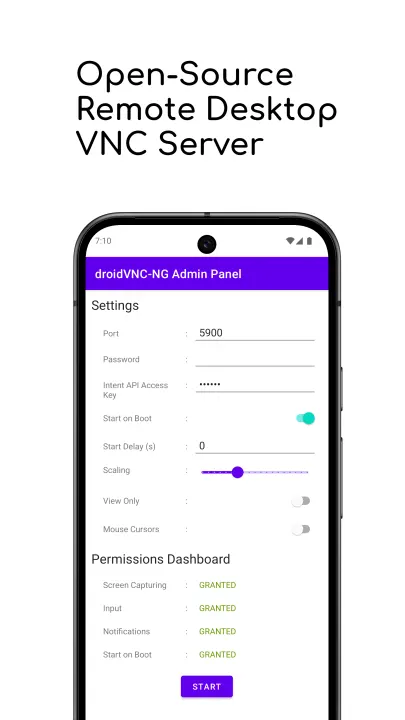
Turn your Android device into a remote-controlled workstation with droidVNC-NG, a powerful, open-source VNC server designed for local networks. This app offers a versatile solution for remote access.
💻 Remote Control & Interaction
• Screen Sharing: Share your device's screen over the network, with optional scaling on the server side for better performance.
• Remote Control: Use your VNC client to control your device, including mouse and keyboard input. To enable this, you need to activate the AccessibilityService for the app on your device.
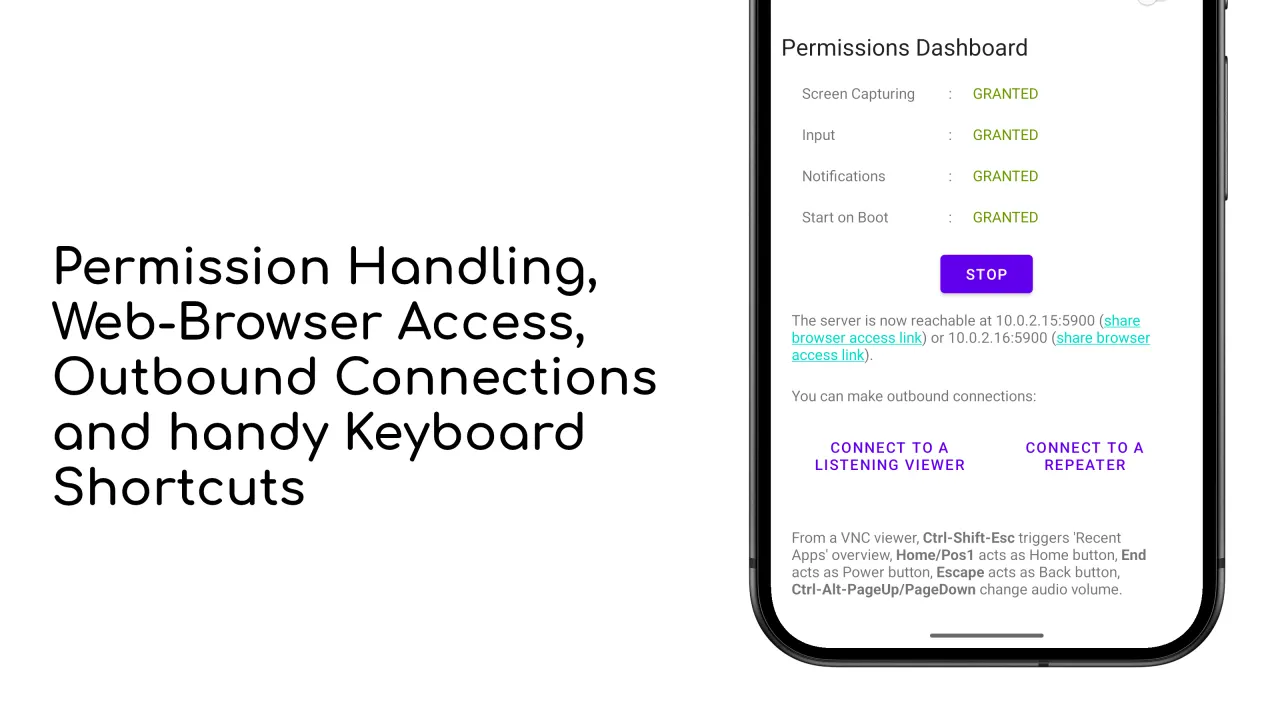
• Special Key Functions: Remotely trigger key functions like 'Recent Apps,' Home button, Back button, Power and volume controls.
• Text Copy & Paste: Support for copying and pasting text from your device to the VNC client. Note that server-to-client copy & paste works automatically for text selected in editable text fields or manually by sharing text to droidVNC-NG via Android's Share-To functionality.
• Multiple Mouse Pointers: Display different mouse pointers for each connected client on your device.
🌴 Comfort Features
• Web Browser Access: Control your device’s shared screen directly from a web browser, without needing a separate VNC client.
• Auto-Discovery: droidVNC-NG uses Zeroconf/Bonjour for easy discovery by native clients.
🔐 Security & Configuration
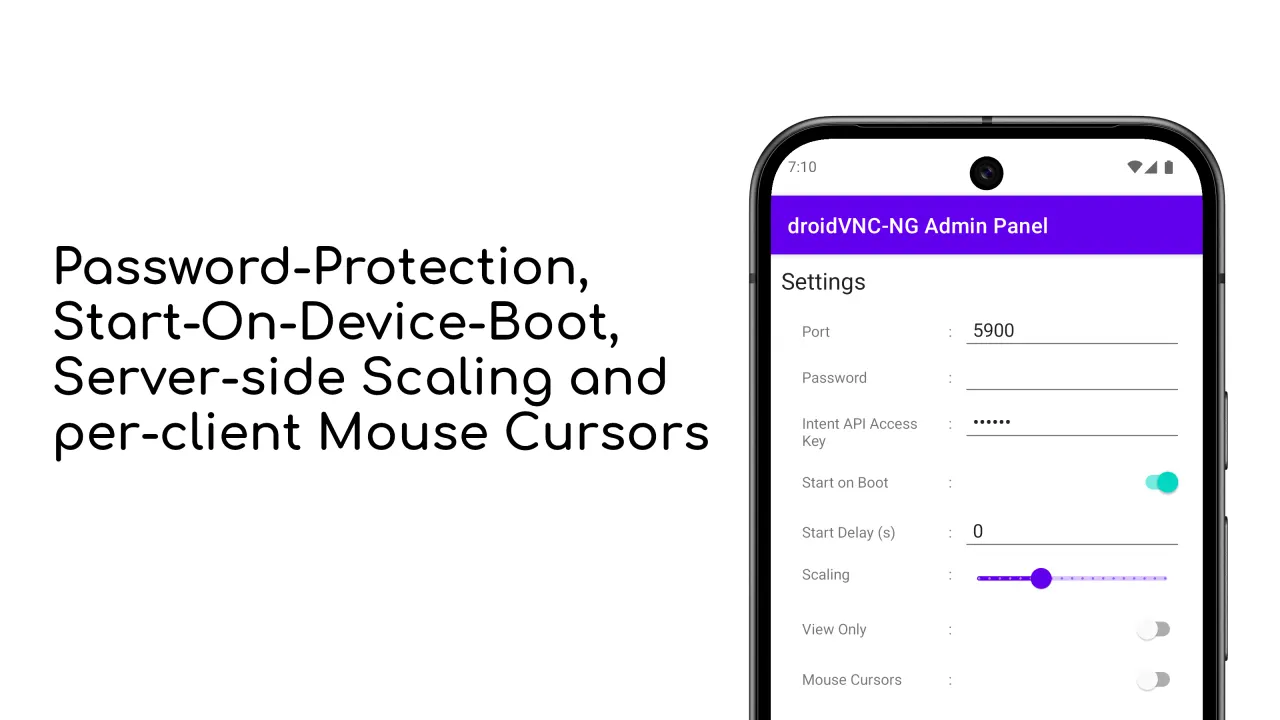
• Password Protection: Protect your VNC connection with a password. Note that setting a password is mandatory in case you want to access the server using MacOS's built-in Screen Sharing app.
• Custom Port Settings: Choose which port the VNC server uses for connections.
• Startup on Boot: Automatically start the VNC service when your device boots up. On Android 11 and newer this also works with kiosk-mode launchers and lock task mode.
• Default Configuration: Load a default configuration from a JSON file or Mobile Device Management.
🚀 Advanced VNC Features
• Reverse VNC: Allow your device to initiate the VNC connection to a client without opening ports on your router.
• Repeater Support: Connect to a repeater that supports UltraVNC-style Mode-2 for more flexible networking.
Please note that more features are still being added to droidVNC-NG. Please report any issues and feature requests at https://github.com/bk138/droidVNC-NG
💻 Remote Control & Interaction
• Screen Sharing: Share your device's screen over the network, with optional scaling on the server side for better performance.
• Remote Control: Use your VNC client to control your device, including mouse and keyboard input. To enable this, you need to activate the AccessibilityService for the app on your device.
• Special Key Functions: Remotely trigger key functions like 'Recent Apps,' Home button, Back button, Power and volume controls.
• Text Copy & Paste: Support for copying and pasting text from your device to the VNC client. Note that server-to-client copy & paste works automatically for text selected in editable text fields or manually by sharing text to droidVNC-NG via Android's Share-To functionality.
• Multiple Mouse Pointers: Display different mouse pointers for each connected client on your device.
🌴 Comfort Features
• Web Browser Access: Control your device’s shared screen directly from a web browser, without needing a separate VNC client.
• Auto-Discovery: droidVNC-NG uses Zeroconf/Bonjour for easy discovery by native clients.
🔐 Security & Configuration
• Password Protection: Protect your VNC connection with a password. Note that setting a password is mandatory in case you want to access the server using MacOS's built-in Screen Sharing app.
• Custom Port Settings: Choose which port the VNC server uses for connections.
• Startup on Boot: Automatically start the VNC service when your device boots up. On Android 11 and newer this also works with kiosk-mode launchers and lock task mode.
• Default Configuration: Load a default configuration from a JSON file or Mobile Device Management.
🚀 Advanced VNC Features
• Reverse VNC: Allow your device to initiate the VNC connection to a client without opening ports on your router.
• Repeater Support: Connect to a repeater that supports UltraVNC-style Mode-2 for more flexible networking.
Please note that more features are still being added to droidVNC-NG. Please report any issues and feature requests at https://github.com/bk138/droidVNC-NG
All versions
| Version | Released | Minimum Android | Size |
|---|---|---|---|
| 2.22.2 | Nov 1, 2026 | Android 7.0 | 6.3 MB |
| 2.22.1 | Oct 22, 2026 | Android 7.0 | 6.3 MB |
| 2.22.0 | Sep 19, 2026 | Android 7.0 | 6.3 MB |
| 2.21.0 | Aug 27, 2026 | Android 7.0 | 6.2 MB |
| 2.20.3 | Aug 5, 2026 | Android 7.0 | 10 MB |
| 2.20.2 | Aug 4, 2026 | Android 7.0 | 10 MB |
| 2.20.1 | Jul 10, 2026 | Android 7.0 | 10 MB |
| 2.20.0 | Jun 16, 2026 | Android 7.0 | 10 MB |
| 2.19.0 | May 14, 2026 | Android 7.0 | 9.6 MB |
| 2.18.2 | Mar 15, 2026 | Android 7.0 | 9.7 MB |
| 2.18.1 | Dec 30, 2025 | Android 7.0 | 9.7 MB |
| 2.18.0 | Dec 18, 2025 | Android 7.0 | 9.7 MB |
| 2.17.0 | Dec 1, 2025 | Android 7.0 | 9.7 MB |
| 2.16.1 | Nov 6, 2025 | Android 7.0 | 8.9 MB |
| 2.16.0 | Oct 30, 2025 | Android 7.0 | 8.9 MB |
| 2.15.0 | Sep 23, 2025 | Android 7.0 | 8.9 MB |
| 2.14.0 | Aug 17, 2025 | Android 7.0 | 8.5 MB |
| 2.13.0 | Jul 3, 2025 | Android 7.0 | 8.5 MB |
| 2.12.0 | Jun 1, 2025 | Android 7.0 | 8.4 MB |
| 2.11.0 | May 24, 2025 | Android 7.0 | 8.4 MB |
| 2.10.2 | Mar 31, 2025 | Android 7.0 | 8.2 MB |
| 2.10.1 | Mar 26, 2025 | Android 7.0 | 8.2 MB |
| 2.9.3 | Feb 16, 2025 | Android 7.0 | 8.1 MB |
| 2.9.2 | Feb 13, 2025 | Android 7.0 | 8.1 MB |
| 2.9.1 | Feb 11, 2025 | Android 7.0 | 8.1 MB |
| 2.9.0 | Feb 6, 2025 | Android 7.0 | 8.1 MB |
| 2.8.0 | Dec 21, 2024 | Android 7.0 | 8.1 MB |
| 2.7.3 | Oct 30, 2024 | Android 7.0 | 8.1 MB |
| 2.7.2 | Sep 16, 2024 | Android 7.0 | 8.1 MB |
| 2.7.1 | Sep 12, 2024 | Android 7.0 | 8.1 MB |
| 2.6.0 | Aug 26, 2024 | Android 7.0 | 8.2 MB |
| 2.5.0 | Jul 10, 2024 | Android 7.0 | 7.8 MB |
| 2.4.1 | Jun 24, 2024 | Android 7.0 | 7.8 MB |
| 2.4.0 | May 20, 2024 | Android 7.0 | 7.8 MB |
| 2.3.1 | May 9, 2024 | Android 7.0 | 7.8 MB |
| 2.3.0 | May 3, 2024 | Android 7.0 | 7.8 MB |
| 2.2.0 | Feb 11, 2024 | Android 7.0 | 7.7 MB |
| 2.1.7 | Dec 25, 2023 | Android 7.0 | 7.7 MB |
| 2.1.6 | Dec 1, 2023 | Android 7.0 | 8 MB |
| 2.1.5 | Oct 25, 2023 | Android 7.0 | 8 MB |
| 2.1.4 | Oct 20, 2023 | Android 7.0 | 8 MB |
| 2.1.3 | Sep 1, 2023 | Android 7.0 | 7.9 MB |
| 2.1.2 | Aug 17, 2023 | Android 7.0 | 7.9 MB |
| 2.1.1 | Aug 14, 2023 | Android 7.0 | 7.9 MB |
| 2.0.0 | Jul 29, 2023 | Android 7.0 | 7.9 MB |
| 1.4.0 | Jun 18, 2023 | Android 7.0 | 7.8 MB |
| 1.3.5 | Nov 16, 2022 | Android 7.0 | 6.8 MB |
| 1.3.4 | Sep 29, 2022 | Android 7.0 | 6.8 MB |
| 1.3.3 | Aug 17, 2022 | Android 7.0 | 6.8 MB |
| 1.3.2 | Aug 7, 2022 | Android 7.0 | 6.8 MB |
| 1.3.1 | Jul 21, 2022 | Android 7.0 | 6.8 MB |
| 1.3.0 | May 20, 2022 | Android 7.0 | 6.3 MB |
| 1.2.6 | Apr 18, 2022 | Android 7.0 | 6.3 MB |
| 1.2.5 | Apr 13, 2022 | Android 7.0 | 6.3 MB |
| 1.2.4 | Nov 7, 2021 | Android 7.0 | 6.3 MB |
| 1.2.3 | Aug 29, 2021 | Android 7.0 | 6.3 MB |
| 1.2.1 | Aug 21, 2021 | Android 7.0 | 6.3 MB |
| 1.2.0 | Aug 10, 2021 | Android 7.0 | 6.3 MB |
How to install an older version of an Android app · How to install an APK file on Android
From the developer (GitHub)
APK files published by the developer on GitHub. They are signed by the developer and may not install over the other builds on this page (different signature). Links open github.com.
Similar apps
-
 URLCheck
Allows analyzing (or sharing) URLs before opening them.
-
 Thunderbird: Free Your Inbox
Thunderbird is a 100% open source, privacy focused email app.
-
 Thunderbird Beta for Testers
Thunderbird is a 100% open source, privacy focused email app.
-
 NeoStumbler
Application for collecting wireless networks to geolocation services
-
 MultiVNC
VNC viewer that aims to be easy to use and fast
-
 Home Assistant
Control all your devices in your Home Assistant instance
-
 Mastodon
Where conversations happen
-
 Presence Publisher
Regularly publish to an MQTT topic