

Pineapple Lock Screen (OSS)
Help you turn your phone screen off (lock screen) without using power button.
- Developer
- Gary Wang
- License
- GPL-3.0-or-later
- Package
net.blumia.pineapple.lockscreen.oss- Category
- System
- Latest version
- 3.2.0-oss · Oct 22, 2026
- Minimum Android
- Android 9
Screenshots
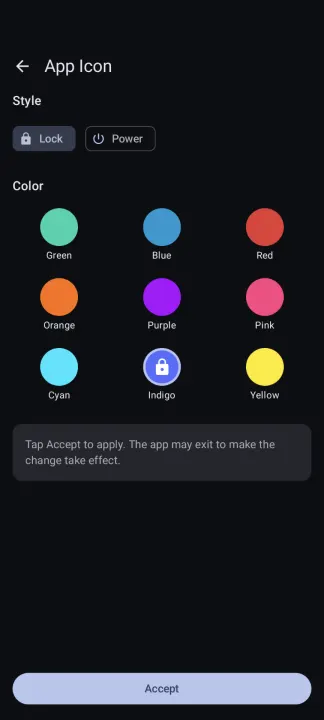
Description
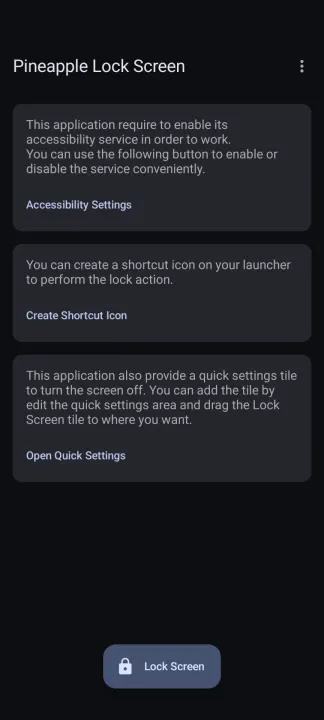
Pineapple Lock Screen (OSS version) is a small, simple, clean, and fast application that helps you turn your phone screen off (lock screen) without using the physical power button. This could help you increase the life of your physical power button, just in case your power physical button is near broken.
This application makes use of the Android accessibility feature so it doesn't require root privilege to work. Alternatively, A Shizuku-based mode is also available for those who cannot use the accessibility feature.
Pineapple Lock Screen (OSS version) is the Open Source Software version of the Pineapple Lock Screen app. It has the identical functionality as the paid version (Plus version) on the store. If you do think this app is helpful, you can buy the plus version to show your support at: https://link.blumia.net/lockscreenplus-playstore
FEATURES
✓ One tap to lock the screen
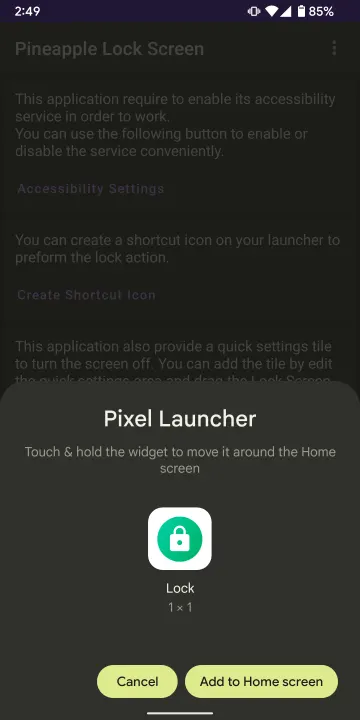
✓ You can create a shortcut to lock the screen without opening the application
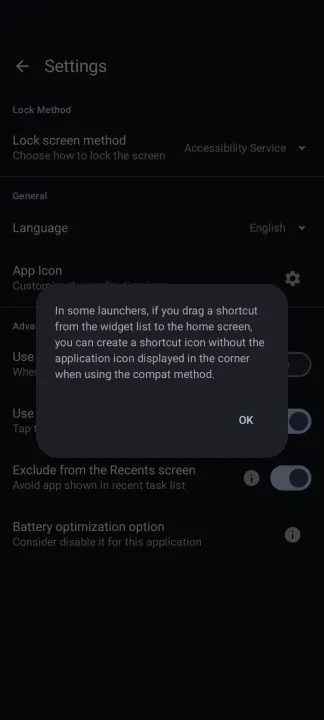
✓ Create shortcut without the app icon in the corner*
✓ Add Quick Settings tile to turn off the screen
✓ Follow system color theme (light/dark)
✓ Doesn't require root
✓ No AD
USAGE
Once installed, you need to enable its associated accessibility service to work. Just follow the in-application description and nothing more than that**.
Please note that every time you reboot or for any other reason the application is force stopped, you need to re-enable the accessibility service.
You can also create a shortcut on your launcher and/or add a Quick Settings tile to turn the screen off without entering the application, it's not required and you can also remove the shortcut when you no longer need it.
• This feature requires launcher support, tested under Pixel Launcher and Microsoft Launcher. Behavior can be toggled in the Settings screen of this app.
** Since Android 13, side-loaded package need user manually allow restricted settings before using the accessibility feature. You can learn more about it at https://support.google.com/android/answer/12623953 .
This application makes use of the Android accessibility feature so it doesn't require root privilege to work. Alternatively, A Shizuku-based mode is also available for those who cannot use the accessibility feature.
Pineapple Lock Screen (OSS version) is the Open Source Software version of the Pineapple Lock Screen app. It has the identical functionality as the paid version (Plus version) on the store. If you do think this app is helpful, you can buy the plus version to show your support at: https://link.blumia.net/lockscreenplus-playstore
FEATURES
✓ One tap to lock the screen
✓ You can create a shortcut to lock the screen without opening the application
✓ Create shortcut without the app icon in the corner*
✓ Add Quick Settings tile to turn off the screen
✓ Follow system color theme (light/dark)
✓ Doesn't require root
✓ No AD
USAGE
Once installed, you need to enable its associated accessibility service to work. Just follow the in-application description and nothing more than that**.
Please note that every time you reboot or for any other reason the application is force stopped, you need to re-enable the accessibility service.
You can also create a shortcut on your launcher and/or add a Quick Settings tile to turn the screen off without entering the application, it's not required and you can also remove the shortcut when you no longer need it.
• This feature requires launcher support, tested under Pixel Launcher and Microsoft Launcher. Behavior can be toggled in the Settings screen of this app.
** Since Android 13, side-loaded package need user manually allow restricted settings before using the accessibility feature. You can learn more about it at https://support.google.com/android/answer/12623953 .
All versions
| Version | Released | Minimum Android | Size |
|---|---|---|---|
| 3.2.0-oss | Oct 22, 2026 | Android 9 | 4.8 MB |
| 3.1.0-oss | Oct 4, 2026 | Android 9 | 4.8 MB |
| 3.0.2-oss | Aug 26, 2026 | Android 9 | 4.8 MB |
| 3.0.1.1-oss | Jul 29, 2026 | Android 9 | 4.8 MB |
| 3.0.0-oss | Jul 10, 2026 | Android 9 | 4.8 MB |
| 2.2.1-oss | Jun 3, 2026 | Android 9 | 4.7 MB |
| 2.1.5-oss | Mar 24, 2026 | Android 9 | 4.6 MB |
| 2.1.4-oss | Feb 4, 2026 | Android 9 | 4.8 MB |
| 2.1.3-oss | Dec 27, 2025 | Android 9 | 4.9 MB |
| 2.1.2-oss | Nov 23, 2025 | Android 9 | 4.6 MB |
| 2.1.1-oss | Sep 3, 2025 | Android 9 | 4.5 MB |
| 2.1.0-oss | Jun 1, 2025 | Android 9 | 4.5 MB |
| 2.0.1-oss | Mar 26, 2025 | Android 9 | 4.5 MB |
| 2.0.0-oss | Nov 26, 2024 | Android 9 | 4.5 MB |
| 1.4.0-oss | Oct 5, 2024 | Android 9 | 4.3 MB |
| 1.3.2-oss | Aug 3, 2024 | Android 9 | 4.1 MB |
| 1.3.1-oss | Apr 9, 2024 | Android 9 | 4.1 MB |
| 1.3.0-oss | Oct 20, 2023 | Android 9 | 4 MB |
| 1.2.3-oss | Sep 12, 2023 | Android 9 | 5 MB |
| 1.2.2-oss | Apr 1, 2023 | Android 9 | 6.1 MB |
| 1.2.1-oss | Feb 6, 2023 | Android 9 | 6.1 MB |
| 1.2.0-oss | Jan 16, 2023 | Android 9 | 19.2 MB |
| 1.1.1-oss | Jul 12, 2022 | Android 9 | 12.5 MB |
| 1.1.0-oss | Apr 18, 2022 | Android 9 | 12.5 MB |
How to install an older version of an Android app · How to install an APK file on Android
Similar apps
-
 Screenshot Tile (NoRoot)
Customizable screenshot tool with quick settings shortcut and floating button
-
 Coffee
Keep display awake
-
 Mute reminder
Remind you to mute media
-
 Prepaid Balance
Keep track your prepaid balance
-
 Auto Auto-Rotate
Automatically remembers your auto-rotate setting for every app
-
 Drowser
Simple background app killer
-
 Scrambled Exif
Remove the metadata from your pictures before sharing them
-
 WaveUp
Turn on the display by waving