

Circle to Share
Crop and share a screenshot from anywhere; nothing is saved unless you ask.
- Developer
- Woshicado
- License
- GPL-3.0-or-later
- Package
eu.woshicado.circletoshare- Category
- Graphics, System
- Latest version
- 0.3.4 · Nov 11, 2026
- Minimum Android
- Android 11
Screenshots
Description
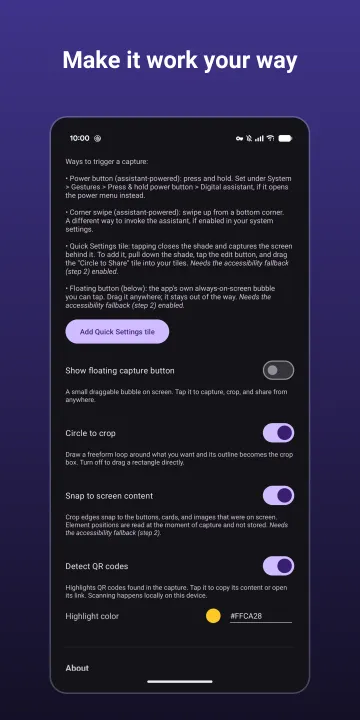
Circle to Share captures the screen from anywhere, lets you crop it, and shares, copies or saves the result — nothing is kept on your device unless you ask.
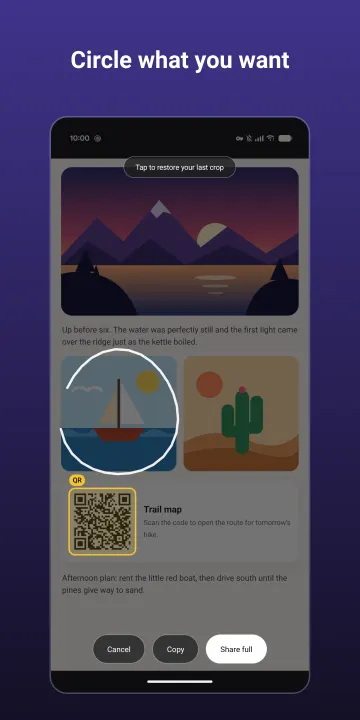
Trigger it, the screen freezes, and you can circle what you want.
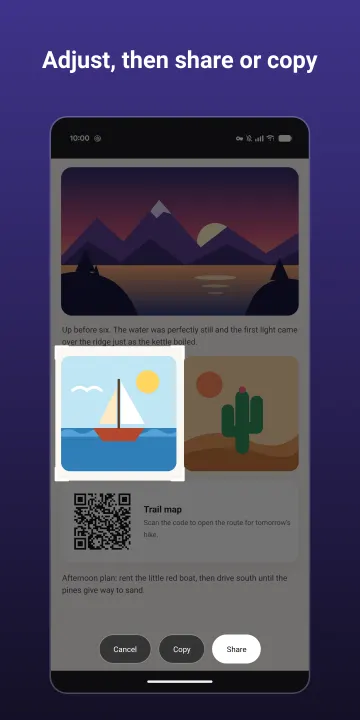
Then tap Share, Copy or Save.
A shared or copied crop lives in the app's private cache only and never lands in your gallery;
Save puts it into your Screenshots folder.
How to open it (use any of them):
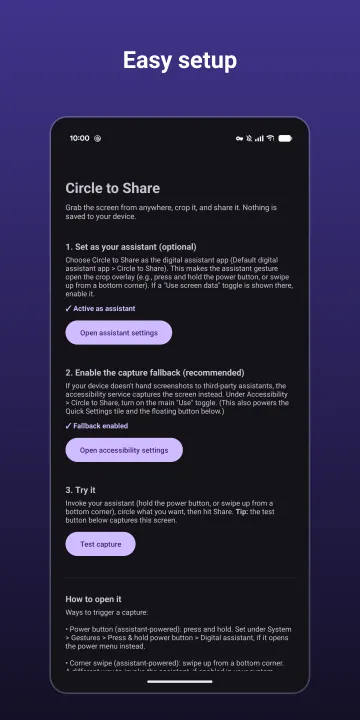
• Power button (assistant-powered): press and hold.
• Corner swipe (assistant-powered): swipe up from a bottom corner.
• Quick Settings tile: tap it and the shade closes before the capture.
• Floating bubble: an optional, always-on-screen button you can tap from any app and drag out of the way.
Highlights:
• No permissions: no internet, storage, camera, microphone, or location.
• Nothing is saved to your device (unless you tap Save).
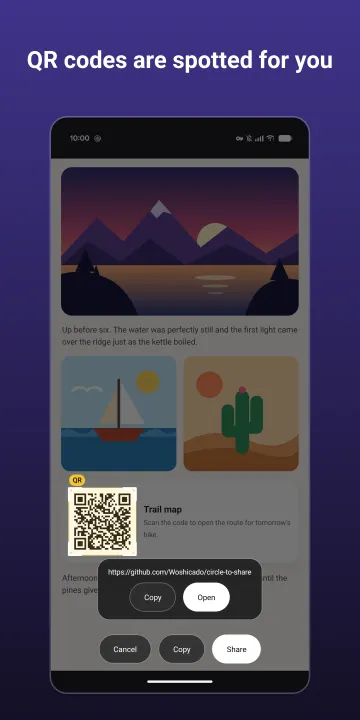
• QR codes in the capture are highlighted, and can be opened, copied, or shared.
• Optional snapping: crop edges align with the buttons, cards and images that were on screen.
Accessibility service: the Quick Settings tile, the floating bubble, snapping, and a capture fallback for devices that don't hand screenshots to third-party assistants use Android's AccessibilityService API. It is optional and off until you agree to the in-app disclosure and switch it on. It is used only to capture the screen and read element positions at the moment you trigger a capture.
Note: screens that block screenshots (banking apps, DRM video) cannot be captured.
Trigger it, the screen freezes, and you can circle what you want.
Then tap Share, Copy or Save.
A shared or copied crop lives in the app's private cache only and never lands in your gallery;
Save puts it into your Screenshots folder.
How to open it (use any of them):
• Power button (assistant-powered): press and hold.
• Corner swipe (assistant-powered): swipe up from a bottom corner.
• Quick Settings tile: tap it and the shade closes before the capture.
• Floating bubble: an optional, always-on-screen button you can tap from any app and drag out of the way.
Highlights:
• No permissions: no internet, storage, camera, microphone, or location.
• Nothing is saved to your device (unless you tap Save).
• QR codes in the capture are highlighted, and can be opened, copied, or shared.
• Optional snapping: crop edges align with the buttons, cards and images that were on screen.
Accessibility service: the Quick Settings tile, the floating bubble, snapping, and a capture fallback for devices that don't hand screenshots to third-party assistants use Android's AccessibilityService API. It is optional and off until you agree to the in-app disclosure and switch it on. It is used only to capture the screen and read element positions at the moment you trigger a capture.
Note: screens that block screenshots (banking apps, DRM video) cannot be captured.
All versions
| Version | Released | Minimum Android | Size |
|---|---|---|---|
| 0.3.4 | Nov 11, 2026 | Android 11 | 4.7 MB |
| 0.3.3 | Nov 4, 2026 | Android 11 | 4.7 MB |
How to install an older version of an Android app · How to install an APK file on Android
From the developer (GitHub)
APK files published by the developer on GitHub. They are signed by the developer and may not install over the other builds on this page (different signature). Links open github.com.
Similar apps
-
 Screenshot Tile (NoRoot)
Customizable screenshot tool with quick settings shortcut and floating button
-
 Coffee
Keep display awake
-
 Mute reminder
Remind you to mute media
-
 Prepaid Balance
Keep track your prepaid balance
-
 Auto Auto-Rotate
Automatically remembers your auto-rotate setting for every app
-
 Drowser
Simple background app killer
-
 Scrambled Exif
Remove the metadata from your pictures before sharing them
-
 WaveUp
Turn on the display by waving