

SwiftSlate
System-wide AI text assistant — type a trigger, get instant text transformation
Promotes non-free network services
- Developer
- Musheer Alam
- License
- MIT
- Package
com.musheer360.swiftslate- Category
- Writing
- Latest version
- 1.0.83 · Nov 9, 2026
- Minimum Android
- Android 6
Screenshots
Description
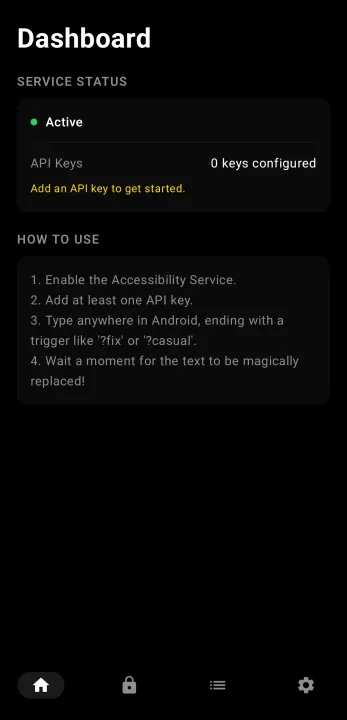
SwiftSlate is a system-wide AI text assistant for Android. Type a trigger like "?fix" at the end of any text, in any app, and watch it get replaced instantly.
It works in most apps — WhatsApp, Gmail, Twitter/X, Messages, Notes, and more. No copy-pasting. No app switching. Just type and go.
Features:
• Works system-wide via Android's Accessibility Service
• Also works from the text-selection menu in any app — no accessibility permission required
• Instant inline text replacement — AI response replaces your text directly
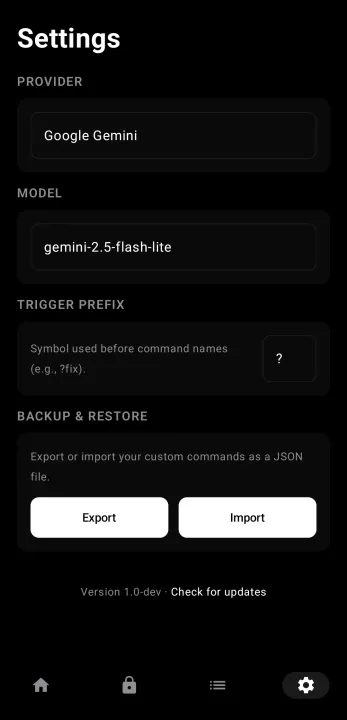
• Multi-provider AI: Google Gemini, Groq, or any OpenAI-compatible endpoint (including local LLMs like Ollama and LM Studio)
• Text replacer commands run entirely offline with zero latency
• Multi-key rotation with automatic rate-limit handling
• API keys encrypted with AES-256-GCM via Android Keystore
• AMOLED dark theme and light theme with Material 3
• Localized in 40 languages — the app follows your device language automatically
• Zero analytics, zero tracking, zero telemetry
• Tiny APK (~1.7 MB) with zero third-party networking dependencies
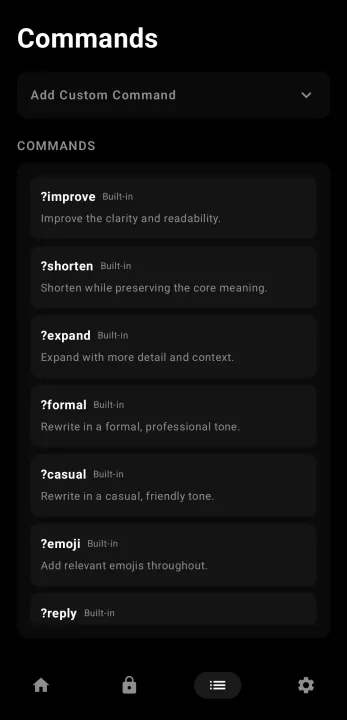
Built-in commands:
• ?fix — Fix grammar, spelling, and punctuation
• ?improve — Improve clarity and readability
• ?shorten — Shorten while keeping meaning
• ?expand — Expand with more detail
• ?formal — Rewrite in professional tone
• ?casual — Rewrite in friendly tone
• ?emoji — Add relevant emojis
• ?human — Rewrite so it doesn't read as AI-generated
• ?reply — Generate a contextual reply
• ?undo — Restore text from before the last replacement
• ?translate:XX — Translate to any language
• ?copy / ?cut / ?paste / ?replace — Clipboard actions without leaving the keyboard
You can also create your own custom AI commands with any prompt, or text replacer commands for instant offline snippets like signatures, canned responses, and shortcuts.
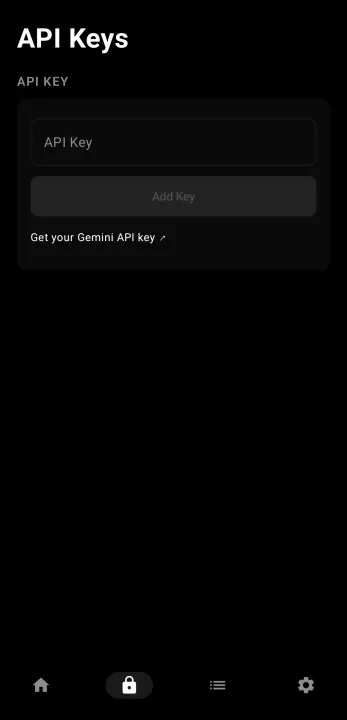
An API key from Google Gemini (free tier available), Groq, or any OpenAI-compatible provider is needed for AI commands. Text replacer commands work without any API key.
It works in most apps — WhatsApp, Gmail, Twitter/X, Messages, Notes, and more. No copy-pasting. No app switching. Just type and go.
Features:
• Works system-wide via Android's Accessibility Service
• Also works from the text-selection menu in any app — no accessibility permission required
• Instant inline text replacement — AI response replaces your text directly
• Multi-provider AI: Google Gemini, Groq, or any OpenAI-compatible endpoint (including local LLMs like Ollama and LM Studio)
• Text replacer commands run entirely offline with zero latency
• Multi-key rotation with automatic rate-limit handling
• API keys encrypted with AES-256-GCM via Android Keystore
• AMOLED dark theme and light theme with Material 3
• Localized in 40 languages — the app follows your device language automatically
• Zero analytics, zero tracking, zero telemetry
• Tiny APK (~1.7 MB) with zero third-party networking dependencies
Built-in commands:
• ?fix — Fix grammar, spelling, and punctuation
• ?improve — Improve clarity and readability
• ?shorten — Shorten while keeping meaning
• ?expand — Expand with more detail
• ?formal — Rewrite in professional tone
• ?casual — Rewrite in friendly tone
• ?emoji — Add relevant emojis
• ?human — Rewrite so it doesn't read as AI-generated
• ?reply — Generate a contextual reply
• ?undo — Restore text from before the last replacement
• ?translate:XX — Translate to any language
• ?copy / ?cut / ?paste / ?replace — Clipboard actions without leaving the keyboard
You can also create your own custom AI commands with any prompt, or text replacer commands for instant offline snippets like signatures, canned responses, and shortcuts.
An API key from Google Gemini (free tier available), Groq, or any OpenAI-compatible provider is needed for AI commands. Text replacer commands work without any API key.
All versions
| Version | Released | Minimum Android | Size |
|---|---|---|---|
| 1.0.83 | Nov 9, 2026 | Android 6 | 1.8 MB |
| 1.0.82 | Sep 11, 2026 | Android 6 | 1.8 MB |
| 1.0.80 | Sep 7, 2026 | Android 6 | 1.8 MB |
| 1.0.79 | Sep 5, 2026 | Android 6 | 1.8 MB |
| 1.0.78 | Aug 26, 2026 | Android 6 | 1.7 MB |
| 1.0.77 | Aug 23, 2026 | Android 6 | 1.7 MB |
| 1.0.76 | Aug 16, 2026 | Android 6 | 1.7 MB |
| 1.0.75 | Aug 13, 2026 | Android 6 | 1.7 MB |
| 1.0.74 | Aug 10, 2026 | Android 6 | 1.7 MB |
| 1.0.72 | Aug 4, 2026 | Android 6 | 1.7 MB |
| 1.0.67 | Jul 31, 2026 | Android 6 | 1.4 MB |
| 1.0.65 | Jul 29, 2026 | Android 6 | 1.4 MB |
| 1.0.63 | Jul 28, 2026 | Android 6 | 1.4 MB |
| 1.0.58 | Jul 26, 2026 | Android 6 | 1.4 MB |
| 1.0.54 | Jul 16, 2026 | Android 6 | 1.4 MB |
| 1.0.52 | Jul 10, 2026 | Android 6 | 1.4 MB |
| 1.0.49 | Jul 3, 2026 | Android 6 | 1.3 MB |
How to install an older version of an Android app · How to install an APK file on Android
From the developer (GitHub)
APK files published by the developer on GitHub. They are signed by the developer and may not install over the other builds on this page (different signature). Links open github.com.
Similar apps
-
 NoNonsense Notes
A simple notepad and to-do app with an excellent navigation
-
 Butterfly
Take notes, draw freely, and organize ideas across an endless workspace
-
 Linwood Butterfly Nightly
Take notes, draw freely, and organize ideas across an endless workspace
-
 Thunderbird: Free Your Inbox
Thunderbird is a 100% open source, privacy focused email app.
-
 Thunderbird Beta for Testers
Thunderbird is a 100% open source, privacy focused email app.
-
 Nextcloud Notes
View and edit notes on Nextcloud
-
 Poet Assistant
Dictionary and TTS tools for editing poems
-
 BeeCount Knitting Counter
Knitting row counter