

DevSwitch
Toggle developer options, USB and wireless debugging, with Quick Settings tiles
- Developer
- retransmit
- License
- GPL-3.0-or-later
- Package
app.devswitch- Category
- Development, System
- Latest version
- 1.3 · Oct 12, 2026
- Minimum Android
- Android 8.0
Screenshots
Description
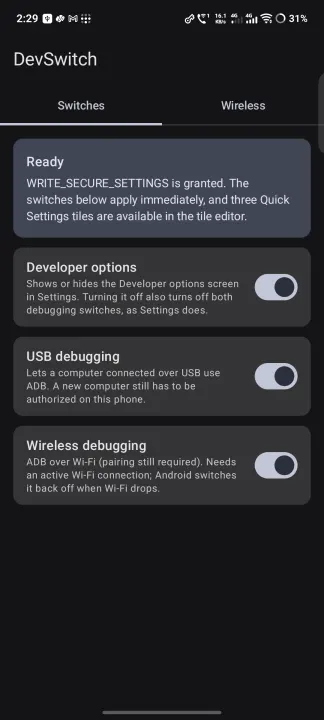
DevSwitch turns Developer options, USB debugging and Wireless debugging on and off from one screen and from three Quick Settings tiles. It writes the same system settings Android's own Settings app does, so the system reacts immediately: adbd starts or stops, and the Developer options screen appears or hides.
One-time setup
Android only lets an app change these settings if it holds WRITE_SECURE_SETTINGS, which cannot be requested with a dialog. Grant it once, in any of three ways, and it survives reboots and updates:
• From a computer: adb shell pm grant app.devswitch android.permission.WRITE_SECURE_SETTINGS
• On the phone, through Shizuku, with no computer needed
• With root
Wireless tab
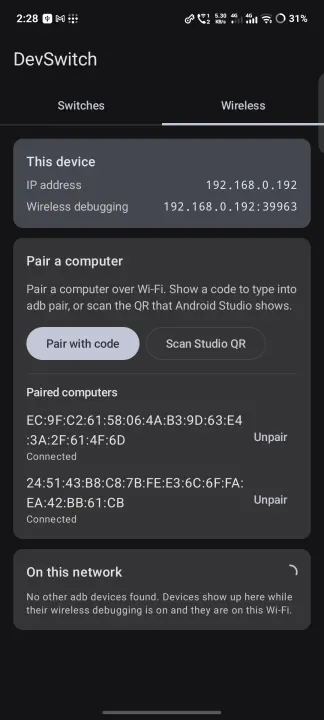
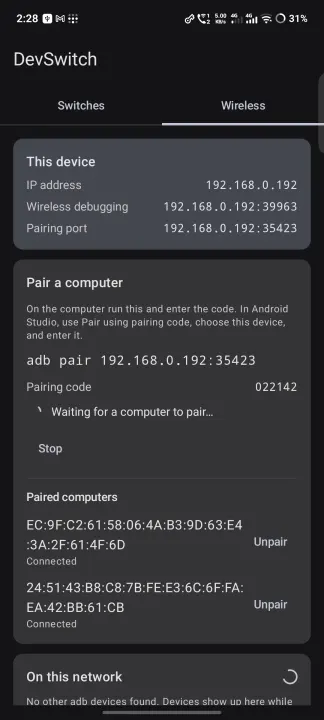
Shows this device's IP address and its live wireless debugging address, plus a scan of adb devices on the Wi-Fi. With Shizuku running it also lists paired computers and can pair a new one, either by showing a code for adb pair or by scanning the QR that Android Studio shows.
Safety
Turning a switch off, or unpairing a computer, asks first, because either can cut the connection a computer is using. The tiles refuse to toggle from the lock screen.
Privacy
No network services, no accounts, no analytics. The only network use is local discovery of adb devices on your own Wi-Fi.
Free software under the GPLv3.
One-time setup
Android only lets an app change these settings if it holds WRITE_SECURE_SETTINGS, which cannot be requested with a dialog. Grant it once, in any of three ways, and it survives reboots and updates:
• From a computer: adb shell pm grant app.devswitch android.permission.WRITE_SECURE_SETTINGS
• On the phone, through Shizuku, with no computer needed
• With root
Wireless tab
Shows this device's IP address and its live wireless debugging address, plus a scan of adb devices on the Wi-Fi. With Shizuku running it also lists paired computers and can pair a new one, either by showing a code for adb pair or by scanning the QR that Android Studio shows.
Safety
Turning a switch off, or unpairing a computer, asks first, because either can cut the connection a computer is using. The tiles refuse to toggle from the lock screen.
Privacy
No network services, no accounts, no analytics. The only network use is local discovery of adb devices on your own Wi-Fi.
Free software under the GPLv3.
All versions
| Version | Released | Minimum Android | Size |
|---|---|---|---|
| 1.3 | Oct 12, 2026 | Android 8.0 | 2.1 MB |
| 1.2 | Oct 8, 2026 | Android 8.0 | 2.1 MB |
| 1.1 | Oct 3, 2026 | Android 8.0 | 2 MB |
| 1.0.1 | Sep 25, 2026 | Android 8.0 | 2 MB |
| 1.0 | Sep 22, 2026 | Android 8.0 | 2 MB |
How to install an older version of an Android app · How to install an APK file on Android
From the developer (GitHub)
APK files published by the developer on GitHub. They are signed by the developer and may not install over the other builds on this page (different signature). Links open github.com.
Similar apps
-
 Screenshot Tile (NoRoot)
Customizable screenshot tool with quick settings shortcut and floating button
-
 Coffee
Keep display awake
-
 Mute reminder
Remind you to mute media
-
 Prepaid Balance
Keep track your prepaid balance
-
 Auto Auto-Rotate
Automatically remembers your auto-rotate setting for every app
-
 Drowser
Simple background app killer
-
 Scrambled Exif
Remove the metadata from your pictures before sharing them
-
 WaveUp
Turn on the display by waving