

Cantonese Keyboard - Jyutping
Easy-to-use Cantonese input method with pronunciation lookup and dictionary.
- Developer
- Bing ZHEUNG
- License
- CC0-1.0
- Package
org.jyutping.jyutping- Category
- Keyboard & IME, Translation & Dictionary
- Latest version
- 0.66.0 · Oct 2, 2026
- Minimum Android
- Android 13
Screenshots
Description
Jyutping is a Cantonese input method that is intuitive and efficient—making typing fast, accurate, and effortless.
Type Cantonese just as you speak it — naturally and fluently.
Every input reinforces your pronunciation. The more you use Jyutping, the more familiar you become with Cantonese.
Ready to use right out of the box, with virtually no complicated setup.
Open source, ad-free, and fully offline — no privacy concerns.
Based on the Jyutping romanization scheme developed by the Linguistic Society of Hong Kong (LSHK), and compatible with various spelling habits.
You can perform reverse lookup of Jyutping using Mandarin Pinyin, Cangjie, Quick (Sucheng), Stroke input, and character decomposition. Detailed explanations are available within the app.
Keyboard feature highlights:
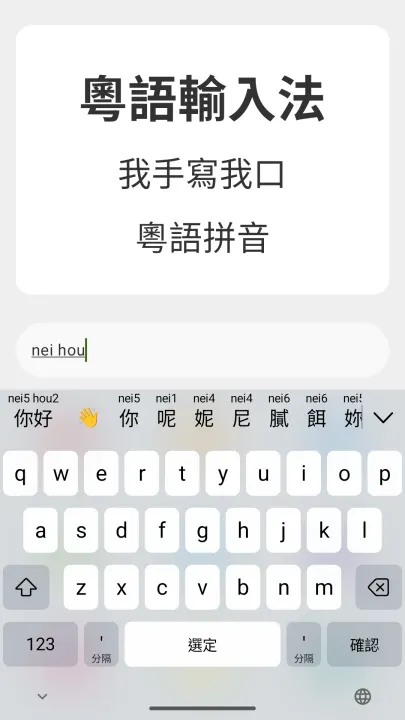
• Standard Jyutping input, e.g. neihou → 你好
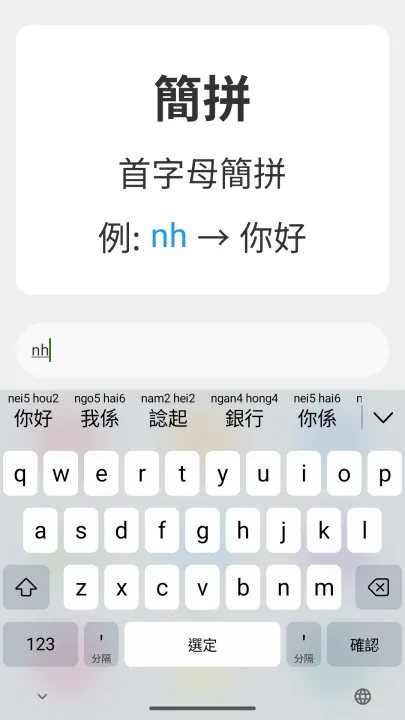
• Abbreviated Jyutping input, e.g. nh / nhou / neih → 你好
• Tone input support for greater accuracy, helping learners master Cantonese tones and pronunciation
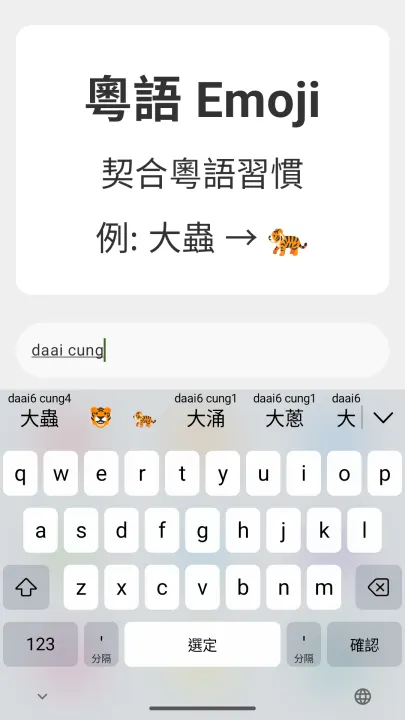
• Candidate words display corresponding Jyutping syllables, making typing easier while reinforcing correct pronunciation
• Supports both Traditional and Simplified Chinese characters, with Traditional characters distinguishing between Hong Kong and Taiwan standards
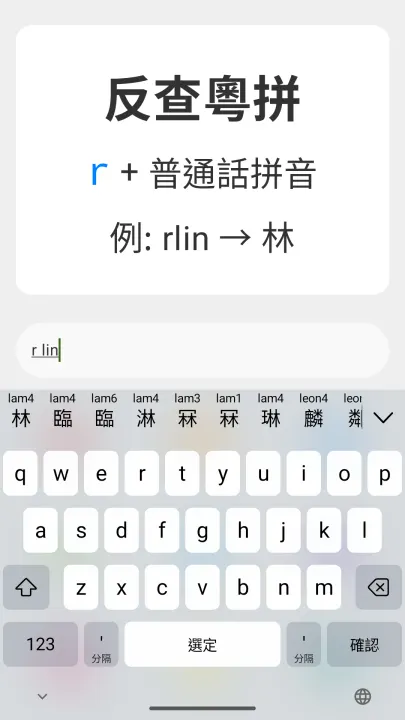
• Reverse lookup via Mandarin Pinyin: prefix with R (e.g. rlin → 林)
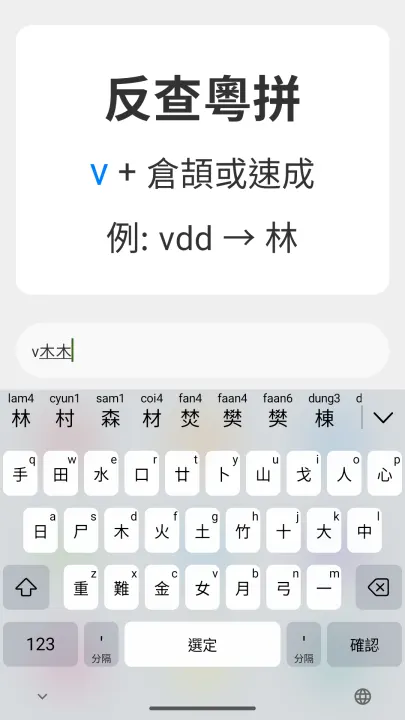
• Reverse lookup via Cangjie or Quick (Sucheng): prefix with V (e.g. vdd → 林)
• Reverse lookup via stroke input: prefix with X (e.g. xwsad → 木)
• Reverse lookup via character decomposition: prefix with Q (e.g. qmukmuk → 林)
• Emoji suggestions that match Cantonese expressions, e.g. daai cung (大蟲) suggests the tiger emoji
• A rich vocabulary tailored to Cantonese usage and grammar for smooth, natural typing
• Includes common English vocabulary for seamless bilingual input
• Multiple keyboard layouts available: 26-key QWERTY, 26-key triple-spell, 9-key (T9), etc.
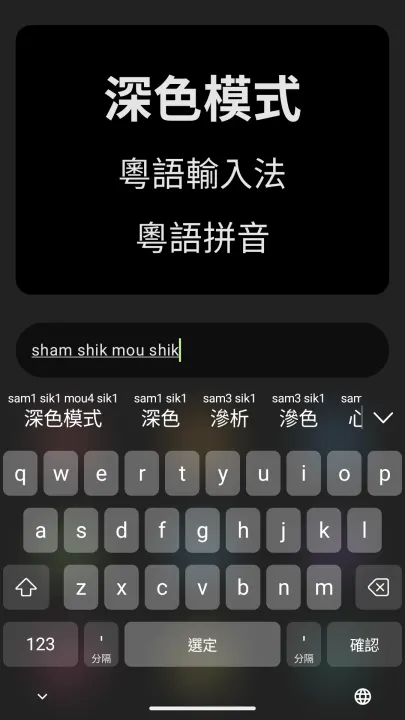
• Fully supports light and dark modes, with adjustable keyboard height
• Convenient editing tools: copy, cut, paste, and cursor movement
• Optional sound and haptic feedback for key presses
The main app provides extensive Cantonese resources for convenient learning and reference:
• Detailed guides for using all Jyutping keyboard functions
• Jyutping scheme tables of initials, finals, and tones
• Common Cantonese phrases and expressions
• Pronunciations of commonly used Cantonese words
• Cantonese pronunciation lookup and dictionary search
• Text-to-Jyutping conversion
• Cantonese text-to-speech
We respect user privacy and do not collect any personal information.
This app is fully open source on GitHub:
https://github.com/yuetyam/jyutping-android
To learn more about Jyutping and Cantonese keyboards, visit our official website:
https://jyutping.app
Type Cantonese just as you speak it — naturally and fluently.
Every input reinforces your pronunciation. The more you use Jyutping, the more familiar you become with Cantonese.
Ready to use right out of the box, with virtually no complicated setup.
Open source, ad-free, and fully offline — no privacy concerns.
Based on the Jyutping romanization scheme developed by the Linguistic Society of Hong Kong (LSHK), and compatible with various spelling habits.
You can perform reverse lookup of Jyutping using Mandarin Pinyin, Cangjie, Quick (Sucheng), Stroke input, and character decomposition. Detailed explanations are available within the app.
Keyboard feature highlights:
• Standard Jyutping input, e.g. neihou → 你好
• Abbreviated Jyutping input, e.g. nh / nhou / neih → 你好
• Tone input support for greater accuracy, helping learners master Cantonese tones and pronunciation
• Candidate words display corresponding Jyutping syllables, making typing easier while reinforcing correct pronunciation
• Supports both Traditional and Simplified Chinese characters, with Traditional characters distinguishing between Hong Kong and Taiwan standards
• Reverse lookup via Mandarin Pinyin: prefix with R (e.g. rlin → 林)
• Reverse lookup via Cangjie or Quick (Sucheng): prefix with V (e.g. vdd → 林)
• Reverse lookup via stroke input: prefix with X (e.g. xwsad → 木)
• Reverse lookup via character decomposition: prefix with Q (e.g. qmukmuk → 林)
• Emoji suggestions that match Cantonese expressions, e.g. daai cung (大蟲) suggests the tiger emoji
• A rich vocabulary tailored to Cantonese usage and grammar for smooth, natural typing
• Includes common English vocabulary for seamless bilingual input
• Multiple keyboard layouts available: 26-key QWERTY, 26-key triple-spell, 9-key (T9), etc.
• Fully supports light and dark modes, with adjustable keyboard height
• Convenient editing tools: copy, cut, paste, and cursor movement
• Optional sound and haptic feedback for key presses
The main app provides extensive Cantonese resources for convenient learning and reference:
• Detailed guides for using all Jyutping keyboard functions
• Jyutping scheme tables of initials, finals, and tones
• Common Cantonese phrases and expressions
• Pronunciations of commonly used Cantonese words
• Cantonese pronunciation lookup and dictionary search
• Text-to-Jyutping conversion
• Cantonese text-to-speech
We respect user privacy and do not collect any personal information.
This app is fully open source on GitHub:
https://github.com/yuetyam/jyutping-android
To learn more about Jyutping and Cantonese keyboards, visit our official website:
https://jyutping.app
All versions
| Version | Released | Minimum Android | Size |
|---|---|---|---|
| 0.66.0 | Oct 2, 2026 | Android 13 | 45.9 MB |
| 0.65.0 | Sep 5, 2026 | Android 13 | 45.7 MB |
| 0.63.1 | Jun 24, 2026 | Android 10 | 53.1 MB |
| 0.62.0 | May 29, 2026 | Android 10 | 52.9 MB |
| 0.61.0 | May 20, 2026 | Android 10 | 48.7 MB |
| 0.60.0 | May 2, 2026 | Android 10 | 48.6 MB |
| 0.59.0 | Apr 5, 2026 | Android 10 | 46.1 MB |
| 0.58.0 | Apr 3, 2026 | Android 10 | 45.5 MB |
| 0.57.0 | Mar 27, 2026 | Android 10 | 45.4 MB |
How to install an older version of an Android app · How to install an APK file on Android
From the developer (GitHub)
APK files published by the developer on GitHub. They are signed by the developer and may not install over the other builds on this page (different signature). Links open github.com.
Similar apps
-
 KeePassDX Passkey Vault
Manage Passkey / Password in a local and open-source vault
-
 HeliBoard
Customizable open-source keyboard
-
 Poet Assistant
Dictionary and TTS tools for editing poems
-
 Trime
Chinese IME with Rime Input Method Engine
-
 QuickDic
Offline translation dictionary
-
 Kakugo
Learn Japanese with Kakugo
- Aard 2 Offline dictionary
-
 DroidTR IME
 (Turkish F/Q keyboard)