

Oversec
Privacy for All Apps! Encrypt and Disguise Messages in All Your Apps!
- Developer
- oversec
- License
- GPL-3.0-or-later
- Package
io.oversec.one- Category
- Text Encryption
- Latest version
- 1.5.15 · Mar 28, 2019
- Minimum Android
- Android 5.0
Screenshots
Description
Oversec transparently encrypts and decrypts any text in any app
You can use it to exchange private encrypted and covert chat- or email messages or store your own encrypted notes on your phone.
See our demo videos:
• Introduction
• Encrypting Emails
• Encrypting Images
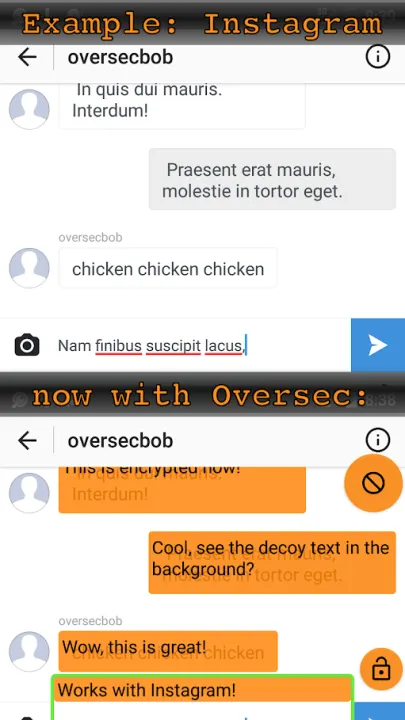
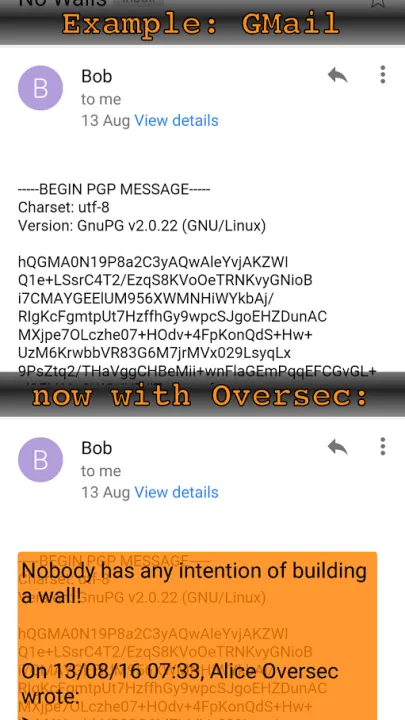
Oversec is completely agnostic of the subjacent app, it works with Whatsapp™, Line™, Snapchat™, Instagram™ or any other chat app. It also supports sending and receiving PGP encrypted messages with the Gmail™ or any other Email app.
End-to-End Encryption was yesterday. Oversec introduces "Eye-to-Eye" encryption. Encrypted data is only decrypted while it is shown on the screen! No clear text is ever persisted and thus cannot be extracted from the file system or accidentally be backed up into the cloud.
We also carefully designed Oversec so that it doesn't require internet access. Because of that, you can rest assured that no decrypted information can ever leave your device.
How it works:
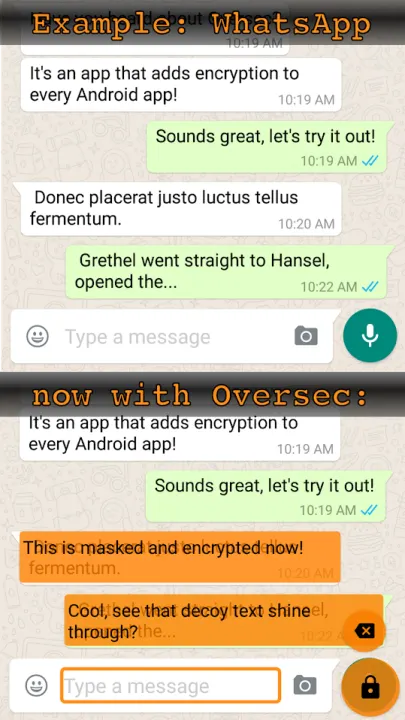
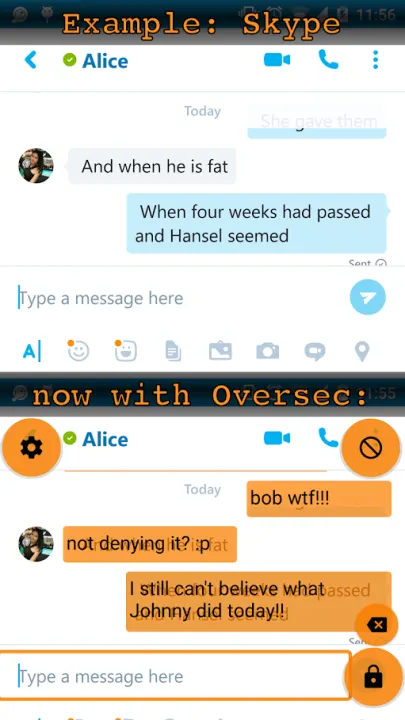
Oversec constantly monitors the text on your screen. When it finds an encrypted text, it tries to decrypt it and then shows the decrypted text as an overlay in place of the encrypted text. Conversely, it can read text out of an input field, encrypt it, and then put the encrypted text back into the input field.
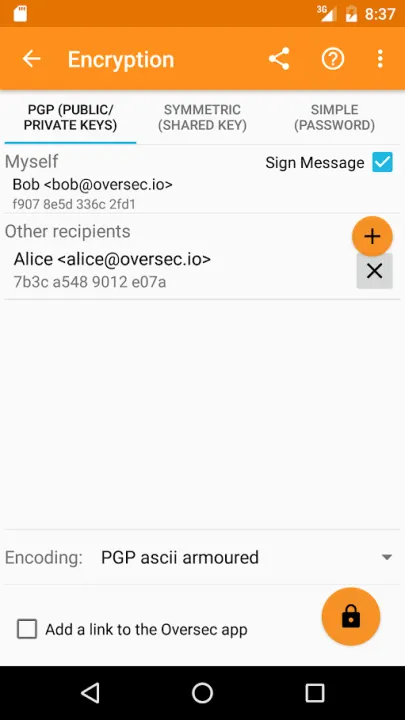
In order to encrypt a text, Oversec shows a button next to an active input field. After having entered the secret text, tapping that button makes Oversec read the text, encrypt it and put back the encrypted text into the field. It is now ready to be sent in the subjacent app as usual - the app doesn't even know that it is sending encrypted data!
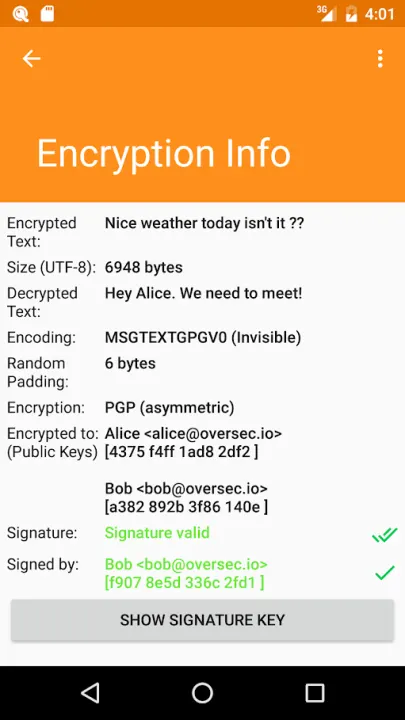
Oversec also features a unique way of encoding the encrypted messages. It stores the encrypted text in invisible (zero-width) characters and let's you add decoy text at the end. That way, a message will just show e.g. "The sun is shining!" with no visible sign of any encryption, whereas in reality it contains a hidden encrypted message.
You may also encrypt and send photos through Oversec - its unique camera mode even allows you to take and send an encrypted photo without ever storing the original photo on the device.
Oversec encrypts your data either using symmetric keys (using ChaCha20 cipher + Poly1305 MAC ) or using asymmetric PGP encryption (making use of the OpenKeychain app).
The code is open source and can be found here.
This app uses Accessibility services.
You can use it to exchange private encrypted and covert chat- or email messages or store your own encrypted notes on your phone.
See our demo videos:
• Introduction
• Encrypting Emails
• Encrypting Images
Oversec is completely agnostic of the subjacent app, it works with Whatsapp™, Line™, Snapchat™, Instagram™ or any other chat app. It also supports sending and receiving PGP encrypted messages with the Gmail™ or any other Email app.
End-to-End Encryption was yesterday. Oversec introduces "Eye-to-Eye" encryption. Encrypted data is only decrypted while it is shown on the screen! No clear text is ever persisted and thus cannot be extracted from the file system or accidentally be backed up into the cloud.
We also carefully designed Oversec so that it doesn't require internet access. Because of that, you can rest assured that no decrypted information can ever leave your device.
How it works:
Oversec constantly monitors the text on your screen. When it finds an encrypted text, it tries to decrypt it and then shows the decrypted text as an overlay in place of the encrypted text. Conversely, it can read text out of an input field, encrypt it, and then put the encrypted text back into the input field.
In order to encrypt a text, Oversec shows a button next to an active input field. After having entered the secret text, tapping that button makes Oversec read the text, encrypt it and put back the encrypted text into the field. It is now ready to be sent in the subjacent app as usual - the app doesn't even know that it is sending encrypted data!
Oversec also features a unique way of encoding the encrypted messages. It stores the encrypted text in invisible (zero-width) characters and let's you add decoy text at the end. That way, a message will just show e.g. "The sun is shining!" with no visible sign of any encryption, whereas in reality it contains a hidden encrypted message.
You may also encrypt and send photos through Oversec - its unique camera mode even allows you to take and send an encrypted photo without ever storing the original photo on the device.
Oversec encrypts your data either using symmetric keys (using ChaCha20 cipher + Poly1305 MAC ) or using asymmetric PGP encryption (making use of the OpenKeychain app).
The code is open source and can be found here.
This app uses Accessibility services.
All versions
| Version | Released | Minimum Android | Size |
|---|---|---|---|
| 1.5.15 | Mar 28, 2019 | Android 5.0 | 5.3 MB |
| 1.5.14 | Mar 3, 2019 | Android 5.0 | 5.3 MB |
| 1.5.13 | Feb 18, 2019 | Android 5.0 | 5.3 MB |
| 1.5.12 | Feb 10, 2019 | Android 5.0 | 5.3 MB |
| 1.5.11 | Feb 5, 2019 | Android 5.0 | 5.3 MB |
| 1.5.10 | Feb 5, 2019 | Android 5.0 | 5.3 MB |
| 1.5.9 | Jan 29, 2019 | Android 5.0 | 5.3 MB |
| 1.5.8 | Jan 27, 2019 | Android 5.0 | 5.3 MB |
| 1.5.7 | Jan 15, 2019 | Android 5.0 | 5.2 MB |
| 1.5.6 | Jan 13, 2019 | Android 5.0 | 5.2 MB |
| 1.5.5 | Jan 8, 2019 | Android 5.0 | 5.2 MB |
How to install an older version of an Android app · How to install an APK file on Android
Similar apps
-
 OpenKeychain: Easy PGP
Encrypt your Files and Communications. Compatible with the OpenPGP Standard.
-
 PGPony
Encrypt, decrypt and sign with OpenPGP. Post-quantum keys and security keys.
-
 Simple Text Crypt
Encrypts plain text using AES256
-
 CryptoSafe
Offline AES-256-GCM text encryption with Argon2id, no internet permission
-
 PixelKnot: Hidden Messages
Have a secret that you want to share? Why not hide it in a picture?
-
 PaperCript
Encrypted passwords on printable QR cards. No network, stores nothing.
-
 Kryptos
Encrypt inside any messenger: the keyboard encrypts, the screen decrypts
-
 Banana Split
Split secrets into QR-code shards using Shamir's Secret Sharing