

Brevier
A reading browser: the web without JavaScript, set in your own type
- Developer
- gurov
- License
- Apache-2.0
- Package
io.github.gurov.brevier- Category
- Browser, Internet, Reading
- Latest version
- 0.22.0 · Nov 6, 2026
- Minimum Android
- Android 7.0
Screenshots
Description
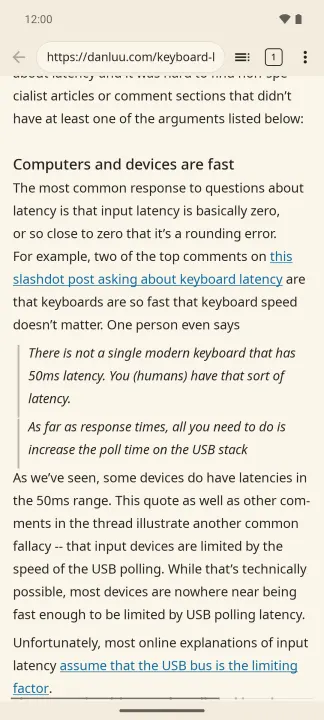
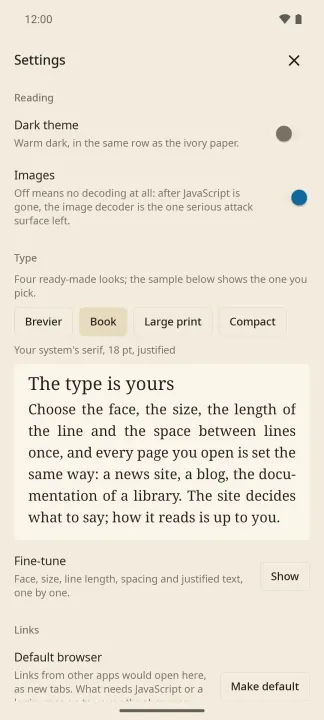
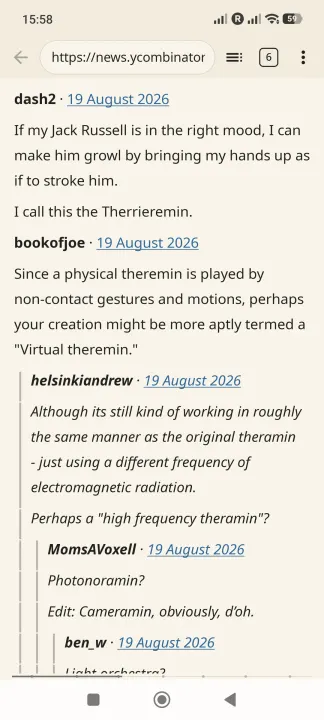
Brevier opens a web page, reduces it to its text and structure — headings, paragraphs, lists, quotes, code, tables, images — and sets it in the reader's typography: a comfortable line length and leading, warm paper in light or dark, four ready-made styles or your own face, size and spacing. No JavaScript runs and no site styles apply. The type is the reader's, not the site's.
What it does
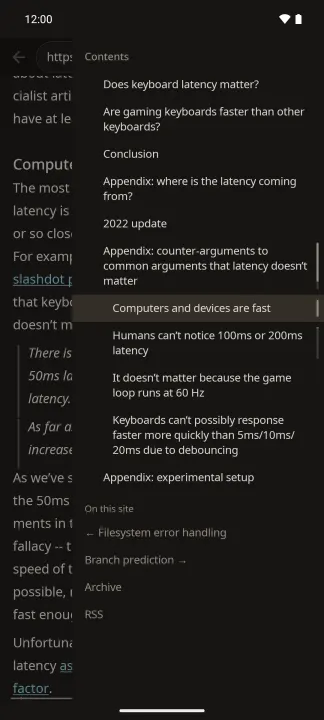
• Articles, blogs, documentation and long reads come out as clean text. The page's own contents, the feeds it offers and its navigation sit on a shelf at the side.
• Long reads remember where you stopped and offer to continue from there.
• Notes on a page: highlight a passage or write a few words beside it, with pictures of your own if you like; they stand under their paragraph and go out as Markdown. The marks come back when you open the page again, even after the site has changed around them.
• Every article you read is kept on the phone as your copy: it opens after the site has changed or gone, and "Search what you've read" looks through all of them.
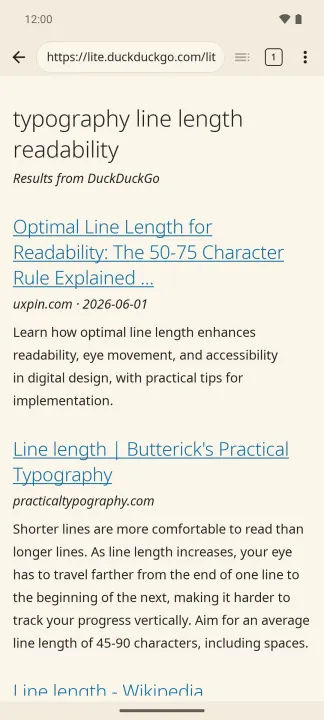
• Search from the address bar: words that are not an address go to DuckDuckGo Lite, and the results come back as a list of links.
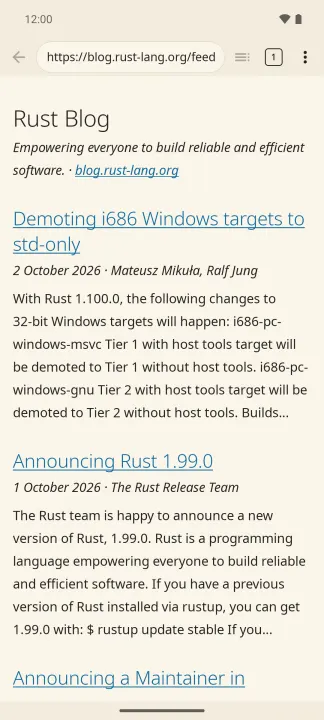
• RSS, Atom and JSON feeds, including feed files and feed:// links. A feed of comments on one page reads as a thread, and so do Hacker News, Lobsters and Discourse forums. Habr articles come with their comments.
• Documentation straight from GitHub and GitLab repositories: type gh:owner/repo.
• Tabs, history, bookmarks, find on page, zoom, saving an article as Markdown (with its images, as a zip).
• Pages read in the last week open without downloading.
• Back and forward return to the place you were reading.
• It can be your default browser: links from other apps open in new tabs, and what needs JavaScript or a login goes on to your other browser in one tap.
• Check this page: a score from 0 to 100 for how well a page reads without JavaScript, with the reasons.
What it does not do
• Run JavaScript, apply site styles, keep cookies or log in.
• Show ads, count its users or ask for an account. Brevier reports nothing to anyone: it fetches the pages you open and what it takes to read them, and your searches go to DuckDuckGo.
Sites assembled entirely by JavaScript do not open. Brevier says so plainly and offers your other browser.
Images are decoded by Brevier's own memory-safe decoders, not the system's. Certificates are checked by Android, and a site Android does not trust does not open.
Brevier is free software, under MIT or Apache-2.0. The same core runs a GTK window on Linux and Windows.
What it does
• Articles, blogs, documentation and long reads come out as clean text. The page's own contents, the feeds it offers and its navigation sit on a shelf at the side.
• Long reads remember where you stopped and offer to continue from there.
• Notes on a page: highlight a passage or write a few words beside it, with pictures of your own if you like; they stand under their paragraph and go out as Markdown. The marks come back when you open the page again, even after the site has changed around them.
• Every article you read is kept on the phone as your copy: it opens after the site has changed or gone, and "Search what you've read" looks through all of them.
• Search from the address bar: words that are not an address go to DuckDuckGo Lite, and the results come back as a list of links.
• RSS, Atom and JSON feeds, including feed files and feed:// links. A feed of comments on one page reads as a thread, and so do Hacker News, Lobsters and Discourse forums. Habr articles come with their comments.
• Documentation straight from GitHub and GitLab repositories: type gh:owner/repo.
• Tabs, history, bookmarks, find on page, zoom, saving an article as Markdown (with its images, as a zip).
• Pages read in the last week open without downloading.
• Back and forward return to the place you were reading.
• It can be your default browser: links from other apps open in new tabs, and what needs JavaScript or a login goes on to your other browser in one tap.
• Check this page: a score from 0 to 100 for how well a page reads without JavaScript, with the reasons.
What it does not do
• Run JavaScript, apply site styles, keep cookies or log in.
• Show ads, count its users or ask for an account. Brevier reports nothing to anyone: it fetches the pages you open and what it takes to read them, and your searches go to DuckDuckGo.
Sites assembled entirely by JavaScript do not open. Brevier says so plainly and offers your other browser.
Images are decoded by Brevier's own memory-safe decoders, not the system's. Certificates are checked by Android, and a site Android does not trust does not open.
Brevier is free software, under MIT or Apache-2.0. The same core runs a GTK window on Linux and Windows.
All versions
| Version | Released | Minimum Android | Size |
|---|---|---|---|
| 0.22.0 | Nov 6, 2026 | Android 7.0 | 13.3 MB |
| 0.19.2 | Nov 4, 2026 | Android 7.0 | 13.2 MB |
| 0.19.1 | Nov 1, 2026 | Android 7.0 | 13.2 MB |
| 0.18.0 | Oct 31, 2026 | Android 7.0 | 13 MB |
| 0.17.0 | Oct 29, 2026 | Android 7.0 | 13 MB |
| 0.15.1 | Oct 27, 2026 | Android 7.0 | 12.9 MB |
| 0.15.0 | Oct 25, 2026 | Android 7.0 | 12.9 MB |
| 0.14.0 | Oct 22, 2026 | Android 7.0 | 12.9 MB |
| 0.11.0 | Oct 15, 2026 | Android 7.0 | 12.7 MB |
How to install an older version of an Android app · How to install an APK file on Android
From the developer (GitHub)
APK files published by the developer on GitHub. They are signed by the developer and may not install over the other builds on this page (different signature). Links open github.com.
Similar apps
-
 Trigger
Open doors via Wi-Fi using HTTPS/SSH.
-
 Dokuwiki Android
Access in local to your dokuwiki
-
 K-9 Mail
Full-featured email client
-
 URLCheck
Allows analyzing (or sharing) URLs before opening them.
-
 FairEmail
Fully featured email client. Neat, intuitive user interface. Privacy friendly
-
 Fedilab
 - a multifunctional Android client to access the distributed Fediverse,
-
 Kreate
A multilingual YouTube Music frontend for Android, prioritize performance.
-
 AndBible: Bible Study
Powerful Bible study toolkit: commentaries, bookmarks, notes, AI tools