

Gentle Glow: Onyx BOOX
quick settings tile to turn the frontlight on or off on Onyx BOOX e-readers
- Developer
- calin-darie
- License
- MIT
- Package
com.onyx.darie.calin.gentleglowonyxboox- Category
- System
- Latest version
- 5.4 · Feb 1, 2025
- Minimum Android
- Android 9
Screenshots
Description
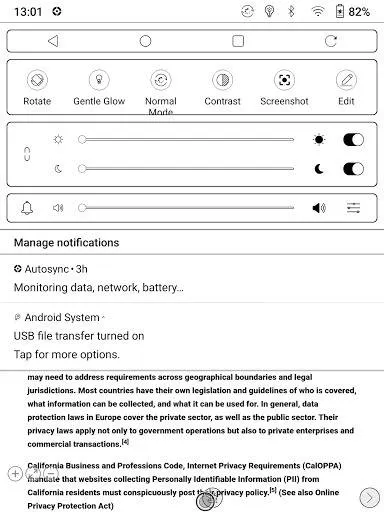
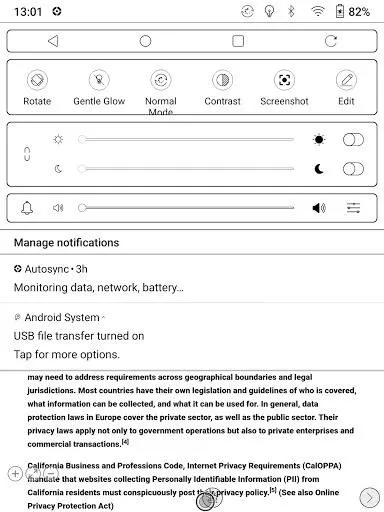
Adds a quick settings tile 💡 to turn the frontlight on or off on Onyx BOOX E-readers running Android 9+.
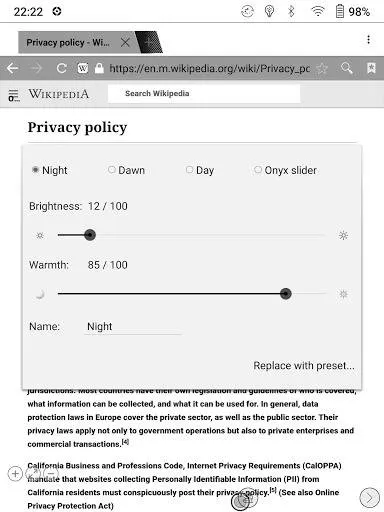
When you long tap this new quick settings tile, you can set warmth and brightness independently, instead of having to manually combine warm brightness with cold brightness.
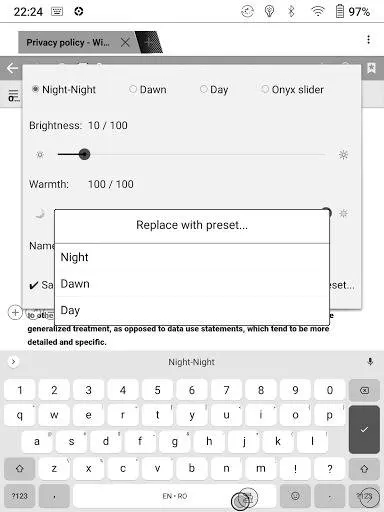
In the warmth & brightness dialog, you get to choose between three configurations. Initially, you get three presets:
• Night, to be used in a dark bedroom.
• Dawn, to be used at first daylight, before sunrise
• Day, to be used at day time indoors or in the shade
You can easily adjust the brightness or warmth on any of the three configurations. Just play with the sliders or with the fine tune buttons to the left and right of the sliders, and your changes are auto-saved.
Should you use the frontlight under any completely different circumstance, say on the subway, you can easily rename any of these three configurations to Subway and fine tune the warmth and brightness to your daily commute needs. At any time, you can go back to any of the presets.
⚠️With this app, you have finer control over the frontlight than with the native sliders. Most of the time, the native controls will show the lights are toggled on, but the cold / warm sliders will stay at zero, because the setting is not one of their fixed increments.
The Onyx Slider configuration is there just so changing the frontlight settings via the system sliders doesn't silently change your current configuration. The Onyx Slider configuration is also a good way to get your system sliders back to a known good state, see the warning above.
When you long tap this new quick settings tile, you can set warmth and brightness independently, instead of having to manually combine warm brightness with cold brightness.
In the warmth & brightness dialog, you get to choose between three configurations. Initially, you get three presets:
• Night, to be used in a dark bedroom.
• Dawn, to be used at first daylight, before sunrise
• Day, to be used at day time indoors or in the shade
You can easily adjust the brightness or warmth on any of the three configurations. Just play with the sliders or with the fine tune buttons to the left and right of the sliders, and your changes are auto-saved.
Should you use the frontlight under any completely different circumstance, say on the subway, you can easily rename any of these three configurations to Subway and fine tune the warmth and brightness to your daily commute needs. At any time, you can go back to any of the presets.
⚠️With this app, you have finer control over the frontlight than with the native sliders. Most of the time, the native controls will show the lights are toggled on, but the cold / warm sliders will stay at zero, because the setting is not one of their fixed increments.
The Onyx Slider configuration is there just so changing the frontlight settings via the system sliders doesn't silently change your current configuration. The Onyx Slider configuration is also a good way to get your system sliders back to a known good state, see the warning above.
All versions
| Version | Released | Minimum Android | Size |
|---|---|---|---|
| 5.4 | Feb 1, 2025 | Android 9 | 553.7 KB |
| 5.2 | Jan 1, 2025 | Android 9 | 554.3 KB |
| 4.4 | Oct 1, 2023 | Android 9 | 408.3 KB |
How to install an older version of an Android app · How to install an APK file on Android
From the developer (GitHub)
APK files published by the developer on GitHub. They are signed by the developer and may not install over the other builds on this page (different signature). Links open github.com.
Similar apps
-
 Screenshot Tile (NoRoot)
Customizable screenshot tool with quick settings shortcut and floating button
-
 Coffee
Keep display awake
-
 Mute reminder
Remind you to mute media
-
 Prepaid Balance
Keep track your prepaid balance
-
 Auto Auto-Rotate
Automatically remembers your auto-rotate setting for every app
-
 Drowser
Simple background app killer
-
 Scrambled Exif
Remove the metadata from your pictures before sharing them
-
 WaveUp
Turn on the display by waving