

OwnDroid
Use device owner privileges to manage your device
- Developer
- BinTianqi
- License
- GPL-3.0-or-later
- Package
com.bintianqi.owndroid- Category
- System
- Latest version
- 8.4.1 · Nov 2, 2026
- Minimum Android
- Android 6
Screenshots
Description
OwnDroid is a DPC (device policy controller) app.
It supports the following working modes:
• Device owner
• Profile owner (only in secondary users)
• Work profile
• Dhizuku
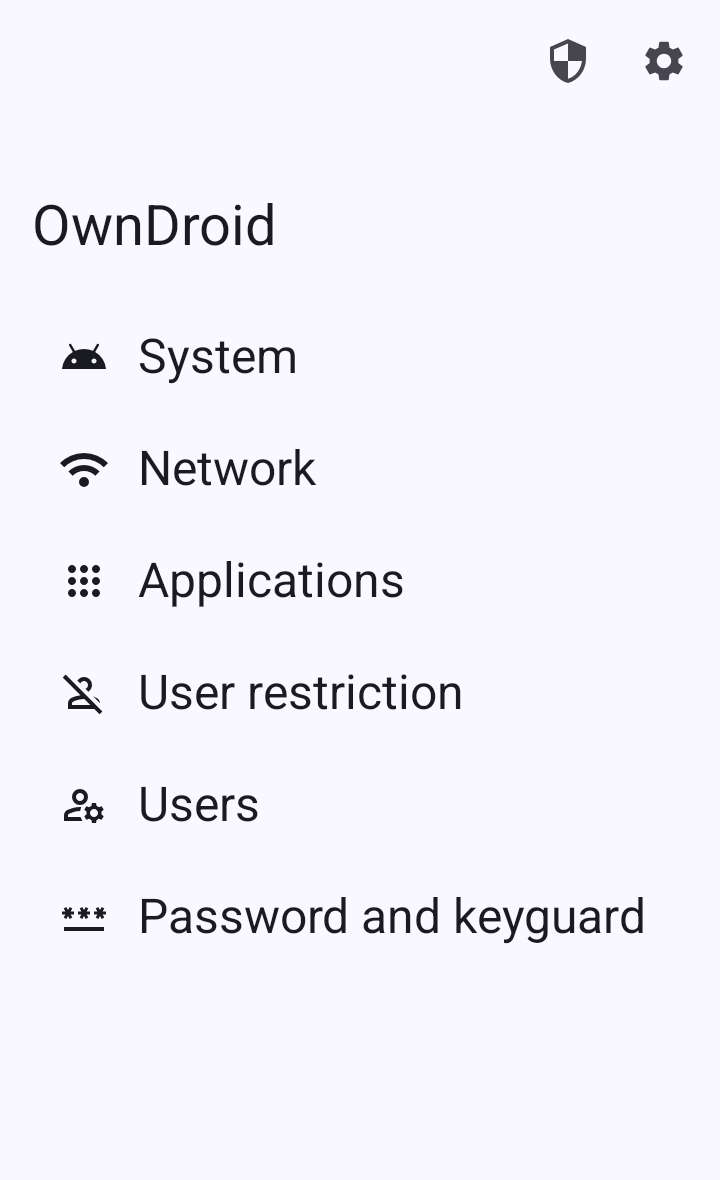
It has the following features:
• System: disable camera, disable screenshot, master volume mute, disable USB signal, lock task mode, wipe data...
• Network: add/modify/delete Wi-Fi, network stats, network logging...
• Applications: suspend/hide app, block app uninstallation, grant/revoke permissions, clear app storage, install/uninstall app...
• User restriction: disable SMS, disable outgoing call, disable bluetooth, disable NFC, disable USB file transfer, disable app installing/uninstalling...
• Users: user information, create/start/switch/stop/delete user...
• Password and keyguard: reset password, set screen timeout...
All versions
| Version | Released | Minimum Android | Size |
|---|---|---|---|
| 8.4.1 | Nov 2, 2026 | Android 6 | 4.5 MB |
| 8.4 | Oct 31, 2026 | Android 6 | 4.5 MB |
| 8.3.1 | Aug 26, 2026 | Android 6 | 3.2 MB |
How to install an older version of an Android app · How to install an APK file on Android
From the developer (GitHub)
APK files published by the developer on GitHub. They are signed by the developer and may not install over the other builds on this page (different signature). Links open github.com.
Similar apps
-
 Screenshot Tile (NoRoot)
Customizable screenshot tool with quick settings shortcut and floating button
-
 Coffee
Keep display awake
-
 Mute reminder
Remind you to mute media
-
 Prepaid Balance
Keep track your prepaid balance
-
 Auto Auto-Rotate
Automatically remembers your auto-rotate setting for every app
-
 Drowser
Simple background app killer
-
 Scrambled Exif
Remove the metadata from your pictures before sharing them
-
 WaveUp
Turn on the display by waving