

Keep SIM Alive
Scheduled keep-alive SMS so prepaid, roaming or backup SIMs stay active
- Developer
- Dymitr Kotowski
- License
- GPL-3.0-or-later
- Package
app.kotowski.keepsimalive.vanilla- Category
- Phone & SMS, System
- Latest version
- 1.0.0 · Oct 16, 2026
- Minimum Android
- Android 7.0
Screenshots
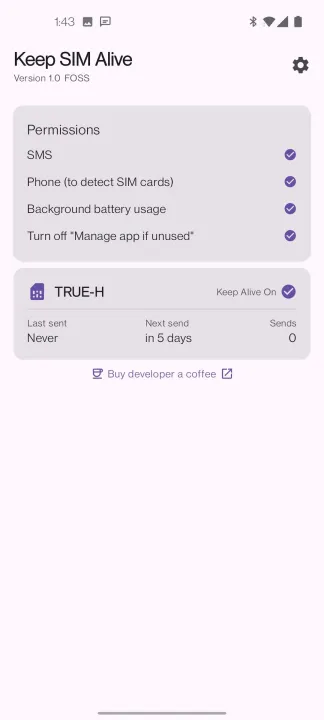
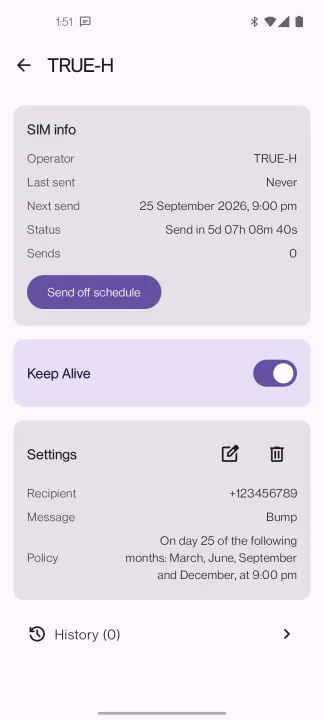
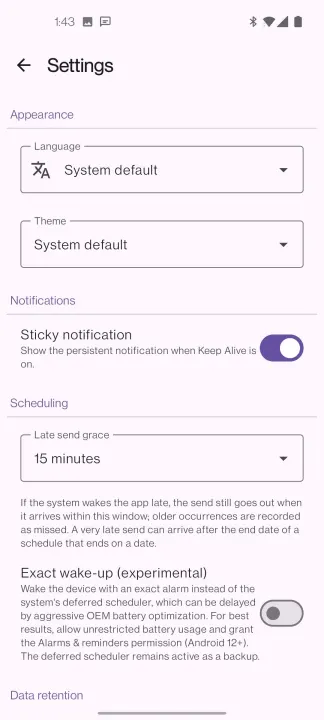
Description
Keep SIM Alive sends an SMS on the schedule you define so your prepaid, roaming, or backup SIM card is never deactivated for inactivity.
How it works
For each SIM on the device you set a recipient, a message, and a schedule for when the message goes out. Each keep-alive is a regular SMS: your carrier may charge for it as per your plan.
Features
• Dual-SIM device support
• Fixed send time or a random window
• Off-schedule manual send
• Send history with per-message outcomes
• Automatic retries if network is down or the SIM is removed
• Live SIM status to clearly identify the SIM
• Schedule per SIM card and not per slot, so the schedule follows the SIM
• Optional sticky notification while keep-alive is on
• Survives reboots and app updates
Privacy
The app has no internet permission and makes no network calls: keep-alive messages are sent directly over the cellular network and all data stays on your device. No advertising, no tracking, no analytics.
Permissions
• Send SMS — the keep-alive message itself
• Read phone state — to properly link the schedule to a certain SIM card
• Show notifications — recommended for sticky notification
• Boot completed — to re-arm the schedule after a reboot
• Ignore battery optimizations — optional but recommended, for reliable wake-ups
• Schedule exact alarms (Android 12+) — optional and experimental, for wake-ups despite aggressive battery optimizations; recommended on devices known to kill background apps. On Android 12-14 you grant it via a separate Alarms & reminders toggle, and on Android 15+ the battery exemption above grants it automatically
How it works
For each SIM on the device you set a recipient, a message, and a schedule for when the message goes out. Each keep-alive is a regular SMS: your carrier may charge for it as per your plan.
Features
• Dual-SIM device support
• Fixed send time or a random window
• Off-schedule manual send
• Send history with per-message outcomes
• Automatic retries if network is down or the SIM is removed
• Live SIM status to clearly identify the SIM
• Schedule per SIM card and not per slot, so the schedule follows the SIM
• Optional sticky notification while keep-alive is on
• Survives reboots and app updates
Privacy
The app has no internet permission and makes no network calls: keep-alive messages are sent directly over the cellular network and all data stays on your device. No advertising, no tracking, no analytics.
Permissions
• Send SMS — the keep-alive message itself
• Read phone state — to properly link the schedule to a certain SIM card
• Show notifications — recommended for sticky notification
• Boot completed — to re-arm the schedule after a reboot
• Ignore battery optimizations — optional but recommended, for reliable wake-ups
• Schedule exact alarms (Android 12+) — optional and experimental, for wake-ups despite aggressive battery optimizations; recommended on devices known to kill background apps. On Android 12-14 you grant it via a separate Alarms & reminders toggle, and on Android 15+ the battery exemption above grants it automatically
All versions
| Version | Released | Minimum Android | Size |
|---|---|---|---|
| 1.0.0 | Oct 16, 2026 | Android 7.0 | 2.5 MB |
How to install an older version of an Android app · How to install an APK file on Android
From the developer (GitHub)
APK files published by the developer on GitHub. They are signed by the developer and may not install over the other builds on this page (different signature). Links open github.com.
Similar apps
-
 Screenshot Tile (NoRoot)
Customizable screenshot tool with quick settings shortcut and floating button
-
 Coffee
Keep display awake
-
 Mute reminder
Remind you to mute media
-
 Prepaid Balance
Keep track your prepaid balance
-
 Auto Auto-Rotate
Automatically remembers your auto-rotate setting for every app
-
 Drowser
Simple background app killer
-
 Scrambled Exif
Remove the metadata from your pictures before sharing them
-
 WaveUp
Turn on the display by waving